EasyManua.ls Logo

Sharp ZQ-6100M - Page 104

Sharp ZQ-6100M
194 pages
Print Icon
To Next Page IconTo Next Page
To Previous Page IconTo Previous Page
Loading...
THE
OUTLINE
FUNCTION
Your
Organizer’s
Outline
processor
is
a
convenient
way
to
create
the
outline
of
a
report,
listing,
speech
or
presentation.
An
outline
consists
of
a
heading
and
as
many
categories
and
sub-categories
as
you
require
to
encompass
the
matter
in
question.
These
categories
may
be
easily
edited
or
completely
restructured
with
powerful
commands.
Structure
of
an
Outline
An
outline
is
composed
of
parent,
child
and
sibling
topics.
Any
parent
and
its
children
as
a
group
are
called
a
family.
The
overall
topic
or
title
of
the
outline
has
no
siblings
and
is
the
progenitor
of
all
other
topics.
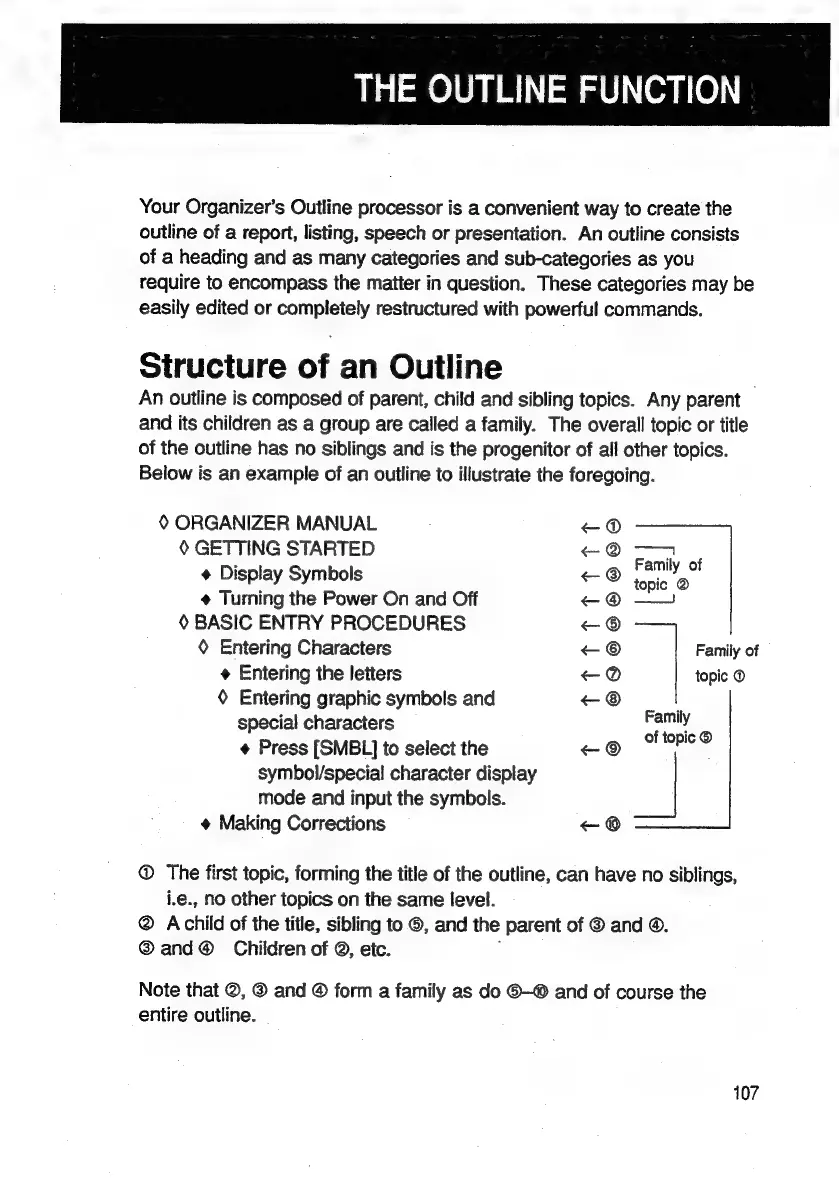
Below
is
an
example
of
an
outline
to
illustrate
the
foregoing.
&
ORGANIZER
MANUAL
~@®
&
GETTING
STARTED
~@
+
Display
Symbols
<@
oe
¢
Turning
the
Power
On
and
Off
-@
——!
®
BASIC
ENTRY
PROCEDURES
-
©
Entering
Characters
«+
Family
of
Entering
the
letters
<@
topic
©
®
Entering
graphic
symbols
and
e
;
special
characters
cues
.
Press
[SMBL]
to
select
the
+
®
symbol/special
character
display
mode
and
input
the
symbols.
Making
Corrections
<—
©
@
The
first
topic,
forming
the
title
of
the
outline,
can
have
no
siblings,
i.e.,
no
other
topics
on
the
same
level.
®
Achild
of
the
title,
sibling
to
©,
and
the
parent
of
©
and
@.
®and@
Children
of
®,
etc.
,
Note
that
@,
@
and
©
form
a
family
as
do
©—®
and
of
course
the
entire
outline.
107

Related product manuals