EasyManua.ls Logo

Sharp ZQ-6100M - Page 131

Sharp ZQ-6100M
194 pages
Print Icon
To Next Page IconTo Next Page
To Previous Page IconTo Previous Page
Loading...
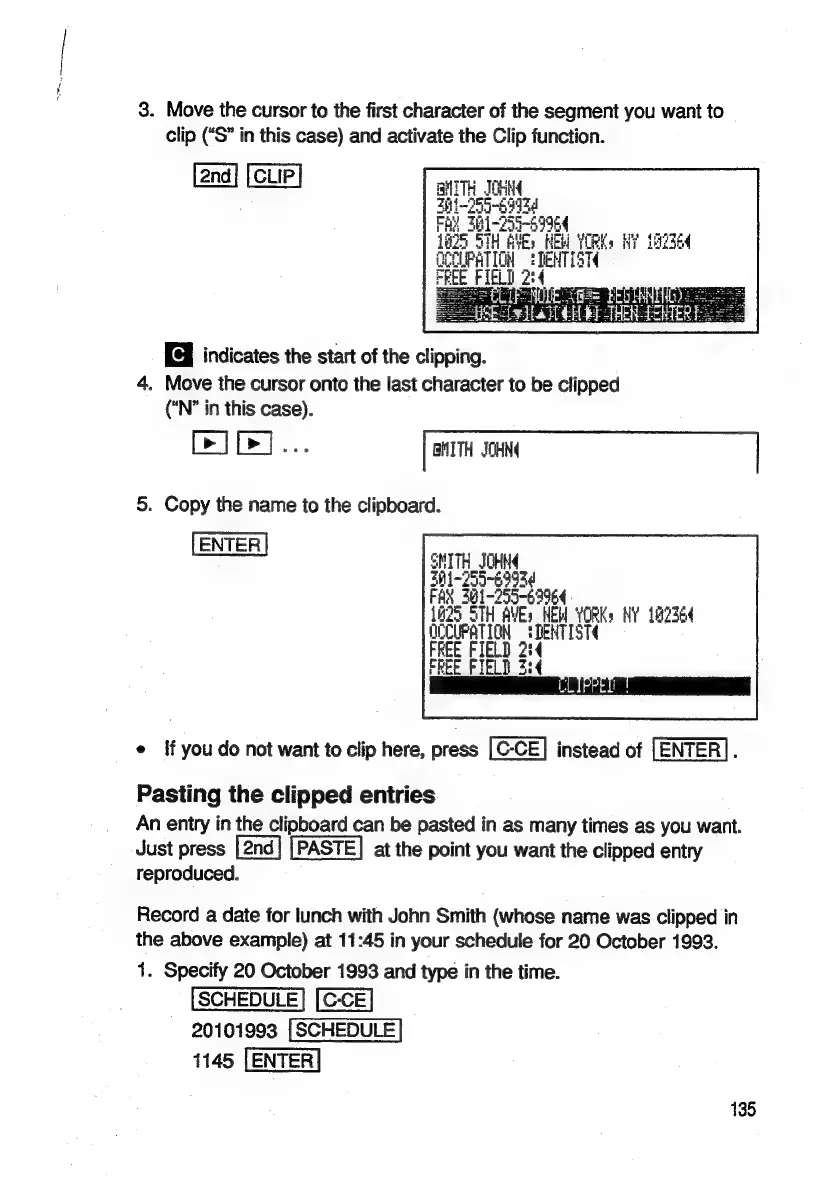
3.
Move
the
cursor
to
the
first
character
of
the
segment
you
want
to
clip
(“S”
in
this
case)
and
activate
the
Clip
function.
CLIP
BHTTH
JOHN
h1-255-4593d
Fas)
Bi
-255-29964
STH
AVE:
NEW
YORK
NY
182364
GeCUPRTION
:TeNTIST
PEE
PIED
2:4
TREN
A
fes=
EEO
LAN
TE
Cele
Ea
HT
CH
bE
THR
TEWTER
indicates
the
start
of
the
clipping.
4.
Move
the
cursor
onto
the
last
character
to
be
clipped
(“N°
in
this
case).
[>]
[>]...
|
BMITH
JOHN
|
5.
Copy
the
name
to
the
clipboard.
[ENTER]
SMITH_JOHNA
351-255-6993
FAX
381~255-69964
LEZ
STH
AVES
EM
YORK
HY
162364
OCCUPATION
:DENTIST
FREE
FIELD
2:4
FREE
FIELD
2:4
e
If
you
do
not
want
to
clip
here,
press
instead
of
[ENTER].
Pasting
the
clipped
entries
An
entry
in
the
clipboard
can
be
pasted
in
as
many
times
as
you
want.
Just
press
PASTE]
at
the
point
you
want
the
clipped
entry
reproduced.
Record
a
date
for
lunch
with
John
Smith
(whose
name
was
clipped
in
the
above
example)
at
11:45
in
your
schedule
for
20.
October
1993.
1.
Specify
20
October
1993
and
type
in
the
time.
20101993
1145
135

Related product manuals