EasyManua.ls Logo

Sharp ZQ-6100M - Page 156

Sharp ZQ-6100M
194 pages
Print Icon
To Next Page IconTo Next Page
To Previous Page IconTo Previous Page
Loading...
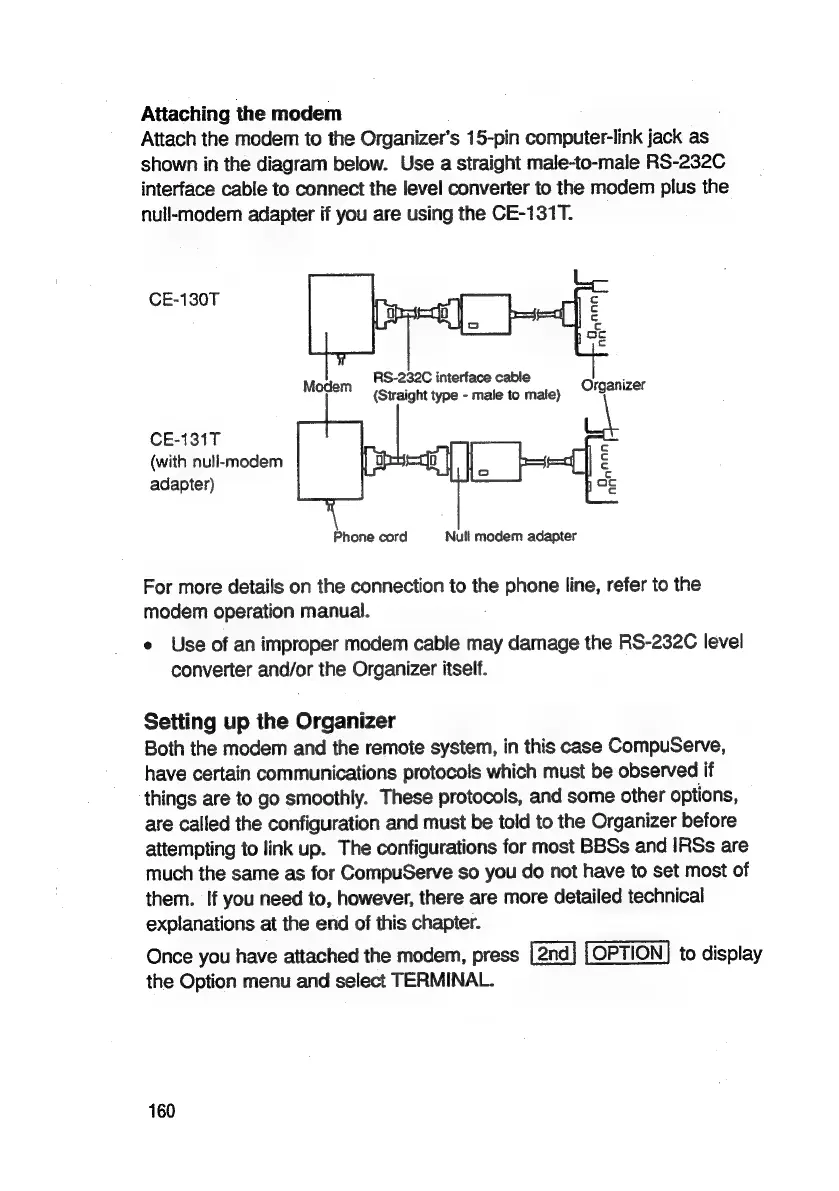
Attaching
the
modem
Attach
the
modem
to
the
Organizer’s
15-pin
computer-link
jack
as
shown
in
the
diagram
below.
Use
a
straight
male-to-male
RS-232C
interface
cable
to
connect
the
level
converter
to
the
modem
plus
the
null-modem
adapter
if
you
are
using
the
CE-131T.
CE-130T
¢
c
c.
oc
c
RS-232C
interface
cable
Modem
{Straight
type
-
male
to
male)
Organizer
CE-131T
a
(with
null-modem
c
adapter)
ce
Phone
cord
Null
modem
adapter
For
more
details
on
the
connection
to
the
phone
line,
refer
to
the
modem
operation
manual.
e
Use
of
an
improper
modem
cable
may
damage
the
RS-232C
level
converter
and/or
the
Organizer
itself.
Setting
up
the
Organizer
Both
the
modem
and
the
remote
system,
in
this
case
CompuServe,
have
certain
communications
protocols
which
must
be
observed
if
things
are
to
go
smoothly.
These
protocols,
and
some
other
options,
are
called
the
configuration
and
must
be
told
to
the
Organizer
before
attempting
to
link
up.
The
configurations
for
most
BBSs
and
IRSs
are
much
the
same
as
for
CompuServe
so
you
do
not
have
to
set
most
of
them.
If
you
need
to,
however,
there
are
more
detailed
technical
explanations
at
the
end
of
this
chapter.
Once
you
have
attached
the
modem,
press
OPTION]
to
display
the
Option
menu
and
select
TERMINAL.
160

Related product manuals