EasyManua.ls Logo

Sharp ZQ-6100M - Page 40

Sharp ZQ-6100M
194 pages
Print Icon
To Next Page IconTo Next Page
To Previous Page IconTo Previous Page
Loading...
YOUR
SCHEDULE
The
SCHEDULE
mode
allows
you
to
store
appointments,
meetings,
or
any
piece
of
information
that
has
a
date
associated
with
it.
In
addition
to
the
date,
each
entry
can
have
a
starting
time,
and
ending
time,
an
alarm
time,
and
a
description.
The
audible
alarm
can
be
set
to
go
off
any
time
before
the
appointment,
even
if
the
Organizer
is
turned
off.
The
start,
end,
and
alarm
time
can
be
skipped
while
making
an
entry.
Schedule
entries
are
indicated
by
a
spot
in
the
CALENDAR
mode
and
can
be
seen
in
a
daily
view
and
a
weekly
view.
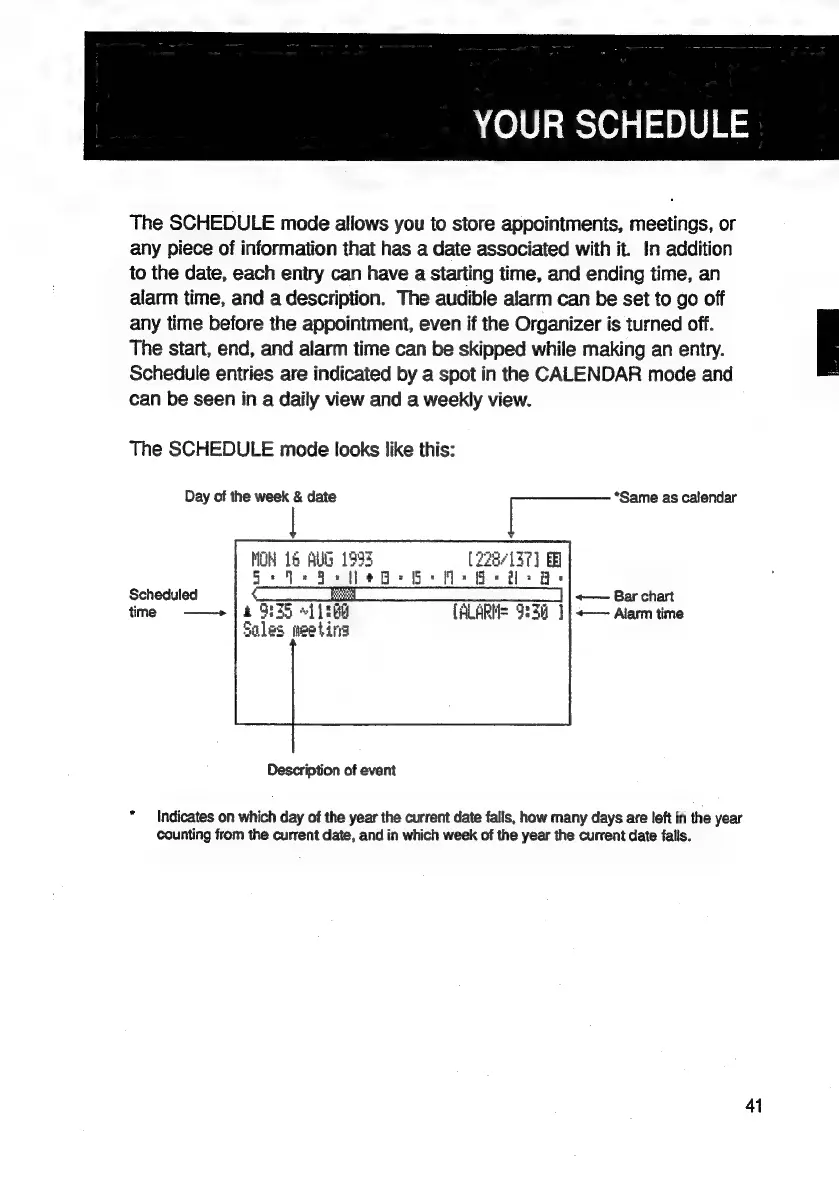
The
SCHEDULE
mode
looks
like
this:
Day
of
the
week
&
date
i
“Same
as
calendar
ie
16
AUG
1995
(228/137)
a
A
|
J”
a
BD
Scheduled
time
——»
a
738
ales
|
«——
Bar
chart
~]
LRG
(ALARM=
9:34
]|<—
Alarm
time
weeting
Description
of
event
*
Indicates
on
which
day
of
the
year
the
current
date
falls,
how
many
days
are
left
in
the
year
counting
from
the
current
date,
and
in
which
week
of
the
year
the
current
date
falls.
41

Related product manuals