EasyManua.ls Logo

Sharp ZQ-6100M - Page 52

Sharp ZQ-6100M
194 pages
Print Icon
To Next Page IconTo Next Page
To Previous Page IconTo Previous Page
Loading...
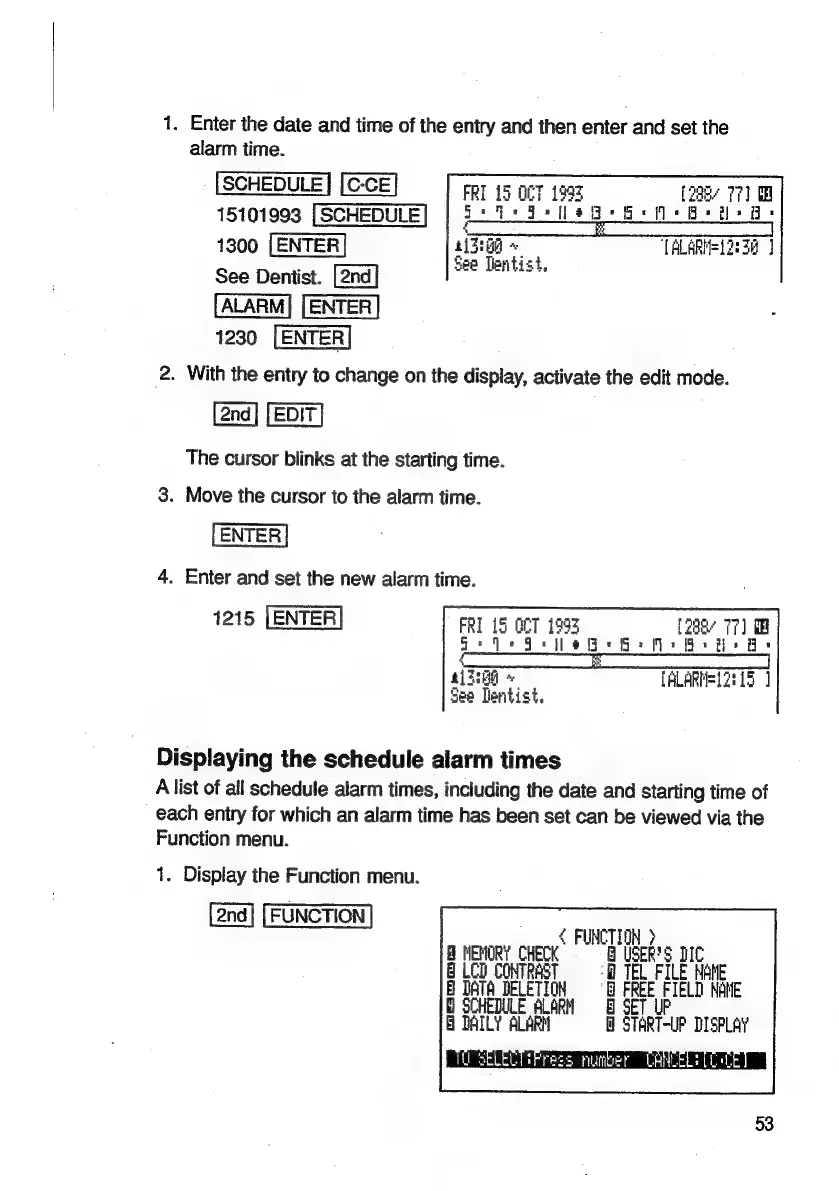
1.
Enter
the
date
and
time
of
the
entry
and
then
enter
and
set
the
alarm
time.
SCHEDULE
FRI
15
OCT
1993
[288
77]
15101993
|
SCHEDULE
F
ole
outer
ela
G:
G:M+
Osis:
1300
[ENTER
REE
TALARHEL2:
34
]
,
See
Tentist,
See
Dentist.
1230
2.
With
the
entry
to
change
on
the
display,
activate
the
edit
mode.
The
cursor
blinks
at
the
starting
time.
3.
Move
the
cursor
to
the
alarm
time.
4.
Enter
and
set
the
new
alarm
time.
1215
LENTER
FRI
is
OCT
1993
f2agr
77)
i
x
ee
BMGs
a:
Re
EG
+
[ALARMEL2
15
See
Dentist.
Displaying
the
schedule
alarm
times
A
list
of
all
schedule
alarm
times,
including
the
date
and
starting
time
of
each
entry
for
which
an
alarm
time
has
been
set
can
be
viewed
via
the
Function
menu.
1.
Display
the
Function
menu.
FUNCTION
>
NEMORY
CHECK
USER'S
E
LCD
CONTRAST
©
©
TEL
FILE
NOME
B
DATA
DELETION
@
FREE
FIELD
NANE
SCHEDULE
ALARN
G
DAILY
ALARN
=
START-UP
DISPLAY
LivFress
number
LAWLELS
53

Related product manuals