EasyManua.ls Logo

Sharp ZQ-6100M - Page 56

Sharp ZQ-6100M
194 pages
Print Icon
To Next Page IconTo Next Page
To Previous Page IconTo Previous Page
Loading...
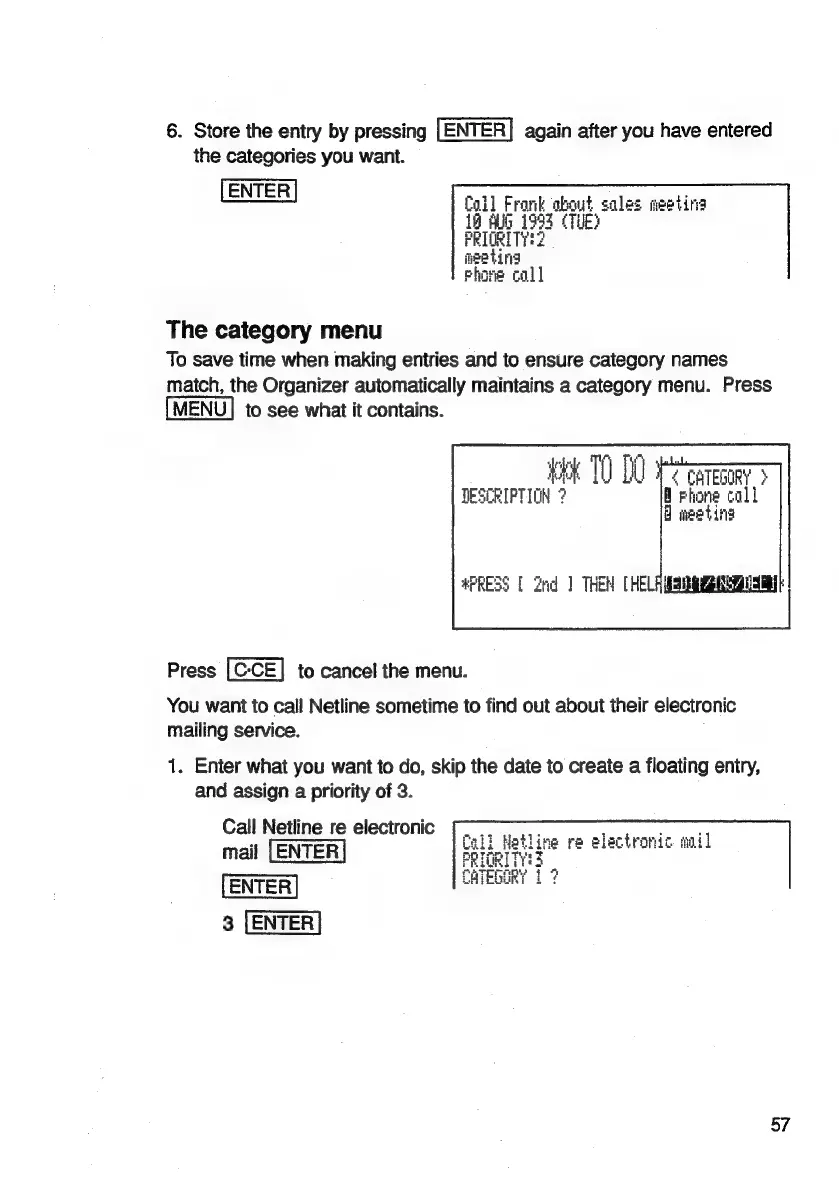
6.
Store
the
entry
by
pressing
[ENTER]
again
after
you
have
entered
the
categories
you
want.
Coll
Frank
about
sales
meeting
19
Alb
1993
(TUE?
PRIORITY?
meeting
Fhone
coll
The
category
menu
To
save
time
when
making
entries
and
to
ensure
category
names
match,
the
Organizer
automatically
maintains
a
category
menu.
Press
MENU]
to
see
what
it
contains.
UPC
CaTeooRy
>
Fhone
call
Oo
weetind
#PRESS
[
Zhd
]
THEM
[HELA
MSMR
DSi
Press
to
cancel
the
menu.
You
want
to
call
Netline
sometime
to
find
out
about
their
electronic
mailing
service.
1.
Enter
what
you
want
to
do,
skip
the
date
to
create
a
floating
entry,
and
assign
a
priority
of
3.
Call
Netline
re
electronic
mail
|
ENTER
ENTER
3
{ENTER
57

Related product manuals