EasyManua.ls Logo

Sharp ZQ-6100M - Page 55

Sharp ZQ-6100M
194 pages
Print Icon
To Next Page IconTo Next Page
To Previous Page IconTo Previous Page
Loading...
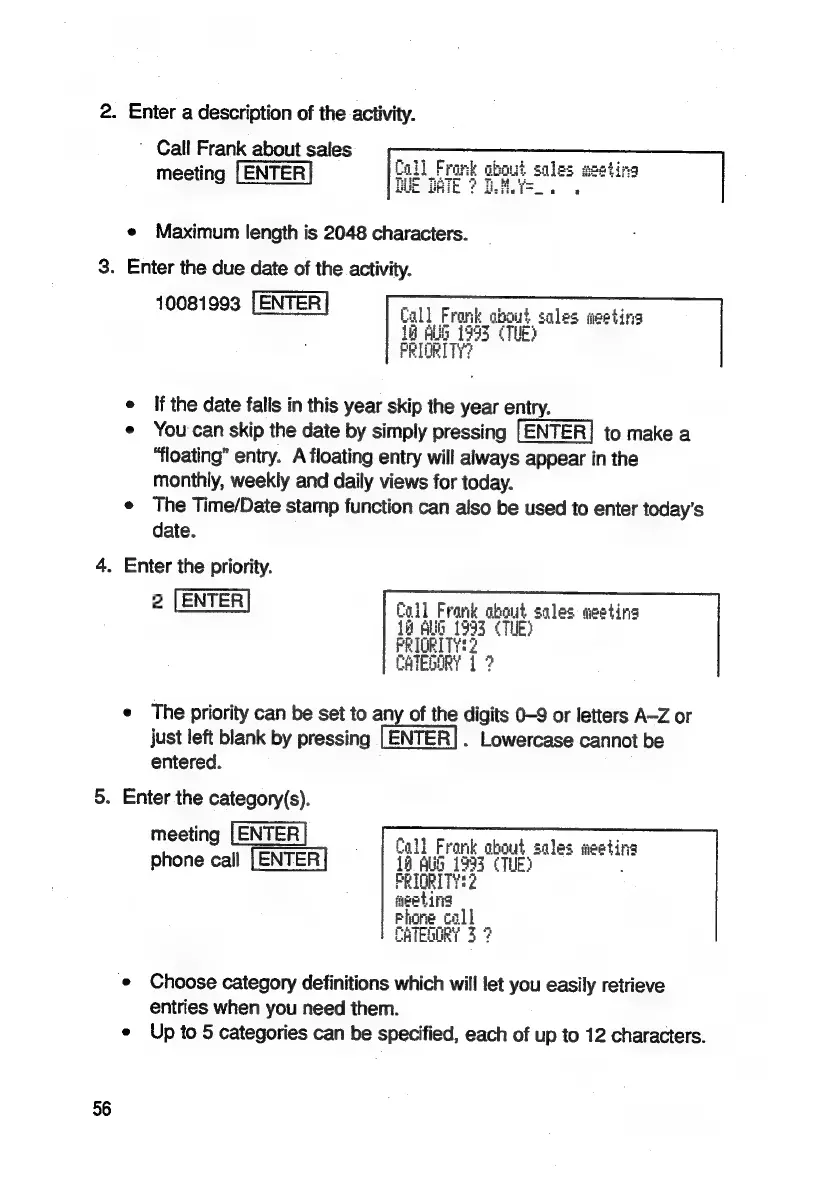
2.
Enter
a
description
of
the
activity.
Call
Frank about
sales
meeting
[ENTER
Call
Frank
about
i
Io
TiATo
4
Th
pce
BUE
DATE
?
Usiie
i
.
'
e
Maximum
length
is
2048
characters.
3.
Enter
the
due
date
of
the
activity.
10081993
|
ENTER
e
If
the
date
falis
in
this
year
skip
the
year
entry.
e
You'can
skip
the
date
by
simply
pressing
to
make
a
“floating”
entry.
A
floating
entry
will
always
appear
in
the
monthly,
weekly
and
daily
views
for
today.
¢
The
Time/Date
stamp
function
can
also
be
used
to
enter
today’s
date.
4.
Enter
the
priority.
2
|ENTER
“all
Fron
mere
sales
gesting
e
The
priority
can
be
set
to
any
of
the
digits
0-9
or
letters
A-Z
or
just
left
blank
by
pressing
[ENTER].
Lowercase
cannot
be
entered.
5.
Enter
the
category(s).
meeting
[ENTER
Cal
Y
F
a
k
obo
$
ct
les
etina
phone
call
iba
tt
out
sales
ae
re
%
|
fe
ee
hing
‘©
Choose
category
definitions
which
will
let
you
easily
retrieve
entries
when
you
need
them.
e
Up
to
5
categories
can
be
specified,
each
of
up
to
12
characters.
56

Related product manuals