EasyManua.ls Logo

Sharp ZQ-6100M - Page 70

Sharp ZQ-6100M
194 pages
Print Icon
To Next Page IconTo Next Page
To Previous Page IconTo Previous Page
Loading...
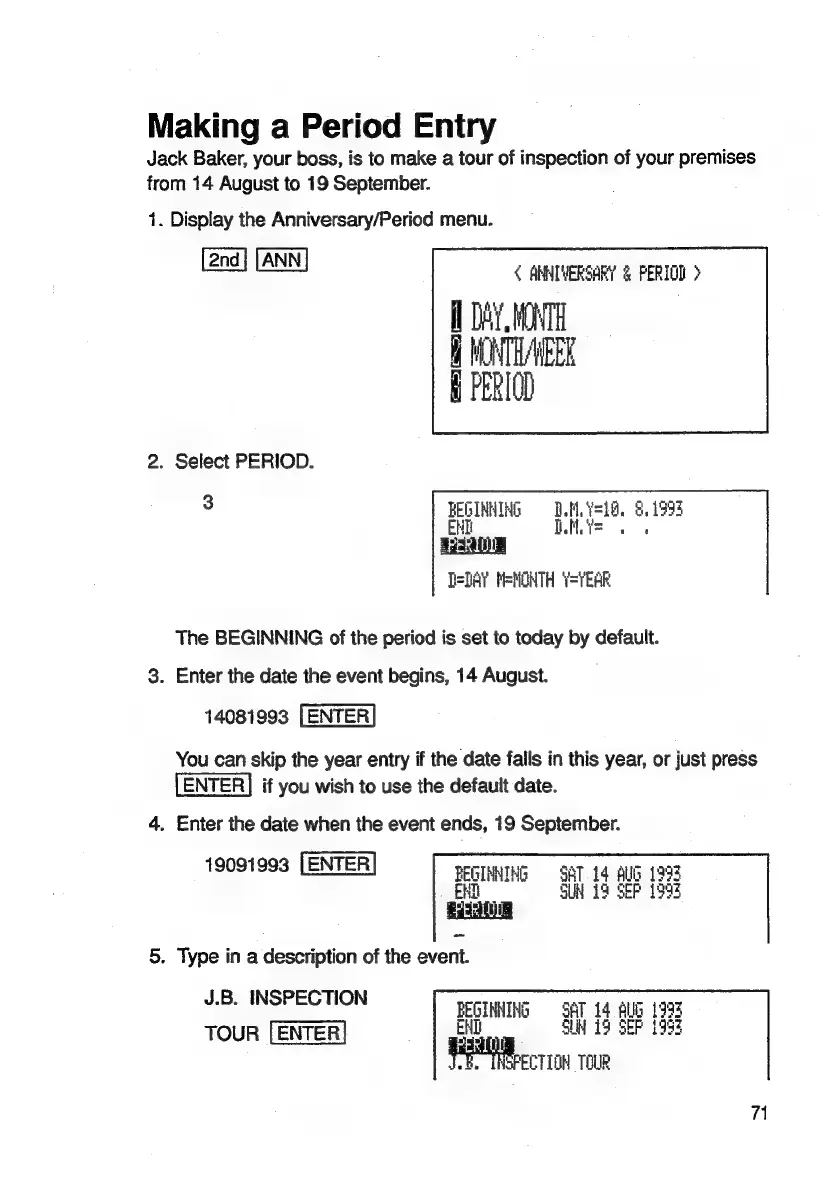
Making
a
Period
Entry
Jack
Baker,
your
boss,
is
to
make
a
tour
of
inspection
of
your
premises
from
14
August
to
19
September.
1.
Display
the
Anniversary/Period
menu.
<
ANNIVERSARY
&
PERIOD
>
DAY
Bhi
UAE
fi
PERIOD
2.
Select
PERIOD.
3
BEGINNING
©
D.M.Y=18,
8.1993
END
nt
WS
T=DAY
MENOHTH
=YEAR
The
BEGINNING
of
the
period
is
set
to
today
by
default.
3.
Enter
the
date
the
event
begins,
14
August.
14081993
[ENTER
You
can
skip
the
year
entry
if
the
date
falls
in
this
year,
or
just
press
ENTER]
if
you
wish
to
use
the
default
date.
4.
Enter
the
date
when
the
event
ends,
19
September.
19091993
[ENTER
BEGINNING
.
EHR
5.
Type
in
a
description
of
the
event.
J.B.
INSPECTION
eae
SAT
14
BUG
1993
TOUR
SUH
13
SEP
1993
a
in
ie
SFECTION
TOUR
71

Related product manuals