EasyManua.ls Logo

Sharp ZQ-6100M - Page 88

Sharp ZQ-6100M
194 pages
Print Icon
To Next Page IconTo Next Page
To Previous Page IconTo Previous Page
Loading...
e
The
first
12
characters
of
the
company
name,
11
characters
of
the
department
name
and
the
first
12
digits
of
the
telephone
number
are
displayed.
Press
[>]
and
[=]
to
move
the
index
cursor
and
select
the
starting
letter
of
the
company
name,
or
press
the
letter
you
want
directly
on
the
keyboard.
If
an
entry
is
being
displayed
when
you
call
up
the
index,
the
first
page
of
entries
with
the
same
starting
letter
as
the
entry
will
appear.
t
and
|
at
the
bottom
of
the
display
indicate
if
there
are
more
entries
in
the
group
above
or
below
those
currently
visible.
and
let
you
step
up
and
down
a
page
at
a
time
in
a
group.
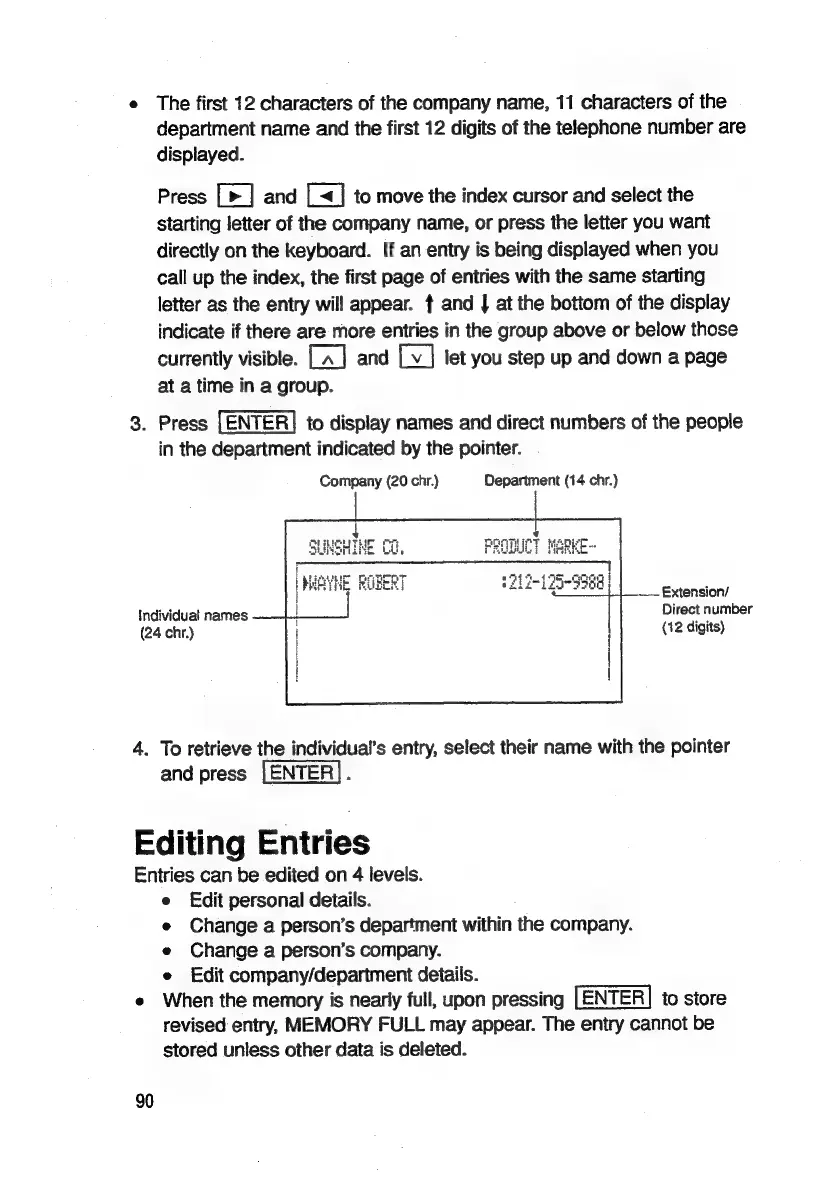
3.
Press
[ENTER]
to
display
names
and
direct
numbers
of
the
people
in
the
department
indicated
by
the
pointer.
Company
(20
chr.)
Department
(14
chr.)
*
nn
neither
ret
ROTUIET
MAREE
Tie
Ono
oT
5th
ng
|
WeYHE
ROBERT
L271
75-9958
Extension/
Direct
number
(12
digits)
Individual
names
(24
chr.)
4.
To
retrieve
the
individual’s
entry,
select
their
name
with
the
pointer
and
press
[ENTER].
Editing
Entries
Entries
can
be
edited
on
4
levels.
e
Edit
personal
details.
e
Change
a
person’s
department
within
the
company.
e
Change
a
person’s
company.
e
Edit
company/department
details.
e
When
the
memory
is
nearly
full,
upon
pressing
to
store
revised
entry,
MEMORY
FULL
may
appear.
The
entry
cannot
be
stored
unless
other
data
is
deleted.
90

Related product manuals