EasyManua.ls Logo

Sharper Image MI603 - General Instructions; Location of Controls; Buttons under Front Panel

Sharper Image MI603
20 pages
Print Icon
To Next Page IconTo Next Page
To Previous Page IconTo Previous Page
Loading...
8
General Instructions
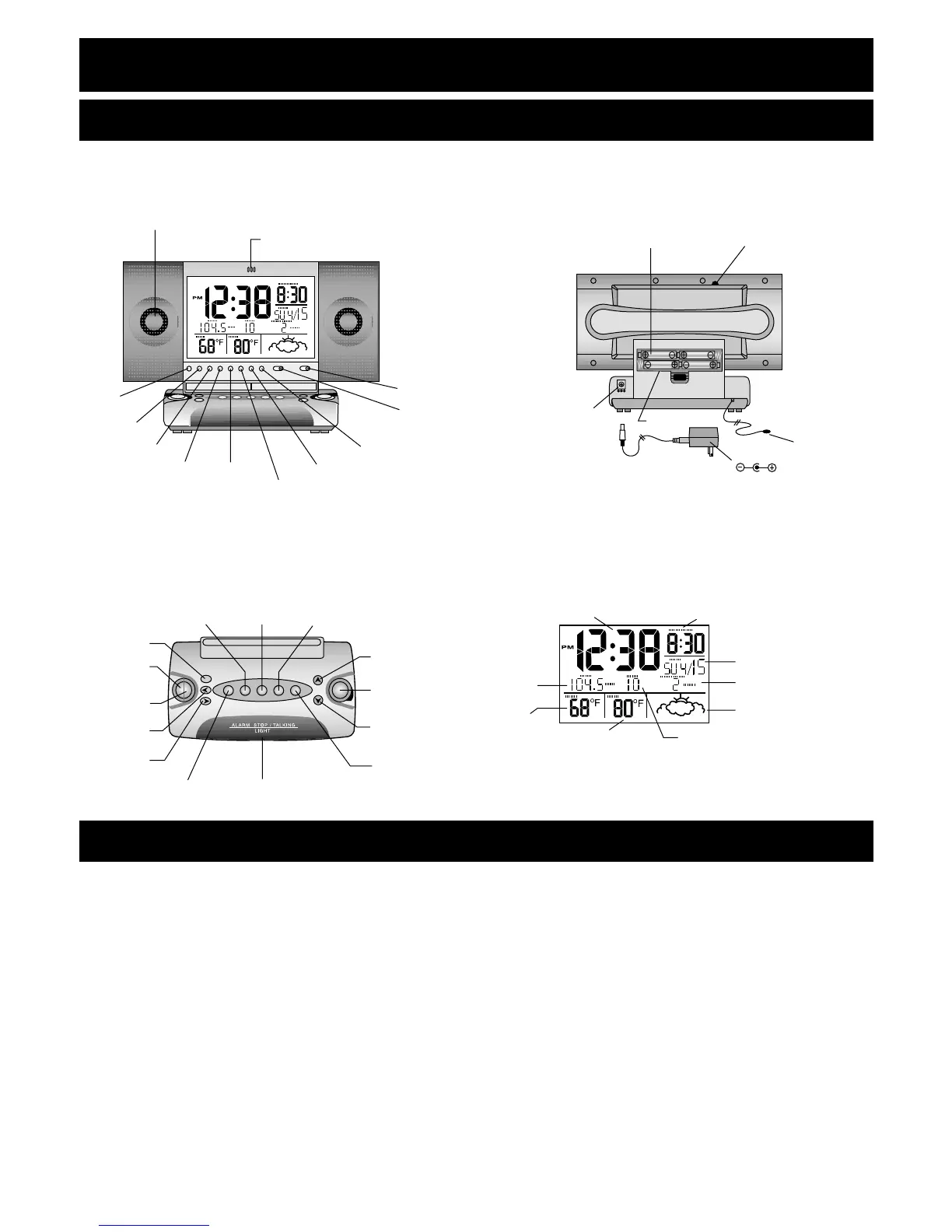
Location of Controls
Front Panel Back Panel
Buttons on the Base Screen
Buttons Under Front Panel
1. RESET – Clears and resets the entire display.
2. °C/°F – Changes temperature display to either Celsius or Fahrenheit.
3. TEMP/MAX/MIN – Displays the maximum and minimum temperatures for
inside and outside temperatures.
4. CLEAR – Clears the maximum and minimum temperature data while the maxi-
mum and minimum temperature is shown on the LCD.
5. RE-SYNC – Resynchronizes the main unit with the remote unit.
6. HR/MONTH – Changes the hours or months when setting the clock or calendar.
7. MIN/DATE – Changes the minutes or day when setting the clock or calendar.

CALENDAR
ALARM TIME
VOICE
MEMO
WEATHER FORECAST
TIME
INDOOR TEMP
OUTDOOR TEMP
FM/AM
RADIO
MEMORY
REC
PLAY
ERASE
BACKWARD
FORWARD
SLEEP
MEMORY
SET
PRESET
BAND
AM/FM
RADIO
ON/OFF
ALARM STOP/TALKING
LIGHT
TUNING UP
VOLUME
TUNING DOWN
ANT.
AC ADAPTER
ADAPTER JACK
BACKLIGHT
ADJUSTMENT
AA BATTERY X 4
BATTERY DOOR
MIC
OFF
VOICE
/BEEP/
12/24HR/
YEAR
LOCK/ALMSET/TIME SET/
CALENDAR/
MIN/DATE
HR/
MONTH
RESET
CLEAR
TEMP/
MAX/MIN
º
C/
º
F
RE-SYNC
ALUMINUM-CONE
SPEAKER