9
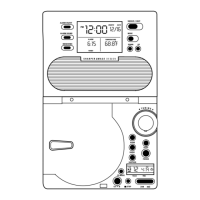
8. 12/24 HR/YEAR – Changes from 12-hour time to 24-hour time when setting
clock or the year when setting the calendar.
9. LOCK/ALM SET/TIME SET/CALENDAR – Allows you to switch from locked to
alarm set to time set to calendar set.
10.OFF/BEEP/VOICE – Switches the alarm sound from off to beep to voice.
Buttons on the Base
1. REC – Records voice messages.
2. PLAY – Plays recorded messages.
3. ERASE – Erases recorded messages.
4. < BACKWARD – Scans backward through recorded messages.
5. > FORWARD – Scans forward through recorded messages.
6. SLEEP – Automatically turns the radio off after a certain amount of time. The
maximum is 90 minutes.
7. PRESET – Changes the preset stations.
8. MEMORY SET – Stores station as a preset station.
9. BAND/AM/FM – Changes between AM & FM band.
10.RADIO ON-OFF – Turns the radio on or off.
11.TUNING
▼/▲ – Tunes the radio station.
12.VOLUME
▼/▲– Controls the volume of the radio and messages.
13.ALARM STOP/TALKING/LIGHT – Stops alarm. It also announces the time, outside
temperature and forecast. This button also activates the automatic temperature-
sensing backlight while the unit is running on battery power.
Button on the Back
• BACKLIGHT ADJUSTMENT – Adjusts the brightness of the LCD backlight.
Battery Installation
Main Unit
To enable the automatic temperature-sensing backlight, plug the main unit into
the wall outlet using the included 10.5V adapter. In case of a power outage, insert
4 AA batteries into the battery compartment on the rear of the main unit, ensuring
proper polarities are observed.
Remote Transmitter Unit
• Insert 2 AA batteries into the battery compartment on the remote unit, ensuring
proper polarities are observed.
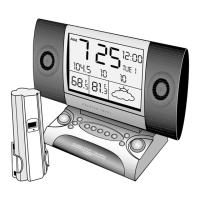
Buttons Under Front Panel


 To Next Page