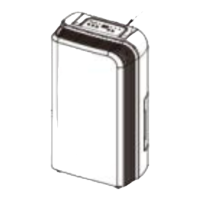
This document describes the Sheffield Electronic Dehumidifier, a product designed to improve indoor air quality by removing excess moisture. It is intended for domestic use and is backed by a 24-month warranty, reflecting the manufacturer's commitment to performance and safety.
Function Description
The Sheffield Electronic Dehumidifier operates by drawing in humid air, removing the moisture, and then releasing drier air back into the room. This process helps to reduce humidity levels, which can prevent the growth of mold and mildew, alleviate allergy symptoms, and create a more comfortable living environment. The unit utilizes R290 (propane) as a refrigerant, which is environmentally friendly with no damaging influence on the ozone layer and a negligible greenhouse effect.
The dehumidifier features a touch panel with a 3-color digital display that indicates the current humidity level: blue for humidity below 45%, green for humidity between 45% and 65%, and red for humidity above 65%. It offers multiple operating modes, including Auto mode, Continuous Drying mode, and Sleep mode, allowing users to select the most suitable setting for their needs.
In Auto mode, the unit automatically adjusts its operation based on the environmental humidity compared to the set humidity. If the environmental humidity is 3% or more above the set humidity, the fan and compressor will activate. If the environmental humidity falls 3% or more below the set humidity, the compressor will stop, followed by the fan after a 30-second delay. Both fan speed and humidity settings can be adjusted in this mode.
Continuous Drying mode allows the machine to run continuously, providing maximum dehumidification without the ability to adjust humidity settings. This mode is ideal for situations requiring rapid and extensive moisture removal.
Sleep mode is designed for quiet operation, making it suitable for use in bedrooms or other areas where noise reduction is important. When activated, the display indicators gradually dim after 10 seconds of no operation, and the fan speed automatically switches from high to low. Pressing any button will wake up the indicator. In this mode, the fan speed and humidity cannot be adjusted. The compressor will stop if the environmental humidity is 57% or less, and the fan will shut down after 30 seconds. If the environmental humidity is 63% or more, the fan will start, and the compressor will activate after 3 seconds.
The dehumidifier also includes a Timer function, allowing users to program the unit to turn on or off automatically after a set number of hours. Each press of the timer button adjusts the time by 1 hour, and the timer can be canceled by setting it to "00". This feature provides convenience and energy efficiency.
A Child-Lock function is integrated to prevent accidental changes to settings. It can be activated or deactivated by pressing and holding the child lock button for 3 seconds.
The unit collects water in a built-in water tank. When the tank is full, the unit will emit a buzzing sound, and the "Water Full" indicator light will illuminate, prompting the user to empty the tank. For continuous operation without manual emptying, the dehumidifier supports Continuous Draining by connecting a drain hose, allowing collected water to flow out using gravity.
Usage Features
Before first use, it is important to remove all packaging materials and stickers (except the rating label), and wipe the exterior with a moist cloth. The dehumidifier should be placed on a flat and stable surface, ensuring it is operated upright and not tipped over. A minimum clearance of 30cm around the unit should be maintained to ensure proper airflow and efficient operation. The unit is designed for indoor domestic use only and should not be used outdoors, in moving vehicles, or for commercial/industrial purposes.
The operating temperature range for this unit is between 5°C and 35°C. If the ambient temperature falls outside this range, the dehumidifier will stop working to protect itself. Specifically, if the ambient temperature is between 5°C and 16°C, the compressor will automatically defrost at intervals, during which the compressor stops, and the fan continues to run.
For optimal energy efficiency, it is recommended to keep doors and windows closed when the dehumidifier is operating. The air inlet and outlet should be kept free of obstacles, and the wind deflector should be adjusted to an upward position before starting the unit. If the unit has been tipped more than 45 degrees, it should be allowed to sit upright for at least 4 hours before being turned on.
When the water tank is full, the unit will stop operating. To resume, the tank must be emptied and correctly reinstalled. If the "Water Full" light remains on after emptying, ensure the float inside the water tank is correctly in place. For continuous draining, the unit should be placed on a horizontal and stable surface. The drain hose must be securely connected, free of kinks or obstructions, and tilted downwards at an angle of at least 20 degrees to allow water to flow out freely. The end of the hose should not be submerged in water to prevent airlocks.
Maintenance Features
The Sheffield Electronic Dehumidifier requires minimal maintenance, with no user-serviceable parts other than cleaning. Any servicing requiring disassembly should be performed by a qualified appliance repair technician.
Before Cleaning: Always turn off and unplug the appliance from the mains supply.
Care and Cleaning:
- Surfaces: Accumulated dust can be removed from the dehumidifier surfaces with a soft cloth. For more thorough cleaning, a cloth moistened with a solution of mild detergent and water can be used. After cleaning, the casing should be thoroughly dried with a soft, dry cloth before operating the unit again. Abrasive cleaning products or sharp objects should never be used on the appliance, especially on the air inlet or outlet, to avoid damage.
- Air Filter: The air filter requires regular cleaning as dust accumulation can restrict airflow, reduce efficiency, and potentially damage the unit. The air filter is removable for easy cleaning. To clean the filter:
- Remove the filter frame and then the filter itself.
- Use a vacuum cleaner to gently remove dust from the surface.
- If the filter is very dirty, wash it with water and a soft detergent, then dry it thoroughly.
- Replace the filter by reversing the removal steps.
The unit should not be operated without the air filter, as this can lead to contamination of the evaporator.
Storing the Dehumidifier:
When storing the appliance and its accessories, ensure it is kept in a safe and dry place.
- Empty any remaining water from the drainage tank.
- Fold up the power supply cord and place it in the water tank.
- Clean the air filter.
- Store the unit in a cool and dry place.
It is crucial that the unit is kept in an upright position during storage.
Before packing the unit for storage, the evaporator inside the machine must be dried out to prevent component damage and mold growth. This can be achieved by unplugging the unit and placing it in a dry, open area for a few days to air dry. Alternatively, setting the humidity point more than 5% higher than the ambient humidity will force the fan to run and dry the evaporator for a couple of hours.
For any issues or troubleshooting, the manual provides a guide to common problems and their solutions, such as no power, water-full indication, incorrect function, loud noise, or error codes. If problems persist, users are advised to contact after-sales support via email or phone.


 To Next Page
 General