EasyManua.ls Logo

Shell NewMotion Business Pro 2.1 - User Manual

Shell NewMotion Business Pro 2.1
70 pages
Print Icon
To Next Page IconTo Next Page
Loading...
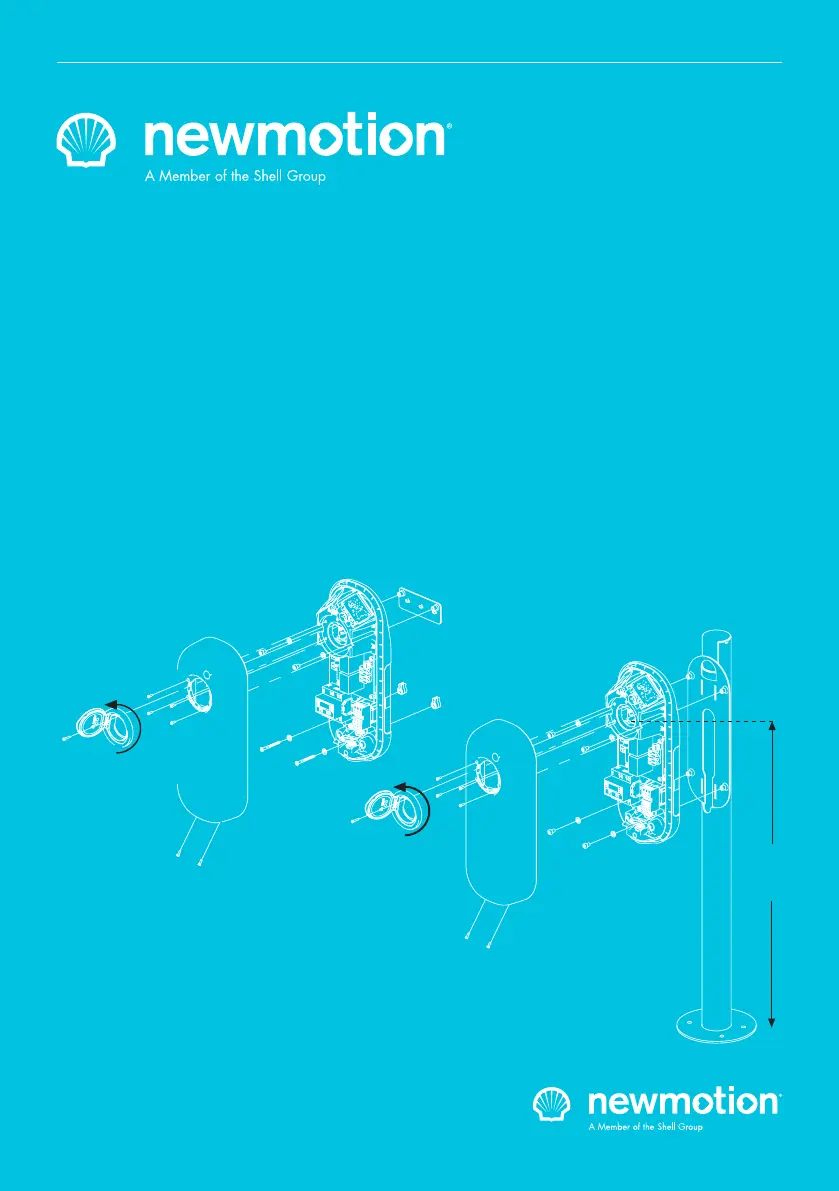
Business Pro 2.1
Business Lite 2.1
Business Pro 2.1 Cable
Business Lite 2.1 Cable
3,7 - 22 kW
100 cm
VERSION 091NM20INT04 2020
INSTRUCTION MANUAL – EN | INSTALLATIEHANDLEIDING – NL | INSTALLATIONSANLEITUNG - DE | MANUEL D’INSTALLATION - FR

Other manuals for Shell NewMotion Business Pro 2.1

Questions and Answers

  • C
    Caroline CrawfordAug 16, 2025
    Why is the LED light flashing purple on my Shell NewMotion Business Pro 2.1 Automobile Accessories?
    • E
      Eric CunninghamAug 17, 2025
      If the LED light on your Shell Automobile Accessories is flashing purple, it indicates that the charge point is either rebooting or undergoing a firmware upgrade. Allow approximately 10 minutes for the charge point to complete this process. It is important not to interrupt the rebooting sequence by turning off the power during this time.
  • B
    Bradley PachecoAug 20, 2025
    Why is there no light on my Shell NewMotion Business Pro 2.1 Automobile Accessories charge point when powered on?
    • K
      Kimberly JosephAug 20, 2025
      If there is no light on your Shell Automobile Accessories charge point when you turn on the power in the fuse box, it could be due to: * The power not being connected to the charge point. * The charge point being broken. To resolve this: 1. Check if the power cables are securely inserted in the terminal block of the charge point. If they are, proceed to the next step. 2. Use a voltage tester to check if the power cable is live (230 Volt (± 10%)) between L1 and N. If it is live, proceed to the next step. 3. Reboot the charge point by turning it off at the circuit breaker in the fuse box and turning it back on after 20 seconds. Allow 5-10 minutes for the charge point to reboot. If the issue persists after these steps, the charge point may be broken.
  • M
    Mitchell WilkinsonAug 29, 2025
    What does it mean when the LED light is flashing red on my Shell Automobile Accessories?
    • D
      Dr. Lisa Williams MDAug 29, 2025
      If the LED light on your Shell Automobile Accessories is flashing red, it means an unauthorized charge card is being used. The owner of the charge point can manage access authorization via my.newmotion.com or Business Hub.
  • S
    Savannah GreenNov 7, 2025
    What to do if the LED light is constantly red on my Shell NewMotion Business Pro 2.1 charge point when plugged in?
    • P
      patricklivingstonNov 7, 2025
      If the LED light on your Shell Automobile Accessories charge point is constantly red while the charge cable is plugged into both the charge point and your vehicle, several issues could be the cause: * A problem with the electric vehicle itself. * Low or high voltage. * A grounding failure. Here are the troubleshooting steps: 1. Reboot the charge point by turning it off at the circuit breaker in the fuse box, waiting 20 seconds, and then turning it back on. Allow 5-10 minutes for rebooting. If this doesn't work, proceed to the next step. 2. Check your vehicle's dashboard for any error messages. If there are none, proceed. 3. Test your vehicle with a different charge point. If it still doesn't charge, take it to a car dealer for testing. If it charges elsewhere, proceed. 4. If p...
  • D
    Doris SandersNov 10, 2025
    What to do if there is no light on my Shell Automobile Accessories charge point when plugged in?
    • N
      Nicole MilesNov 11, 2025
      If there is no light on the Shell Automobile Accessories charge point when the charge cable is plugged in, it could be due to: * The power not being connected to the charge point. * A broken charge cable. Here's how to troubleshoot: 1. Ensure there is no live power on the power cable. 2. Check that the power cables are securely inserted in the charge point's terminal block. 3. Verify that the RCD, MCB, or RCBO in the distribution board are turned on. If they are, proceed to the next step. 4. Check if the power cable is live (230 Volt (± 10%)) between L1 and N) using a voltage tester. If it is live, proceed to the next step. 5. Reboot the charge point by turning it off at the circuit breaker in the fuse box and turning it back on after 20 seconds. Allow 5-10 minutes for it to re...
  • K
    Keith CruzNov 24, 2025
    Why is the LED light constantly green on my Shell NewMotion Business Pro 2.1 charge point but not charging?
    • M
      Michelle MejiaNov 24, 2025
      If the LED light on your Shell Automobile Accessories is constantly green, it indicates that the charge point is in a charge session but charging is delayed. This is normal, but it can be a problem if the car is not charged overnight. This can happen because: * The electric vehicle is delaying the charge session. * Dynamic Power Sharing could be activated, preventing the charge point to continue charging. To troubleshoot: 1. Check if the electric vehicle has a delayed charging timer scheduled or a limit on the maximum battery state of charge. If so, verify with the customer if this schedule and limit are desired; otherwise, they can be turned off. 2. Check if the customer is able to charge on different charge points. 3. Disable any delayed charging features of the vehicle and try...
  • N
    Nicholas Wilson PhDDec 3, 2025
    How to fix a Shell NewMotion Business Pro 2.1 Automobile Accessories charge point that is offline?

    Shell NewMotion Business Pro 2.1 Specifications

    General IconGeneral
    Power OutputUp to 22 kW
    Max. Charging Power22 kW
    Rated Current32A
    Communication ProtocolOCPP 1.6
    RFID ReaderYes
    MID MeterYes
    Enclosure RatingIP54
    Product TypeCharging Station
    Connector TypeType 2
    Network ConnectivityEthernet, Wi-Fi, 4G
    Installation TypeWall-mounted
    Rated Voltage400 V AC

    Related product manuals