◆ Display Operation
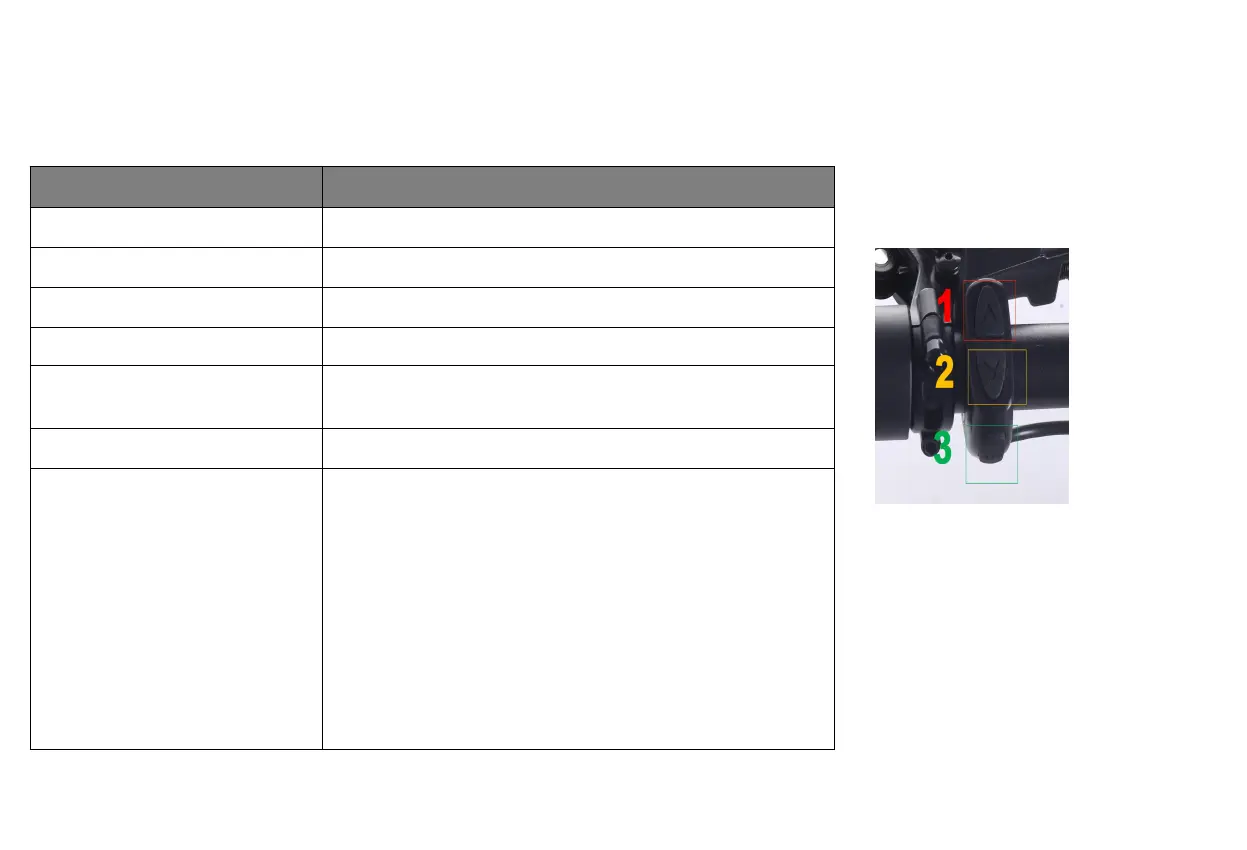
Press and hold MODE (3)until power engages
Increase pedal assist (PAS) level
Press and release up arrow (1)
Decrease pedal assist (PAS) level
Press and release down arrow (2)
Toggle odometer, trip odometer
Press and release MODE (3)
Toggle current speed ("SPEED”),
average speed ("AVG SPEED"),
and max speed ("MAX SPEED")
Press and hold up MODE (3) and arrow (1) until speed display changes
Switch the content of the
mu-function display area
Press and release MODE (3)
Enter the “factory default settings” page
1. Press and hold the up arrow (1) and arrow (2) simultaneously until you enter
the function setting interface (P01-P20).
2. In the range of P01-P20, press the up arrow (1) or arrow (2) until the
function to be modified is selected.
3. For example: you have selected function P10, this page will display the code
of "000". Press the up arrow (1) to increase the value, otherwise press the down
arrow (2) to decrease the value.
4. When you finish modifying a function, you can press MODE (3) to continue
to the next one.
5. When you have finished all the modification functions, press and hold the up
arrow (1) and arrow (2) again until you exit the current page, and the
information you just modified will also be saved.


 To Next Page