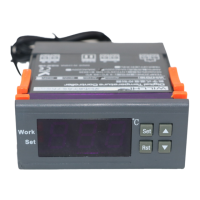
◆Turn on or off the thermostat:
When it is wired up, the state of being acquiescent is power on.
Press RST key to switch on and off, press the RST key once on the power-off
state to turn it on. On the power-on state, press the RST key and hold on for
three seconds, then it will be off.
※ Startup and shutdown timing:
Press the RST key once in the standby mode to start the timing out-put. scr
een alternately displays the remaining time and the current temperature; re-pr
essthe RST key once to turn off the timing output, screen alternately displays
OFF and the current temperature.
◆
OFF
temperature :
In the Standby mode, press the SET key once to enter the OFF temperature
setting, press ▲ or ▼ button to adjust, press ▲ or ▼ button and hold on for three
seconds to enter the fast adjusting mode, press the SET key again and back to
the standby mode.
◆
ON
temperature s:
In Heating mode: ON temperature= OFF temperature- Difference
In Cooling mode: ON temperature= OFF temperature+Difference
Set The Difference in the setting menu.
◆system menu settings:
Press SET key and hold on for three seconds to enter the controlled-
parameters setting, press the ▲ or ▼ key to select the adjustment menu, press
SET key once to enter the appropriate parameter settings, press ▲ or ▼ to
adjust the parameters needed to be modified. After being adjusted, press the
RST key to exit, or exit as the system delay for 5 seconds.
◆ Menu code statement:


 To Next Page
 Loading...