Need help?
Do you have a question about the Sherbourn PT-7010A and is the answer not in the manual?
Guidelines for proper grounding of CATV and antenna systems.
Instructions for safely unpacking the unit and recording its serial number.
Details on using the power button to turn the unit on and off.
Ensuring the IR receiver window is clear for remote control functionality.
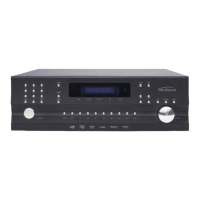
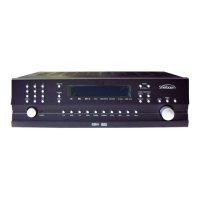
Describes the front panel display showing input, frequency, and volume.
Explains the operation of the volume knob and its smooth volume ramp feature.
How to control Zone 2 functions independently from the Main Zone.
Using buttons to select sources and adjust input levels for consistent volume.
Using Mode buttons to cycle through various sound playback modes.
Operating the AM/FM tuner, including scanning and preset tuning.
How to adjust Bass and Treble levels using the front panel.
Meaning of indicator lights for Dolby Digital, DTS, and digital signals.
Functionality of the Mute button and Panel Dim for light adjustment.
Explanation of COM/RECV, ZONE TWO POWER, ZONE TWO ADJUST, SIDE AXIS lights.
Description of audio/video input and output connections for various sources.
Details on Component Video inputs and outputs for enhanced picture quality.
Use of IR inputs for custom installs and trigger outputs for component control.
Connecting to a computer for software upgrades via the RS-232 port.
Balanced XLR and unbalanced RCA audio outputs for amplifiers.
Connecting 8-channel analog inputs for surround processors or DVD-Audio.
Connecting FM/AM antennas and the ground screw.
Various analog audio input and output connections for playback and recording.
Fixed Main/Zone 2 stereo outputs and optional side-axis outputs.
Connection point for the detachable AC power cord.
Connecting digital audio sources and outputting digital audio for recording.
Port for future expansion and accessories.
Advice on choosing a suitable location to protect the unit from heat and damage.
Guidance on electrical power requirements and safe socket usage.
Advice on routing cords and making connections for optimal audio performance.
Explanation of Composite, S-Video, and Component Video quality.
How the PT-7010A converts video signals for flexible output.
How video signals are routed to the TV for display and OSD.
Using 12 VDC trigger terminals to control other components.
Shows independent 12 VDC outputs for amplifier and device activation.
Demonstrates looping 12 VDC to activate a device using existing triggers.
Description of the device buttons and overall layout of the remote.
Explanation of the remote's LCD display and button/display lighting.
How to select and operate different components using the remote's device buttons.
Using the PAGE button to access additional functions on the remote.
Functions of MAIN, FAV, JOYSTICK PAD, and Macro buttons on the remote.
Step-by-step instructions for initial setup and remote control operation.
Instructions for installing AAA batteries into the remote control.
Setting speaker size (Small/Large/Off) for bass management.
Adjusting speaker volume levels for optimal home theater balance.
Measuring speaker distances for correct delay time adjustments.
Measuring speaker distances for correct delay time adjustments.
Adjusting speaker volume levels for optimal home theater balance.
General advice for optimal speaker placement to enhance sound quality.
Step-by-step guide to turn on the main zone using the remote.
Instructions for enabling and turning on Zone 2 using the remote.
Using 3-digit codes to program the remote for various components.
Teaching the remote to learn commands from other remote controls.
Changing device labels and button assignments on the remote.
Programming and accessing favorite TV and radio stations.
Making buttons like Volume work across different devices.
Erasing stored commands or programming from the remote.
Adjusting or disabling the remote's backlight.
Programming buttons to transmit sequences of commands.
Viewing assigned 3-digit codes for programmed devices.
Copying all programming from one Sherbourn remote to another.
Specifying which video outputs are used for OSD text display.
How to activate the OSD using the remote's MENU button.
Using the INFO button to display information about the current source.
Allows fine adjustment of speaker volume levels for the current program.
Adjusting dynamic range, Pro Logic II/IIx, DTS modes, Party, and Jazz Club.
Allows boosting or cutting Bass and Treble levels.
Details on configuring each input source, including name and default mode.
Setting AM/FM band and frequency for up to 40 radio stations.
Steps to save tuned stations as presets using the OSD menu.
Configuration options for the main zone, including power-up source and volume.
Settings for Zone 2, including enabling, balance, and power-up options.
Setting speaker size (Small/Large/Off) for bass management.
Setting the size for main speakers for bass management.
Instructions for setting the size of side-axis speakers.
Guides for setting the size of surround speakers.
Explains the function of the center speaker setting (Phantom vs. ON).
How to configure surround back speakers.
Setting to enable or disable the subwoofer.
Guides on measuring speaker distances for delay time adjustments.
Measuring speaker distances for correct delay time adjustments.
Adjusting speaker volume levels for optimal home theater balance.
General advice for optimal speaker placement to enhance sound quality.
Redirecting low frequencies to the subwoofer via crossover settings.
Setting the subwoofer output to NORMAL or ENHANCED BASS mode.
Enabling/disabling pop-up messages for volume, source, and mode changes.
Selecting the video output for OSD text display.
Configuring VID2/MON2 outputs for recording or monitoring.
Adjusting audio delay relative to video signals for synchronization.
Shows software revision levels and allows firmware upgrades via RS-232.
Settings to enable/disable RS-232, rear IR, and front panel IR controls.
Explains how to redirect bass frequencies to the subwoofer.
Lists and describes available surround modes for stereo sources.
How to tune stations manually, directly, and set presets.
How to record audio from the PT-7010A to tape or VCR.
Explains Zone 2 status LEDs and the Zone 2 Adjust indicator.
Step-by-step instructions for enabling and turning on Zone 2.
General advice on speaker placement to maximize sound quality.
Recommendations for positioning front left, right, and center speakers.
Guidance on positioning the center speaker for dialog clarity.
Advice on positioning side-axis speakers for improved soundstage.
Recommendations for positioning surround speakers.
Guidance on positioning surround back speakers for enhanced realism.
Tips and methods for finding the optimal location for a subwoofer.
List of remote control codes for audio components.
Remote control codes for auxiliary devices.
Remote control codes for various CD player brands.
Remote control codes for cable boxes and satellite receivers.
Remote control codes for various DVD player brands.
Remote control codes for laserdisc players.
Remote control codes for satellite and DSS receivers.
Remote control codes for various television brands.
Remote control codes for various VCR brands.
Troubleshooting steps for no sound from one or more speakers.
Steps to resolve issues with subwoofer output or lack thereof.
Tips and solutions for improving AM and FM radio reception.
Solutions for when inputs cannot be selected on the unit.
Steps to diagnose and resolve issues with no video signal on the TV.
Explanation of why tone controls may not be functioning.
Troubleshooting steps for Dolby Digital or DTS playback problems.
Solutions for sound dropouts during CD or DVD playback.
Troubleshooting steps for remote learning failures.
Steps to resolve issues when the remote control is not functioning.
Troubleshooting steps for when Zone 2 is not operating correctly.
Solutions for Zone 2 not playing digital input sources.
Troubleshooting steps for amplifiers shutting down unexpectedly.
Steps to resolve when the PT-7010A becomes unresponsive.
Instructions on how to reset the PT-7010A to factory defaults.
Troubleshooting steps for issues encountered during firmware updates.
Steps to isolate and fix ground loop hum noises in the system.
Other potential causes and solutions for noise issues in the system.
Reference to Tone Settings on page 35.
Reference to Main Zone settings on page 37.
Reference to Zone 2 settings on page 37.
Reference to Mode Settings on page 35.
Reference to Control Settings on page 41.
Reference to Video Settings on page 40.
Table for logging input jack, name, and other settings.
Table for logging speaker position, calibration, trim, distance, and settings.
 General
| Channels | 7 |
|---|---|
| Total Harmonic Distortion (THD) | < 0.05% |
| Frequency Response | 20 Hz - 20 kHz |
| Signal-to-Noise Ratio | > 100 dB |
| Input Impedance | 47k Ohms |
| Outputs | Binding Posts |
| HDMI Version | Not Applicable |
| Type | Power Amplifier |
| Inputs | RCA |

 To Next Page