10 11
■
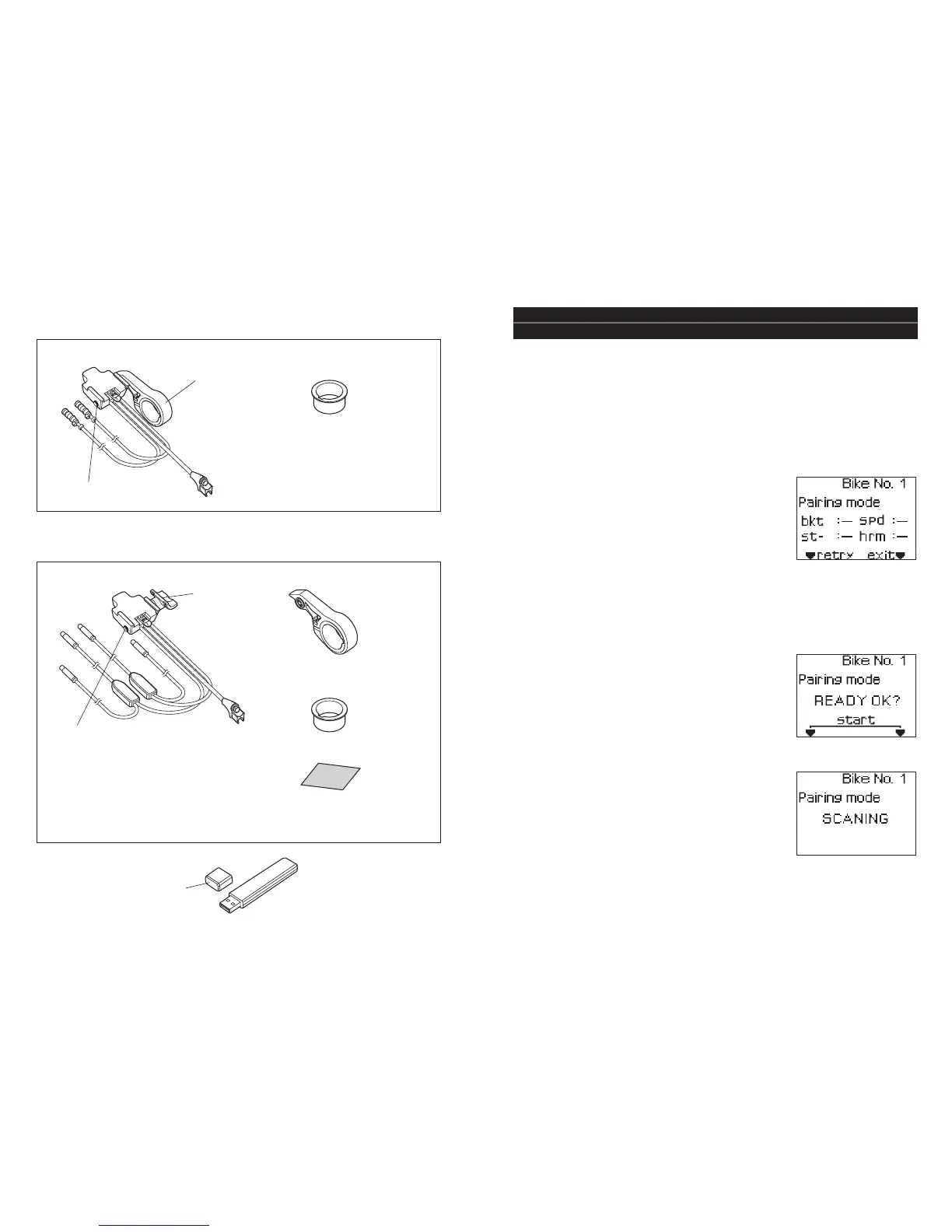
Bracket set for FLIGHT DECK
SM-EW79F-E (for ST-7970)
Bracket band
Rear derailleur
adjustment button
• Bracket
■
USB dongle SM-DL79
USB port cover
• Bracket band adapter
For 25.8 mm inner diameter
■
Bracket set for FLIGHT DECK
SM-EW79F-I (for ST-7971/SW-7971)
• Bracket
• Bracket fixing screws
18mm (x1)
15mm (x1)
12mm (x1)
• Bracket band
• Bracket band adapter
For 25.8 mm inner diameter
Adapter
Rear derailleur
adjustment button
• Bracket fixing screws
18mm (x1)
15mm (x1)
• Aero bar protective sticker
• Cable ties for securing
adapter (2 types x4)
(1) Press button A and button B on the main unit simultaneously to start
up setting mode.
(For details on starting up setting mode, refer
to page 26.)
(2) Select “SETTING” in the main menu. Then
select “PAIRING” in the Setting menu so that
the pairing confirmation screen is displayed.
If pairing has not yet been carried out for a
particular unit, “–“ will appear beside the
name of the unit. If pairing has already been carried out for a unit, “
™
”
will appear.
■
Pairing setting method
4. Pairing Function
In order for the main unit to display information from each of the sensors,
the various units must first be registered with the SC-7900 system.
This is called ‘pairing’.
* If a unit is replaced or added, carry out pairing again for all units.
(3) When you press the select button (▼retry) on the main unit, the main
unit will switch to pairing standby mode.
While the main unit is in pairing standby mode,
insert the battery into the unit to be paired.
* The units will switch to pairing mode for 30
seconds after their batteries are inserted.
* The SM-EW79F-E/I will switch to pairing mode
for 30 seconds once the battery for the gear
shifting system has been connected.
(4) Press the select button and the set button on
the main unit simultaneously within the 30
seconds that the unit to be paired is in pairing
mode.
“SCANNING” will appear in the data display
and pairing will then start.
(5) When pairing is complete, “
™
” will appear beside the name of the unit
which has just been paired. If you press the select button, the main unit
will switch to pairing standby mode. You can then continue to carry


 To Next Page