10
3.
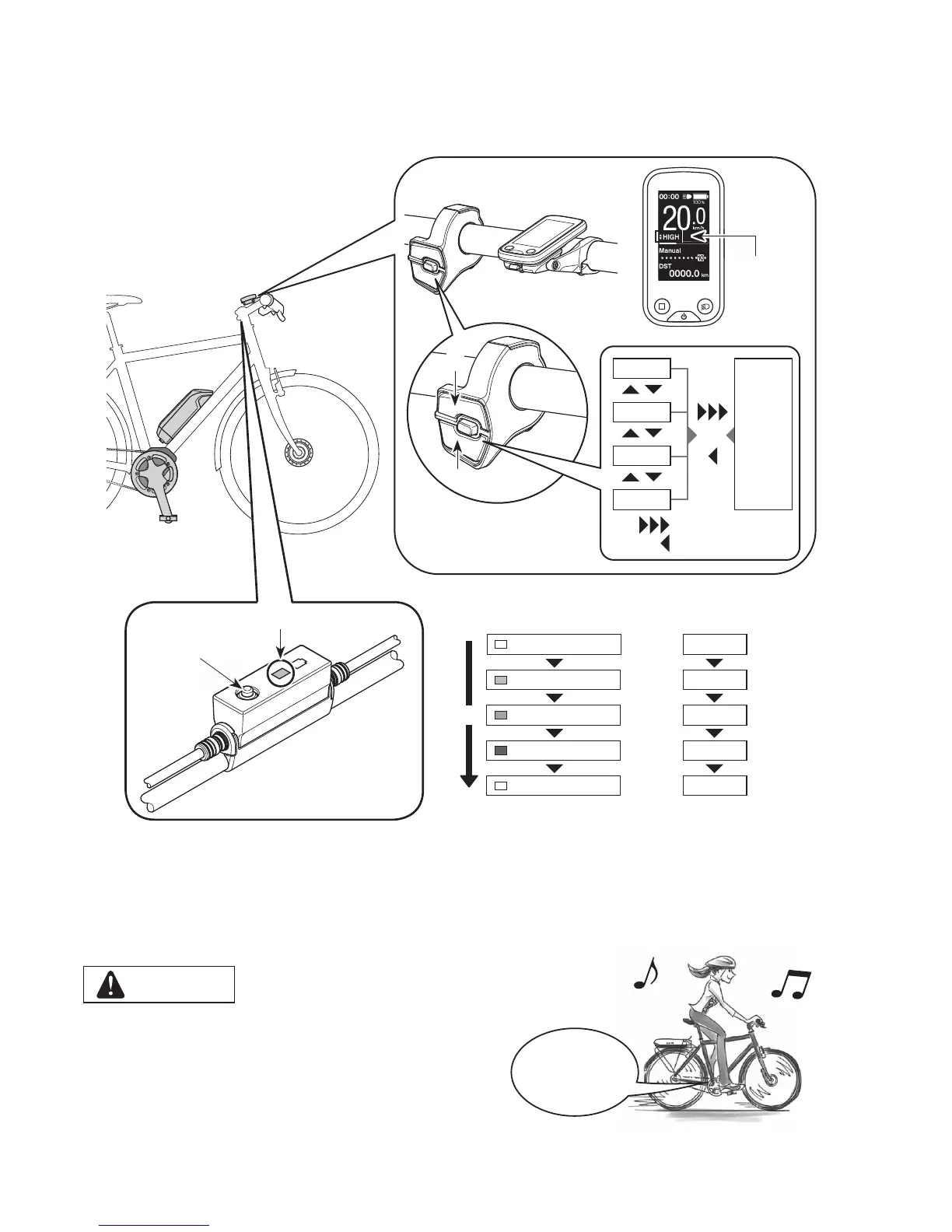
Select your preferred assist mode.
The bicycle is equipped with either SC-E6100 or EW-EN100.
*
When the power is turned on, assist mode is set to [OFF].
*
To change to the [WALK] assist mode, it is
necessary to use the above assist switch.
Assist mode
display
LED lamp (inner side)
Z
< SC-E6100 >
< EW-EN100 >
X
Y
OFF
Lit in light blue
Lit in green
Lit in yellow
OFF
[OFF]
[ECO]
[NORM]
[HIGH]
[OFF]
LED lamp (inner side) indications Assist mode
Z
[HIGH]
[NORM]
[ECO]
[OFF]
[WALK]
XY
Long press Y
Short press X
4.
Ride the bicycle.
Assist will start when you start pedaling.
CAUTION
SHIMANO STEPS supports various brake systems.
Before riding, please check the brake system of your bicycle and
how to operate it beforehand.
5.
Turn off the power.
Assist
Start





 To Next Page