33
Walk assist mode
•
This mode may not be available in certain regions.
•
The walk assist function can operate at a maximum of 6 km/h. The assistance level and speed vary with the gear position.
Switch to walk assist mode
1.
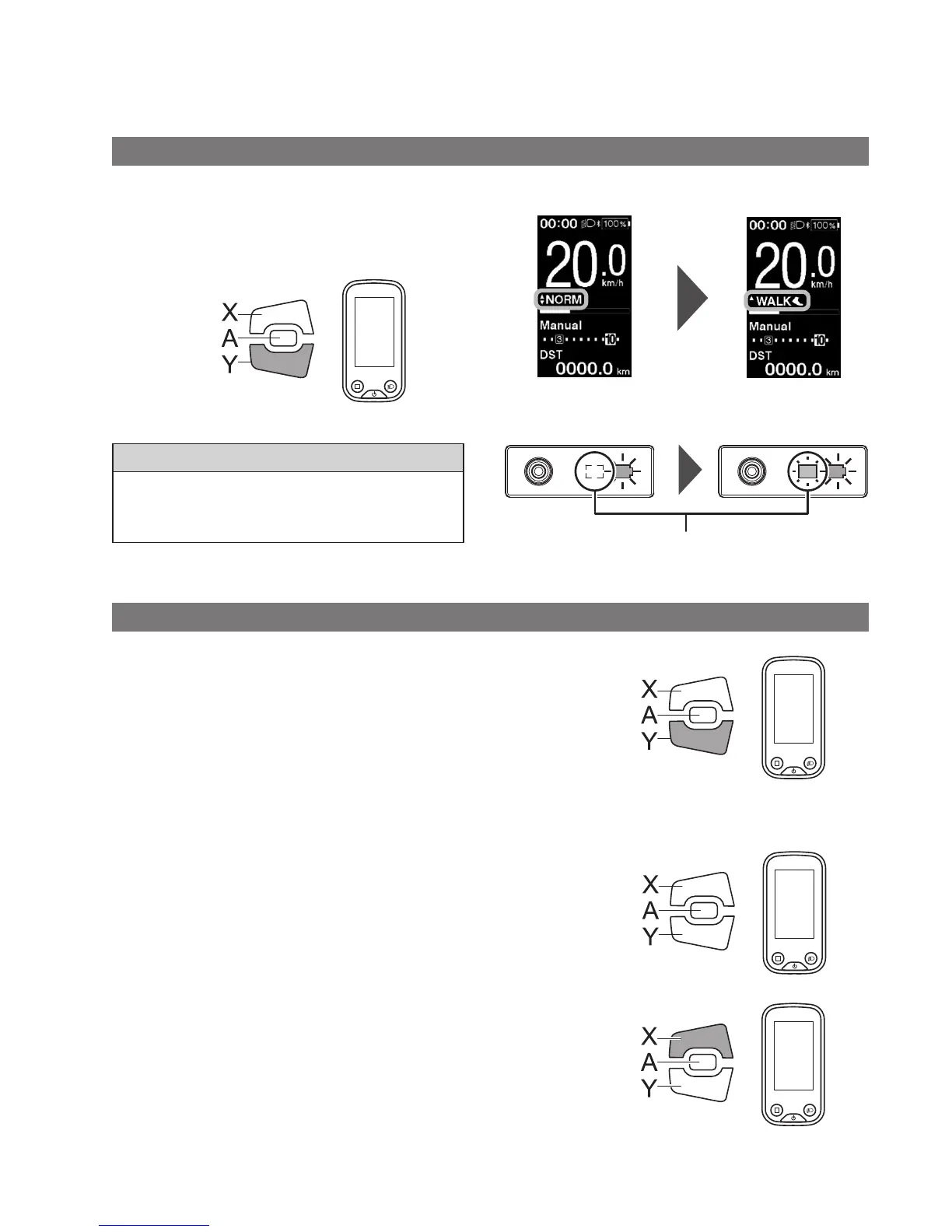
Press and hold Assist-Y (about 2 seconds) until the
following occurs.
SC-E6100: [WALK] is displayed on the screen
EW-EN100: LED lamp (inner side) lights up blue
Assist
2 Sec.
NOTE
A warning tone will sound while switching is in progress if it is
not possible to switch to [WALK] mode because the current
speed is not [0 km/h] or there is pressure on the pedals etc.
< SC-E6100 >
< EW-EN100 >
LED lamp (inner side)
Assist OFF Walk assist mode enabled
Operation of walk assist function
1.
While in walk assist mode, press and hold down Assist-Y.
•
Start the walk assist function.
•
If Assist-Y is not operated for over 1 minute, the assist
mode will change to [OFF].
•
If the switch unit is connected to EW-EN100, the LED
lamp (inner side) blinks blue when the above
operation is performed.
2.
Hold the handlebar and push the bicycle carefully.
Assist
Hold down
3.
To stop the walk assist function, release Assist-Y.
Assist
Release
4.
To exit the walk assist mode, press the Assist-X button.
Assist




 To Next Page