37
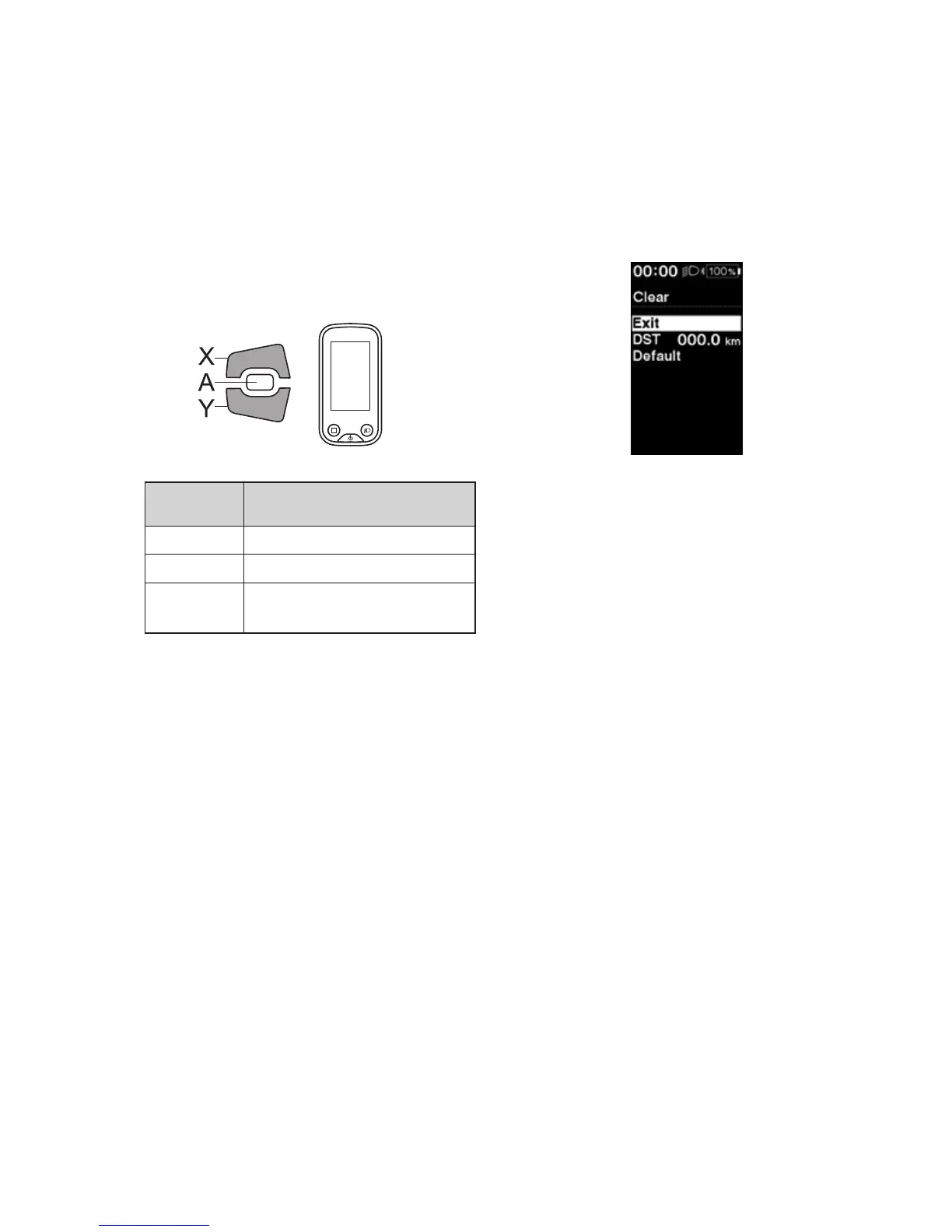
Clear
Reset the traveling distance or the setting values.
When the [DST] (traveling distance) is cleared, [TIME] (travelable time), [AVG] (average speed) and [MAX] (maximum
speed ) are also cleared.
1.
Enter the [Clear] menu.
(1) Launch the setting menu.
(2) Press Assist-X or Assist-Y to select [Clear], then
press Assist-A.
2.
Press Assist-X or Assist-Y to select what you want to
reset.
Assist
Configurable
items
Details
[Exit] Return to setting menu.
[DST] Reset the traveling distance
[Default]
Reset the setting values of the
cycle computer.
Items and default values reset by [Default] are as
follows:
•
[Backlight]: ON
•
[Beep]: ON
•
[Unit]: km
•
[Language]: English
•
[Brightness]: 3
•
[Font color]: White
3.
Press Assist- A to reset the selected item.
*
The screen will automatically return to the setting
menu screen.




 To Next Page