08
Scanning
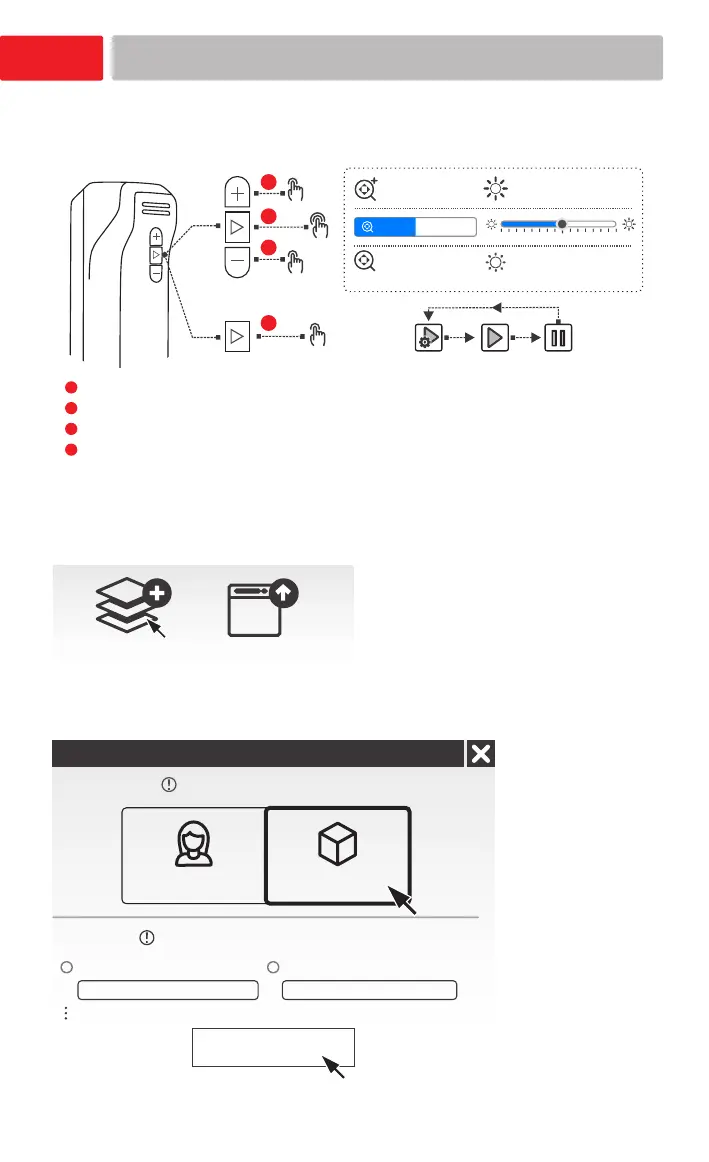
Scanner button controls
1.Create a New project group(or Open project group).
2.Select Scan mode “object” and the suitable
Object size.
Object mode scanning
New project group
Open project group
Portrait Object
New project
Scan Mode
Object size
Medium and large objects Small objects
Size larger than 200*200*200mm
50*50*50mm - 200*200*200mm
Apply
Click to start scanning
X1
X2
X1
X1
Increase
Zoom in
Decrease
Zoom out
Zoom
Preview Start Pause
1
2
3
4
Click to zoom in (increase brightness) .
Double click to switch between Zoom and Brightness adjustment.
Click to zoom out (decrease brightness).
Click to switch scanning status.
1
2
3
4














 To Next Page