7. PARAMETER SETTING VM-5S
-38-
LCD display
Proce-
dure
Key operation
MEAS 1
(Parameter)
MEAS 2
(Parameter
Status)
Remarks
37
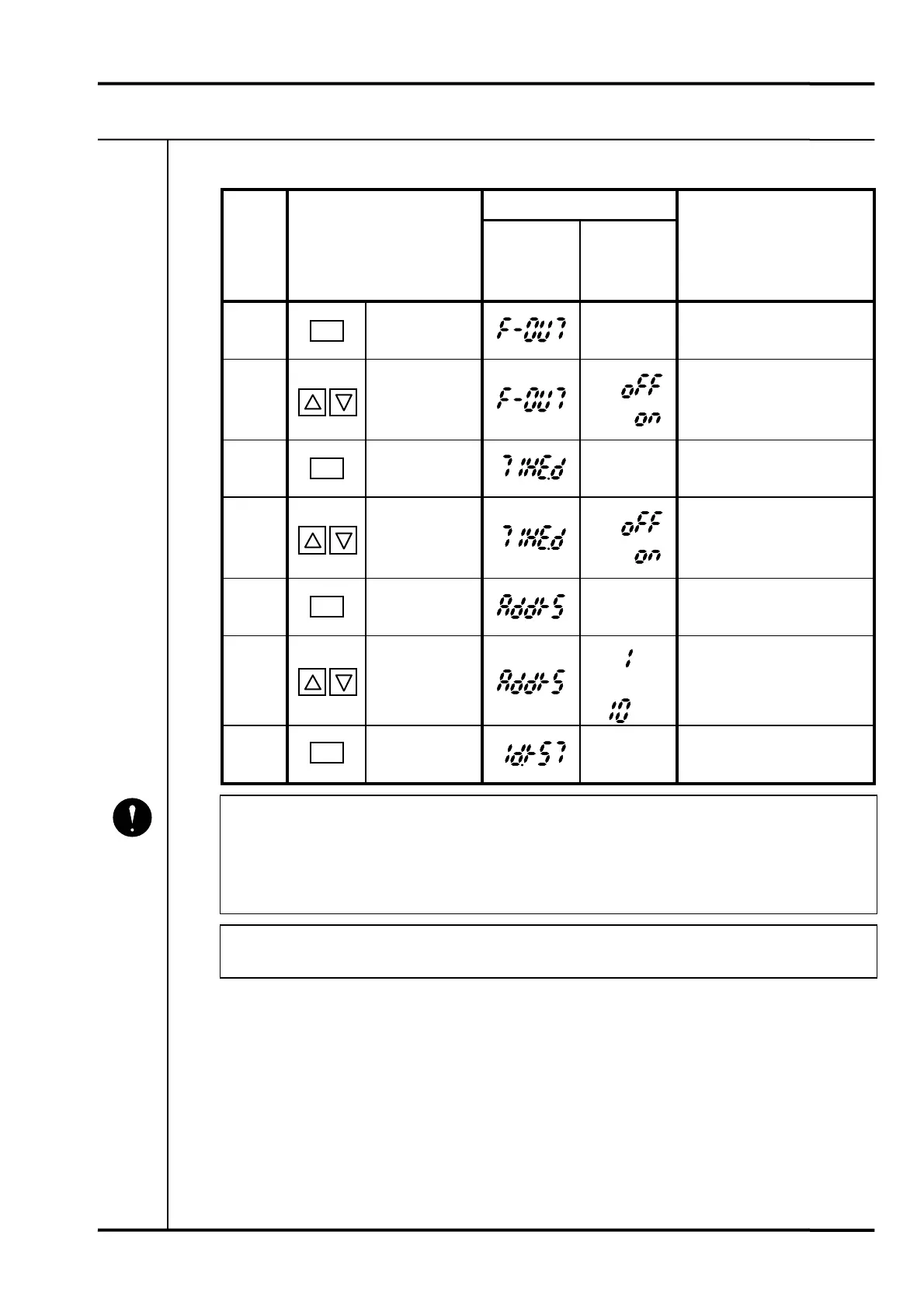
Press SET key.
Present
status
Specify first-out display.
38
Press UP or
DOWN key.
Select ON (enable) or OFF
(disable) with UP or DOWN
key.
39
Press SET key.
Present
status
Specify timed OK channel
defeat.
40
Press UP or
DOWN key.
Select ON (enable) or OFF
(disable) with UP or DOWN
key.
41
Press SET key.
Present
status
• Specify address.
42
Press UP or
DOWN key.
•••
Select address between
1 and 10 with UP or DOWN
key.
43
Press SET key.
Present
status
Return to procedure 1.
• Make sure to assign a unique address for use with the VM-5P1,2 Communication/
Phase Marker Unit or VM-53 Dual Communication Unit and VM-5H3 or VM-5W1
Instrument Rack.
Same addres number is not allowed in the same rack.
• The display is reset to normal approx. 60 sec. after setting is completed.
Mandatory
SET
SET
SET
SET



 To Next Page
 Loading...