4
3. Setting Communication Parameters
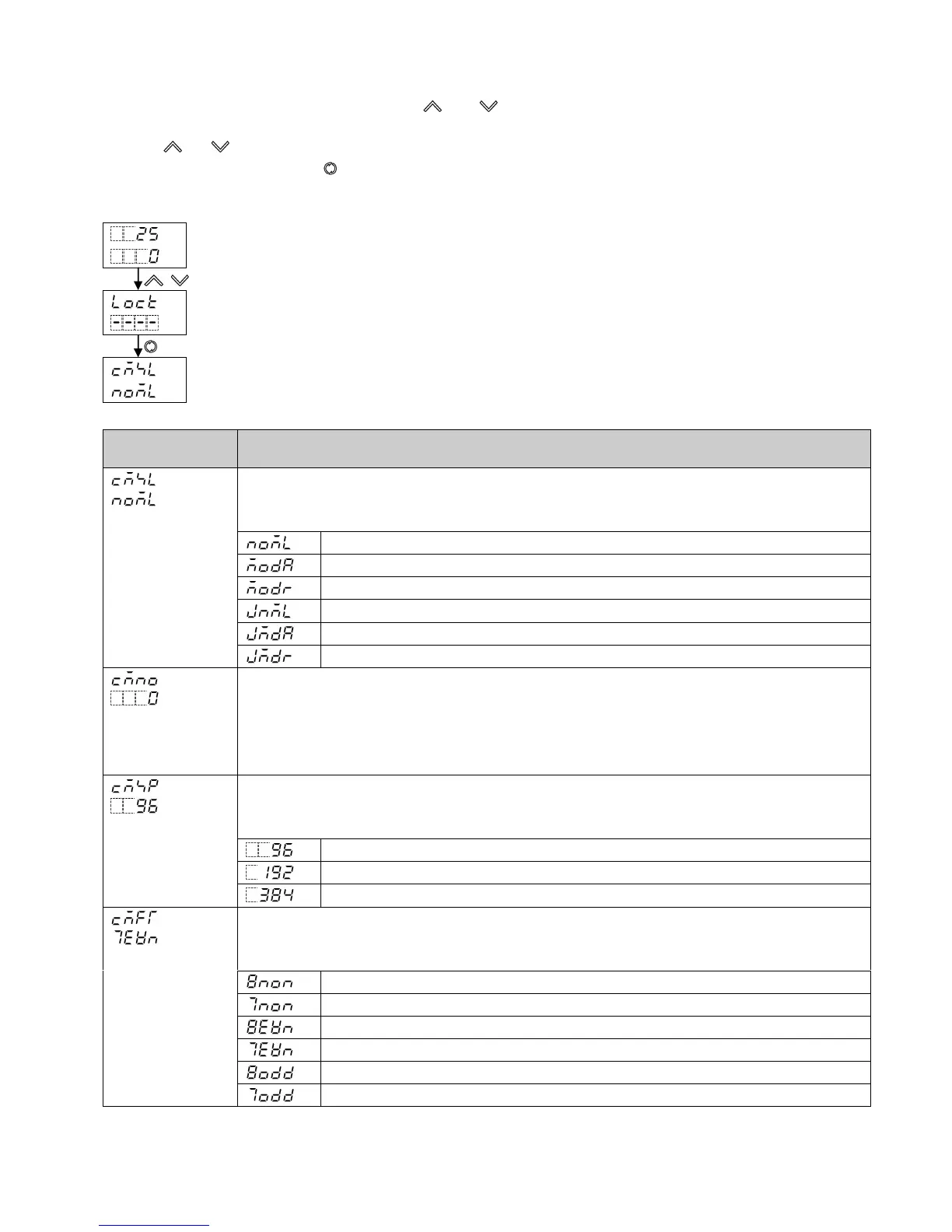
Set communication parameters in Engineering mode 1.
To enter Engineering mode 1, press and hold the and keys (in that order) together for approx. 3 seconds
in RUN mode.
Use the or key for settings (or making a selection).
To register the set data, use the key.
Set each communication parameter following the procedure below.
RUN mode
PV/SV Display
+ (3 sec)
Engineering mode 1
Set value lock
(Several times)
Communication protocol
Characters,
Factory Default
Setting Item, Function, Setting Range
Communication protocol
• Selects communication protocol.
• Selection item:
Shinko protocol
Modbus ASCII
Modbus RTU
Shinko protocol (JC command allocated)
Modbus ASCII (JC command allocated)
Modbus RTU (JC command allocated)
Instrument number
• Sets the instrument number.
The instrument numbers should be set one by one when multiple instruments are
connected in Serial communication, otherwise communication is impossible.
• Setting range: 0 to 95
Communication speed
• Selects a communication speed equal to that of the host computer.
• Selection item:
9600 bps
19200 bps
38400 bps
Data bit/Parity
• Selects data bit and parity.
• Selection item:
8 bits/No parity
7 bits/No parity
8 bits/Even
7 bits/Even
8 bits/Odd
7 bits/Odd


 To Next Page
 Loading...