SHOPSMITH MARK V 845180
Page 6
now.
Also, remember that your MARK V could possibly
go out of alignment if it is moved to an area with
varying floor levelness. Remember to recheck
alignment and make needed adjustments after
moving your MARK V, if needed.
ADJUST THE HEADREST LOCK
(ALL MARK V MODELS)
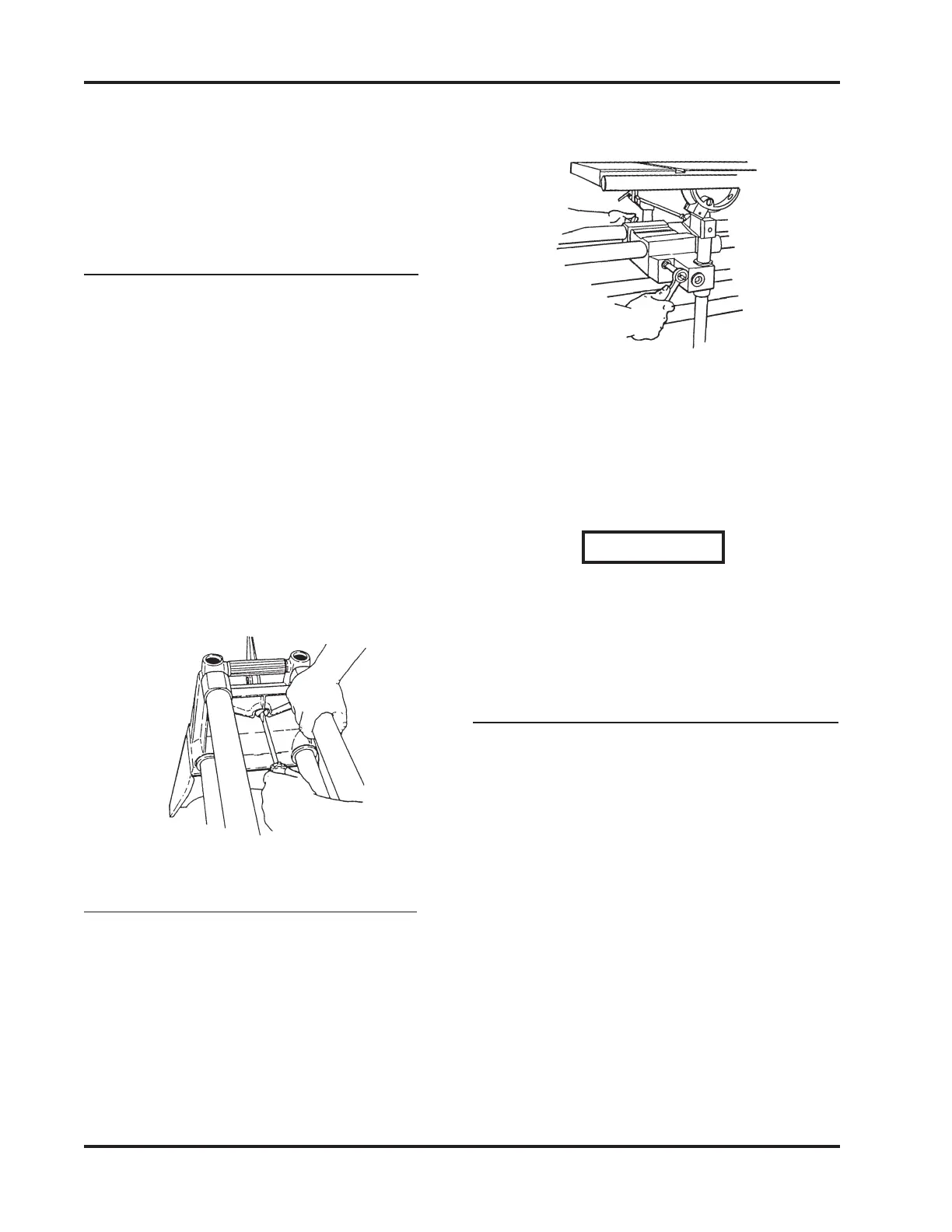
1. To check the Headrest Lock, grasp the
Way Tubes near the Tie Bar and pull up,
as demonstrated by the Right Hand in
Figure 1.
2. If there is "give" in the Lock, unlock the
Handle and use Medium Straight Blade
Screwdriver to turn the Lock Shaft clock-
wise, as done by the Left Hand in Figure
1. If the Lock is difficult to operate, the
Lock Shaft is too tight. To loosen, unlock
the Handle and turn the Lock Shaft coun-
terclockwise.
Figure 1
ADJUST THE CARRIAGE LOCK
(MARK V MODELS 510 & 520)
1. If the Carriage Lock Handle does not
lock past the horizontal position to four-
o’clock or the Carriage moves when the
lock handle is in this position, the Lock
needs adjusting. To adjust the Lock, use
a 1/2" Socket with an Extension and
Ratchet Handle to tighten or loosen the
Nut located at the back of the Carriage
Assembly, as shown in Figure 2.
Figure 2
2. When the Carriage Lock Handle locks
past the horizontal position to four-
o’clock and the Carriage no longer moves
when the Handle is in this position,
tighten the Nut a final 1/4 turn.
WARNING
The Carriage Lock Handle MUST lock
past the horizontal position to Four-
O’clock, otherwise the Carriage Lock
will vibrate loose.
SET WORKTABLE'S 90° LEFT STOP
(MARK V MODEL 500)
1. Unlock the Carriage and Headstock.
Move the Headstock to the middle of the
Way Tubes. Then move the Carriage
between the Headstock and Base Mount
(right side).
2. Tighten the Headstock and Carriage
Locks. Place the MARK V in the vertical
position by loosening the Headrest
Handle, firmly grasping the Way Tubes
near the Headrest end, and lifting the
Tubes into the 90° position, as demon-
strated in Figure 3.


 To Next Page