Δ Interface
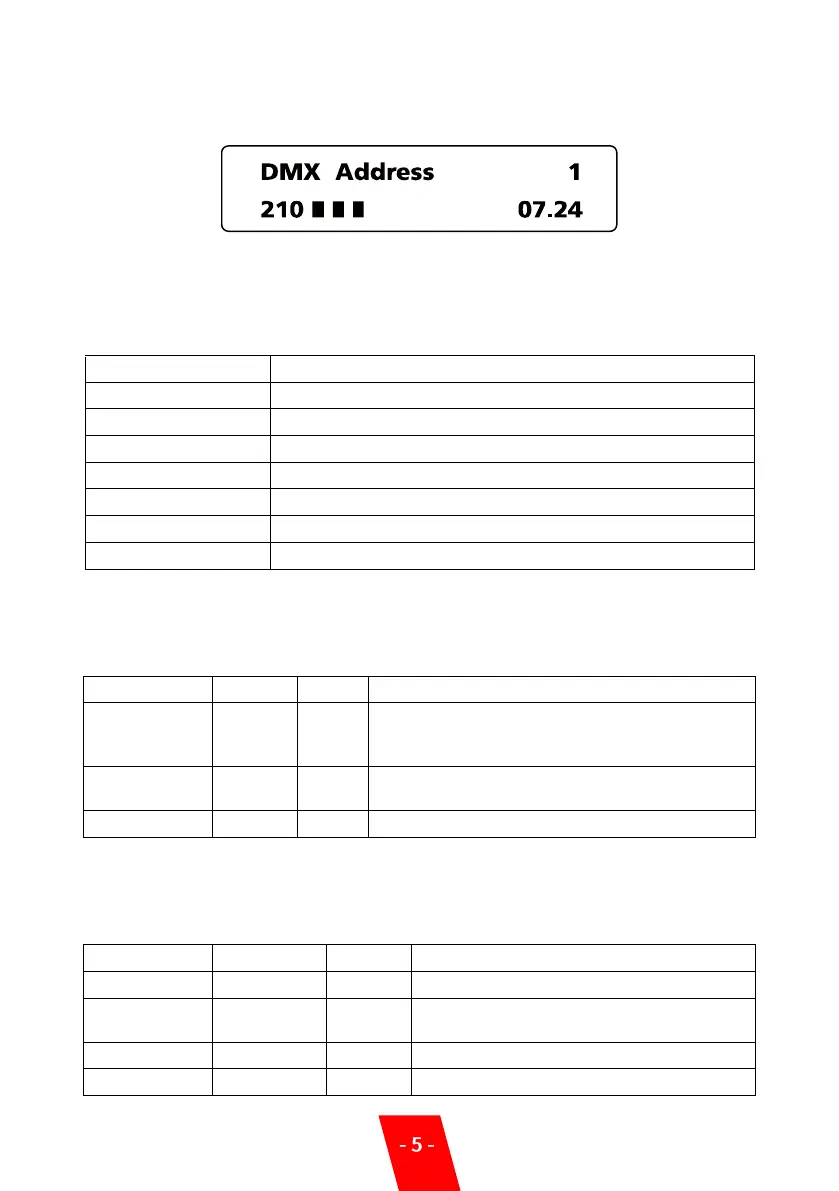
1. Main Interface
First line: Display DMX address is “1”
Second line: Display the present inner core temperature and the temperature progress bar;
isplays remaining time is 7 minutes and 24 seconds
2. Error Information
3. Setting Menu
Press “MENU” to enter the Setting interface, press the “MENU” button to enter different
options until you return to the main interface
4. Advanced Menu
Press and hold “MENU” for 3 seconds to enter the advanced setup interface, press MENU key
to enter different options, wait 3 seconds to return to the main interface.
Temperature sensor is not connected or damage
Insufficient granules or remaining time, please swiping time card
Heating chamber over-temperature
Machine slant over 45 degrees.
Set the DMX address, machine become a wireless host
and can send out DMX signal when its address is
“1++”
Wireless function switch, you can match machine with
remote controller when at “ON” status
Manual fountain switch , for testing purposes only
Setup inner Core temperature
Auto preheat function switch after turn on
machine
Adjust the sparks density
Factory Mode is factory debugging mode,


 To Next Page