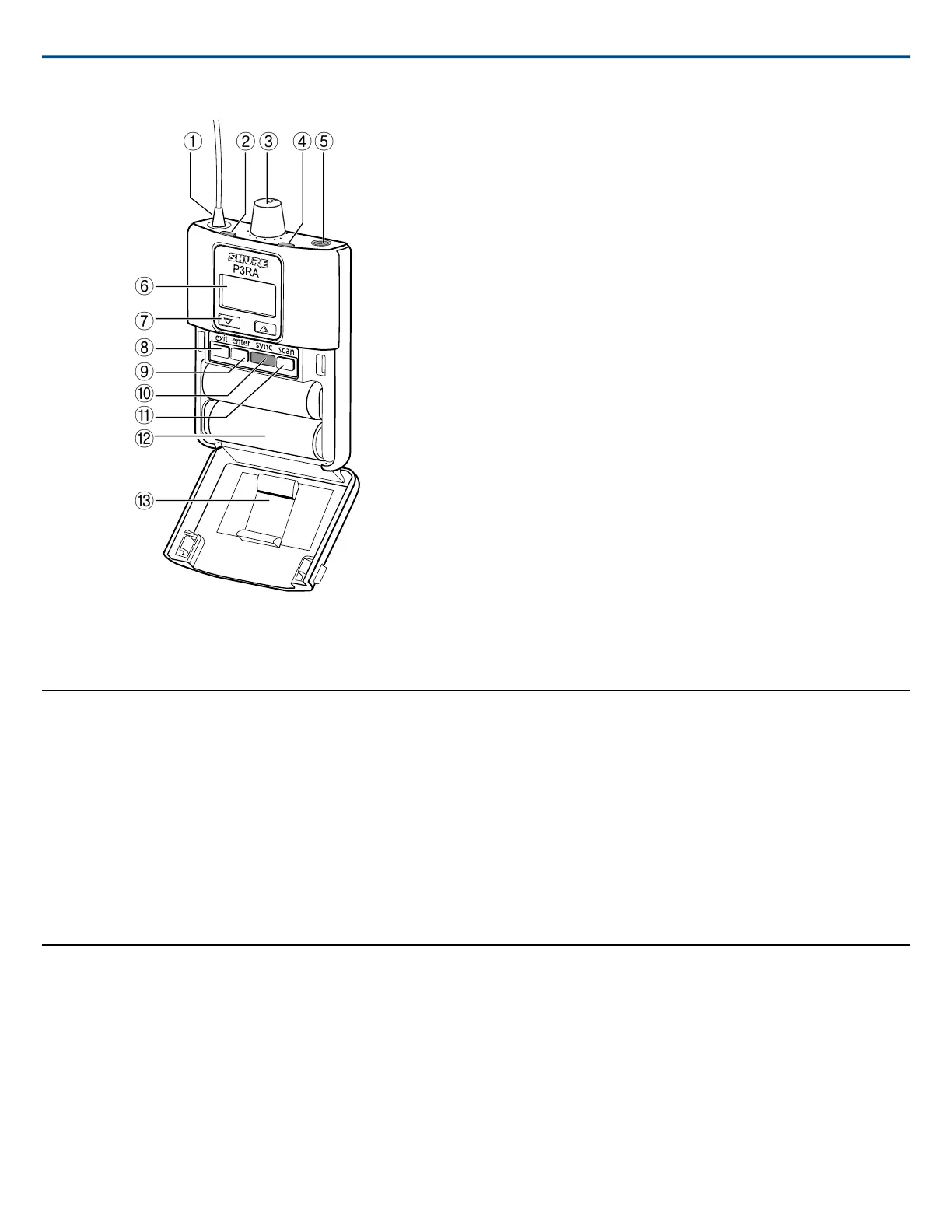
① Antenna
Receives signal from P3T transmitter
② RF Indicator
Illuminates when the bodypack is receiving a signal from the transmitter
③ Volume Knob / Power Switch
Turn to power on/off and adjust headphone volume
④ Battery LED
Indicates battery status
Note: see the battery life table for specific runtime values
⑤ Headphone Output
Use earphones or headphones with a 3.5 mm (1/8-inch) plug
⑥ Display
Shows settings and menu navigation
⑦ Navigation buttons (▲▼)
Use to scroll through menu and adjust settings
⑧ Exit button
Press to return to previous screen
⑨ Enter button
Press to enter a menu screen or to confirm a setting
⑩ IR Sync Window
Use to send group and channel settings between the bodypack and transmitter
⑪ Scan Button
Press to perform an RF scan
⑫ Battery Compartment
Uses a Shure SB900 rechargeable battery or two AA batteries
⑬ Removable AA Adapter
Remove to use with a Shure SB900 rechargeable battery
Note: To remove, open the door and slide the adapter out. To reinstall, press
the adapter into place—there is an audible click when seated.
Audio Settings
MODE
STEREO: Audio from channel 1 is heard on the left earphone; audio from
channel 2 is on the right earphone.
MIXMODE: Both channels are heard on the left and right earphones. The
blend between mixes is adjustable.
EQ
Use the two-band shelving equalizer to boost either bass or treble frequencies
up to +6dB in 2 dB increments.
LOW BOOST: Boosts frequencies below 100 Hz
HIGH BOOST: Boosts frequencies above 10 kHz
OFF: No EQ (flat)
VLIMIT (Maximum Volume)
Set a value (-3 to -21 dB, adjustable in 3 dB increments) to attenuate the
highest possible volume level. Turning the volume knob through its entire
range of motion still affects volume; the limit simply narrows the range of dB
adjustment.
Note: The VLIMIT does not compress the audio.
BAL MX / BAL ST (Balance)
The behavior of the balance control depends on which mode the bodypack
is set to:
STEREO: Adjusts the left/right balance
MIXMODE: Adjusts the blend between channel 1 and channel 2
Utilities
CONTRAST
Customize the display screen contrast by selecting a setting between low
and high
LOCK PANEL
Locks all controls except the volume knob to prevent accidental changes to
settings
Lock: Select UTILITIES>LOCK PANEL
Unlock: Press the exit button and select OFF when the lock setting screen
appears. Press enter to confirm.
BATTERY
Displays remaining battery runtime (hours:minutes), temperature, status,
cycle count, health, and voltage
Note: Applies to SB900 battery only
RESTORE
Restores bodypack to factory default settings
AUTO OFF
Automatically turns off the bodypack after a selectable amount of time (5,
30, or 60 min.) while it is in power-save mode or when connected to a
charger with the power on. To restore power to the bodypack, the power
switch must be turned off and then on again.
Note: SB900 batteries charge fastest when the bodypack is off
Shure IncorporatedP3RA Professional Wireless Bodypack Receiver
3/72017/10/30



 To Next Page
 Loading...










