Shure Incorporated
7/14
1.
2.
3.
1.
2.
3.
4.
5.
Power Save Mode
Usepowersavemodetochargebatterieswiththecharger’snetworkfunctionalityoff.
Disconnect the power cable from the AC power outlet.
Press and hold storage while reconnecting to the AC power outlet.
When the charge status and error LEDs flash amber, release the button.
The charger remains in power save mode until you power off the charger.
Note: Transmitters docked with the power switch in the ON position will power on when fully charged. To avoid unwanted audio and unnecessary battery drain,
ensure all transmitters are switched OFF before charging.
Adding a Charger
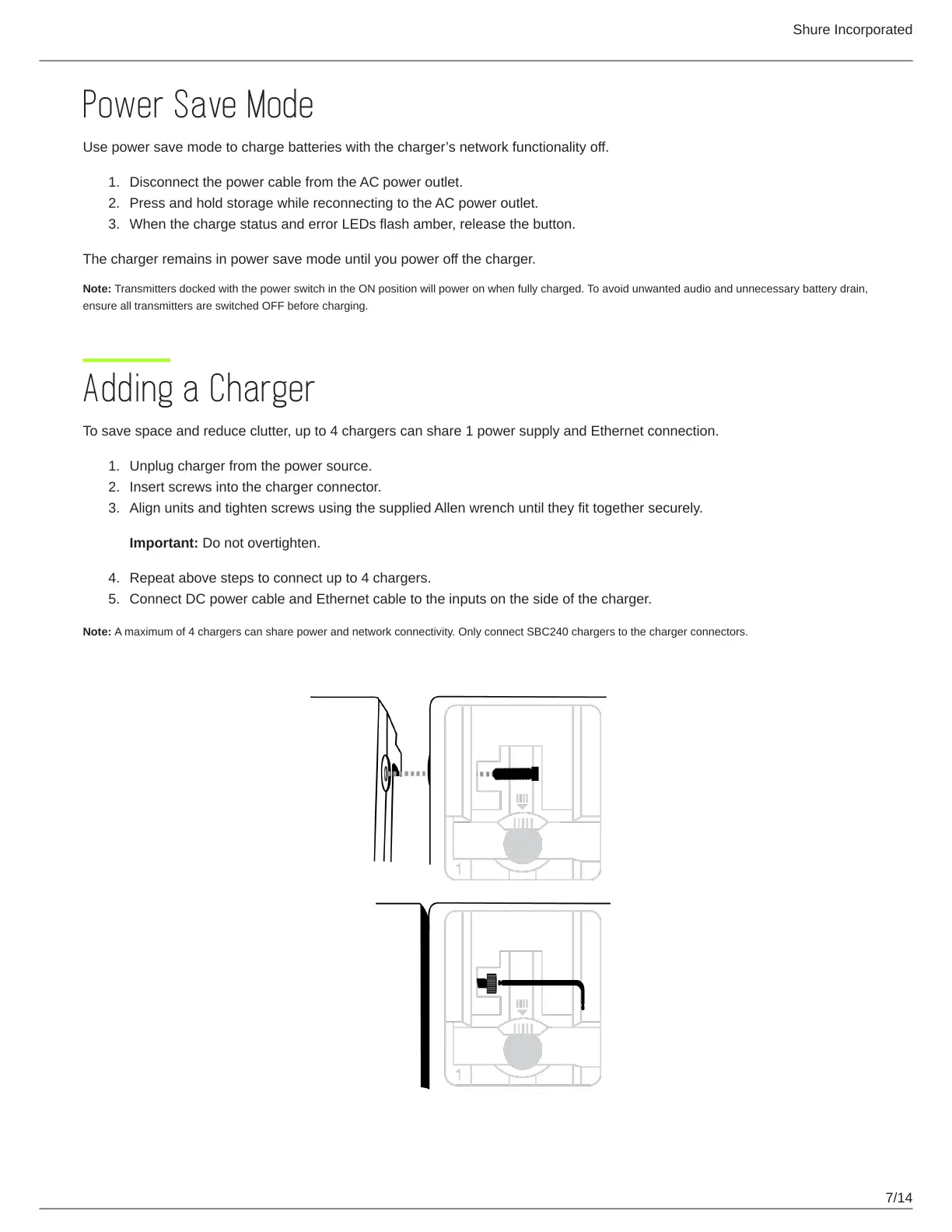
To save space and reduce clutter, up to 4 chargers can share 1 power supply and Ethernet connection.
Unplug charger from the power source.
Insert screws into the charger connector.
Align units and tighten screws using the supplied Allen wrench until they fit together securely.
Important: Do not overtighten.
Repeat above steps to connect up to 4 chargers.
Connect DC power cable and Ethernet cable to the inputs on the side of the charger.
Note: A maximum of 4 chargers can share power and network connectivity. Only connect SBC240 chargers to the charger connectors.



 To Next Page