Shure Incorporated
11/12
•
•
•
•
•
•
•
•
•
•
•
•
Install or Remove the Stand Adapter
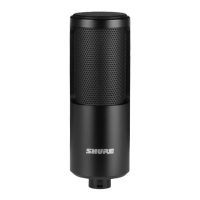
To mount the microphone on a 3/8 in. stand, insert the included brass stand adapter and tighten it with a coin or screwdriver.
Important: Make sure that the slots on the adapter face outward.
Additional Resources
Shure Knowledge Base FAQs
Training from the Shure Audio Institute
Microphone Techniques for Recording
Houses of Worship Systems Guide
Shure Performance & Production YouTube channel
Shure Creators YouTube channel
How to Avoid Plosives When Recording
See also
The difference between condenser and dynamic mics
How a dual-diaphragm mic design reduces the proximity effect.
How to fix feedback problems.
What is phantom power?
How should I clean my microphone?
What is a noise floor/self-noise?
Important Product Regulatory Information
For information regarding responsible party and other matters relating to FCC compliance, please contact Shure Incorporated,
5800 W. Touhy Avenue, Niles, Illinois 60714-4608 U.S.A. shure.com/contact
Changes or modifications not expressly approved by Shure Incorporated could void your authority to operate this equipment.
CE Notice
Hereby,ShureIncorporateddeclaresthatthisproductwithCEMarkinghasbeendeterminedtobeincompliancewithEuro-
pean Union requirements.
The full text of the EU declaration of conformity is available at the following site: https://www.shure.com/en-EU/support/declara-
tions-of-conformity.


 To Next Page