①
②
②
③
③
④
⑤
①
17
Network Connection and Configuration Examples
Note: Use shielded Cat5e cable for network connections to ensure reliable performance.
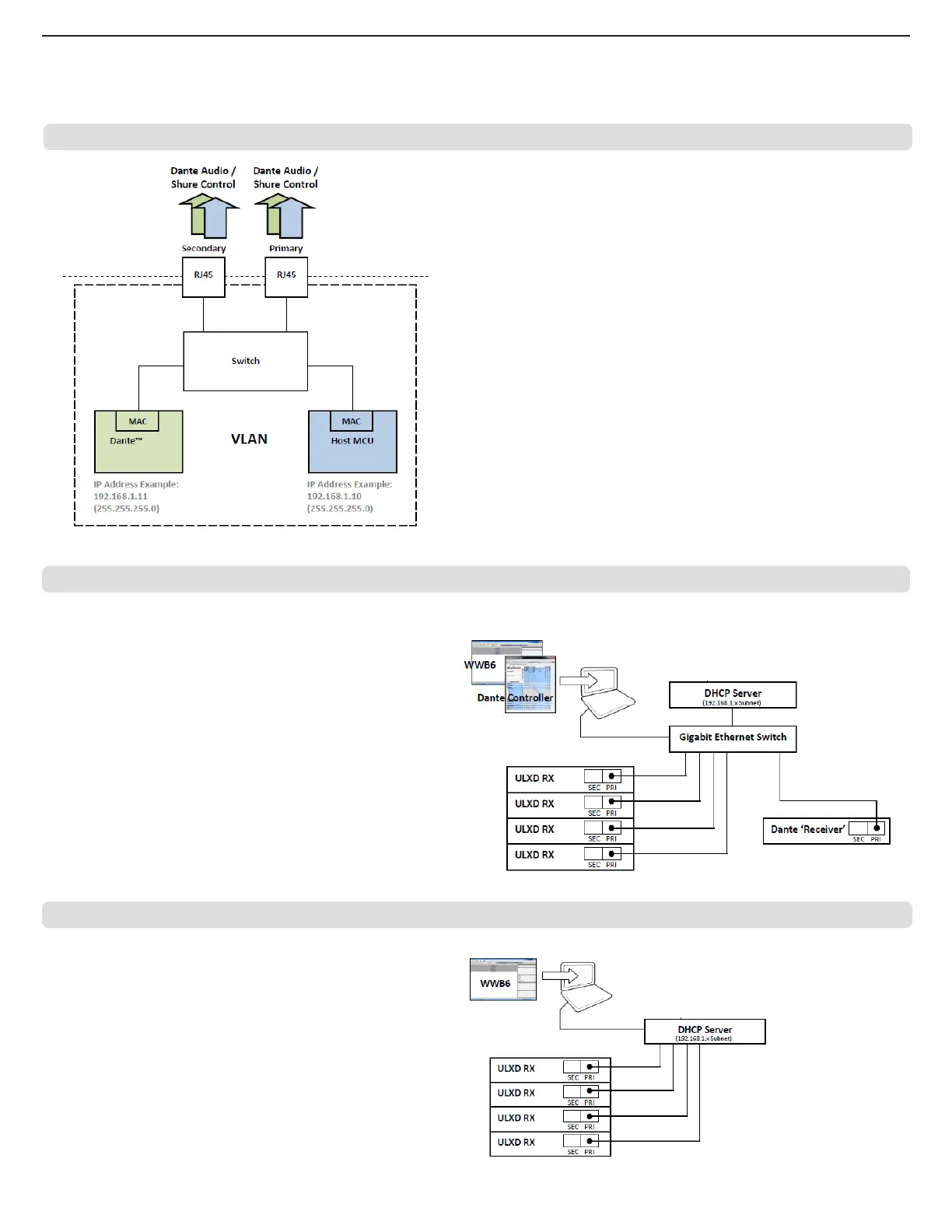
Switched Mode
Switched mode is typically used for single network installations of star or
daisy-chained networks. Switched mode is recommended for installations
that don't require Dante audio.
Network Characteristics:
• Dante Audio and Shure Control are present on both the Primary and
Secondary ports
• The Dante IP address and the Shure Control IP address must be on the
same subnet. The computer running WWB6 must also be on this subnet.
Network Example (Dante Audio + WWB6)
① Computer
Connect the computer running the Dante controller and WWB6 to the Primary
port.
② DHCP Server
Can be configured with or without a DHCP server. Do not route audio through
the server.
③ Gigabit Ethernet Switch
• Do not connect both network ports to the same Ethernet switch
• Use a star network topology to minimize audio latency
④ Receiver Connection
Connect receivers to the Primary port
⑤ Dante Receiver
Connect Dante receivers (mixers, recorders, amplifiers) to the Primary port.
Network Example (WWB6 Only)
① Computer
Connect the computer running WWB6 to the Primary port.
② DHCP Server
Can be configured with or without a DHCP server.
③ Receiver Connection
Connect receivers to the Primary port
(AXT620, Wi-Fi router, etc...)
(mixers, recorders,
amplifiers, etc...)
(AXT620, Wi-Fi router, etc...)
Note: Dante controller
does not support Wi-Fi
network connections.



 To Next Page