6
Transmitters
RF MUTE
on
ULXD2
⑧
⑩
⑪
②
④
⑤
⑥
⑦
ULXD1
①⑫ ② ③
④
⑤
⑥
⑦
⑧
⑨
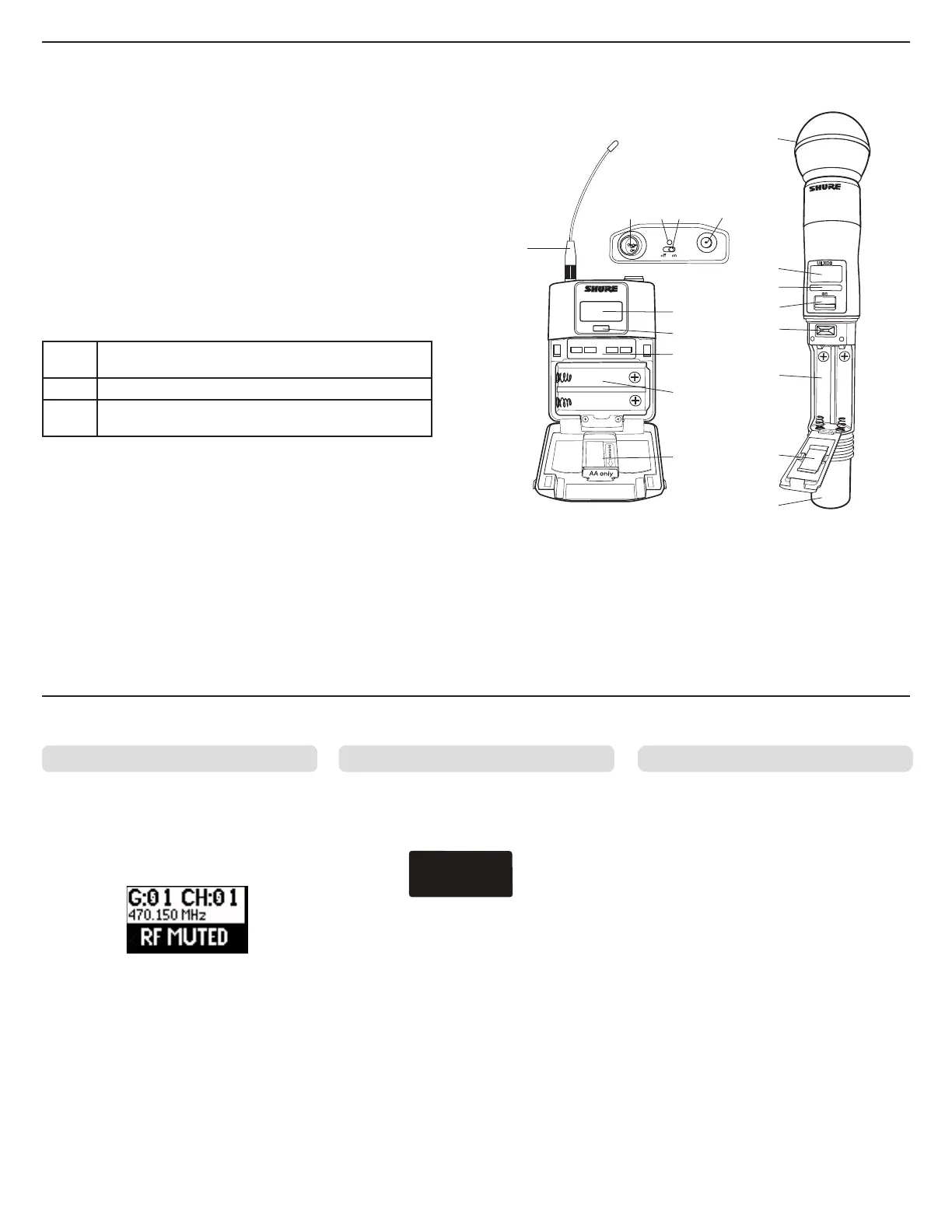
① Power LED
• Green = unit is powered on
• Red = low battery or battery error (see Troubleshooting)
• Amber = power switch is disabled
② On/Off Switch
Powers the unit on or off.
③ SMA Connector
Connection point for RF antenna.
④ LCD Display:
View menu screens and settings. Press any control button to activate the backlight.
⑤ Infrared (IR) Port
Align with the receiver IR port during an IR Sync for automated transmitter
programming.
⑥ Menu Navigation Buttons
Use to navigate through parameter menus and change values.
exit
Acts as a 'back' button to return to previous menus or pa-
rameters without confirming a value change
enter Enters menu screens and confirms parameter changes
▼▲
Use to scroll through menu screens and to change param-
eter values
⑦ Battery Compartment
Requires Shure SB900 rechargeable battery or 2 AA batteries.
⑧ AA Battery Adapter
• Handheld: rotate and store in the battery compartment to use a Shure SB900
battery
• Bodypack: remove to accommodate a Shure SB900 battery
⑨ Bodypack Antenna
For RF signal transmission.
⑩ Integrated Antenna
For RF signal transmission.
⑪ Microphone Cartridge
See Optional Accessories for a list of compatible cartridges.
⑫ TA4M Input Jack
Connects to a 4-Pin Mini Connector (TA4F) microphone or instrument cable.
Transmitter Input Clip MIC.OFFSET
Tx OVERLOAD
Advanced Transmitter Features
To correct, set MIC.OFFSET to 0 dB and if
necessary, attenuate the signal source.
If the source cannot be attenuated while using a
bodypack transmitter, select INPUT PAD from the
main menu to attenuate the input signal by 12 dB.
Use this to turn on a transmitter without interfering
with the RF spectrum.
Press and hold the exit button during power-on
until RF MUTED is displayed. To un-mute, restart
the transmitter.
The following warning displays on the receiver
LCD panel when the transmitter input is clipped:
MIC.OFFSET compensates for signal level
differences between transmitters that share the
same receiver channel.
Set the offset gain on a low signal level
transmitter to match a louder transmitter: UTILITY
> MIC.OFFSET
Note: For normal gain adjustments, use the
receiver gain buttons.



 To Next Page