Shure Incorporated
5/13
Connections
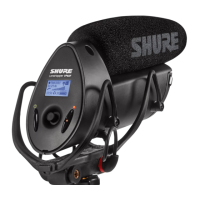
UsethesuppliedY-splittercabletoconnecttheVP88totwoinputsofamixerorconsole.Theredconnector,marked“M”and
“L”,carriestheMidsignal(inMSmode)orleftsignal(instereomode).Thegreenconnector,marked“S”and“R”,carriesthe
Side signal (in MS mode) or right signal (in stereo mode). For stereo mode operation, connect the left (L) splitter connector to
the Channel 1 input and the right (R) splitter connector to the Channel 2 input of the mixer or console. Set the Channel 1 pan
pot to full left and the Channel 2 pan pot to full right.
Use the Shure C110 Extension Cable (available as an accessory) for extended cable runs between the VP88 and a mixer or console.
Using an Additional Microphone
A second (mono) microphone can be used for interviewing or close miking. Turn its channel pan pot to the center position and
set its level independently.
Monitoring
To check the balance for the mono listener, monitor sound in mono mode as well as stereo. Since the side signal is cancelled
in mono, the mono output will be equal to the cardioid Mid cartridge signal only, regardless of the side level control setting.
Minimizing Wind and Breath Noise
The integrated pop filter provides reduction of breath and wind sound. Use the removable foam windscreen for high intensity
wind and speaking conditions.
Low-Frequency Rolloff
A low-frequency rolloff (12 dB per octave cut below 80 Hz) rolloff reduces pickup of low-frequency noise and vibration. Set the
upper control switch on the VP88 to either of the two low-frequency rolloff positions, depending on whether phantom or battery
power is being used.
Rolloff Selection Switch


 To Next Page