
 Need help?
Do you have a question about the Sices DST4601 and is the answer not in the manual?
Clarifies terms like BLOCK, DISABLE, and WARNING used throughout the manual.
Explains document conventions such as vertical bars and gray backgrounds for revisions.
Details the functions of the key-lock switch for controlling operation modes.
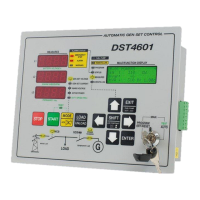
Describes the specific functions of each pushbutton on the DST4601 front panel.
Explains the MEASURES display and the MULTIFUNCTION display capabilities.
Details the PROGRAM, STATUS, MEASURES, and EVENTS LOG modes of the display.
Lists and explains the various signals indicated on the front panel indicators.
Details the optocoupled digital inputs on connectors JA, JB, and JC.
Lists the terminals for measuring generator and mains voltages and currents.
Describes the relay and open collector outputs for various control functions.
Specifies terminals for engine-related inputs like oil pressure and temperature.
Covers power supply, RS232 interface, and optional board connectors.
Explains the password system for accessing programming functions.
Guides on how to input or modify text-based parameters using the interface.
Describes the feature to quickly access the most recently used programming page.
Details configuration of protections and alarms, including delay time settings.
Information on identifying, storing, and clearing events and data records.
Procedure for clearing various counters on the device.
Covers language selection and fuel level sensor calibration procedures.
Details the automatic and manual control modes for the fuel pump.
Provides safety and mounting instructions for the DST4601 controller.
Technical drawings showing unit dimensions and panel mounting cutout.
 General
| Brand | Sices |
|---|---|
| Model | DST4601 |
| Category | Industrial Equipment |
| Language | English |

 To Next Page



