EasyManua.ls Logo

Sices DST4602 - User Manual

Sices DST4602
4 pages
Print Icon
To Next Page IconTo Next Page
Loading...
The following indications have been used to identify the safety messages in this manual:
WARNING! This indication is used in the safety messages for risks which, unless avoided, can
cause malfunction or damage to property or persons.
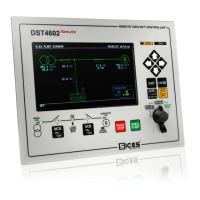
This area, which is composed by a display and buttons, allows the visualization of the configuration parameters, the
plant status, the electrical measures, the engine analogue and digital measures, the digital IN/OUT signals acquired
and the historic visualization of the events and the measures.
The navigation is organized in menus and pages. The UP and DOWN buttons allow the vertical moving through menus
and configuration parameters. The LEFT and RIGHT buttons allow to move through pages of the same menu. The
ENTER allows to access the PROGRAM submenus, to enable the value adjustment. ACK allows to silence the horn
and to acknowledge a Warning/Alarm.
The EXIT button allows to return to the previous menu, to cancel an adjustment in progress. The SHIFT button allows
to increase up to x10 the movement of values or to vary the display light. Depending on the environmental lighting
conditions, a contrast adjustment may be required in order to view the display correctly. Press the buttons sequence
SHIFT + LEFT to decrease the contrast and SHIFT + RIGHT to increase it.
This area, composed by buttons and LEDs or key switch, allows the choice of the operating mode of the plant:
PROGRAM-OFF/RESET, MANUAL, AUTOMATIC-TEST.
In order to modify the operating mode, it is necessary to press the
UP or DOWN button for some seconds. The LED on, in relation to
the symbols, indicates the current operating mode on the device.
With the key switch version, it is necessary to turn the key to the
correct position.
PROGRAM OFF/RESET (Engine Stopped): In this mode, the
control and switching commands are disabled. In this status, no
faults (warning/alarm) are revealed. By means of buttons UP and
DOWN, view page PROGRAMMING. Press ENTER to access the configuration menu and adjust the available
parameters (some parameters may require a password).
MAN. (Engine Started/Stopped): In this mode, the control commands are enabled. It is
possible to start the engine by pressing the START button and stop the engine with the
STOP button. With genset running and electrical measurements in tolerance, it is possible
to use the GCB button to open/close the GCB circuit breaker/changeover switch with
possible synchronisation, according to the configuration and
status of the plant.
In parallel with Mains powering the LOAD; if the button is
pressed, it activates the fast unload ramp before the circuit
breaker opens.
In case no ramp is needed, simply keep the GCB button
pressed for a few seconds and until the circuit breaker opens.
The MCB button is used to open and/or close the Mains contactor/circuit breaker to the Load. With engine not
running, you can open the Mains MCB circuit breaker by pressing and holding the MCB button for at least 5 (five)
seconds.
Evolution
Question and Answer IconNeed help?

Do you have a question about the Sices DST4602 and is the answer not in the manual?

Summary

Information on Safety

General Safety Warning

Indicates risks that can cause malfunction or damage to property or persons if avoided.

Navigation Overview

Multifunction Display and Navigation

Area composed of display and buttons for visualization and navigation of parameters, status, and measures.

Operation Modes

PROGRAM - OFF;RESET Mode

Engine stopped mode. Control and switching commands disabled; access programming menu.

MANUAL (MAN.) Mode

Engine started/stopped mode. Control commands enabled; manage engine and load circuit breakers.

AUTO (Automatic Operation) Mode

Device automatically starts genset, manages GCB, and checks electrical measurements.

Parameter Configuration

Parameter Configuration Safety Warning

Assigning incorrect values can cause damage; changes by skilled personnel only.

Parameter Access and Passwords

Access to programming is protected by password levels (SICES, Maker, System, User).

Parameter Settings Adjustment

Guide to navigate menus, select parameters, adjust values, and confirm/cancel changes.

Language Selection

Instructions for changing the display language via the BOARD STATUS screen.

Technical Specifications

Characteristics and Dimensions

Overview of device supply voltage, current consumption, frequency, operating temperature, and dimensions.

Connection Diagram

Overview

The SICES DST4602-DST4602Evolution SPtM+SSB is an installation guide for a device designed for single parallel to mains and single stand-by operations. This device is an advanced control system for power plants, offering comprehensive management of generators, mains, and load.

Function Description

The device's core function is to manage the operating modes of a power plant, including PROGRAM-OFF/RESET, MANUAL, AUTOMATIC-TEST, and AUTO. It provides a user-friendly interface for visualizing configuration parameters, plant status, electrical measurements, engine analogue and digital measurements, digital IN/OUT signals, and historical events and measures.

Navigation and Display: The device features a multifunction display and navigation buttons (UP, DOWN, LEFT, RIGHT, ENTER, ACK, EXIT, SHIFT).

  • UP and DOWN buttons: Used for vertical navigation through menus and configuration parameters.
  • LEFT and RIGHT buttons: Used to move through pages within the same menu.
  • ENTER button: Provides access to submenus, enables value adjustment, and confirms changes.
  • ACK button: Silences the horn and acknowledges warnings/alarms.
  • EXIT button: Returns to the previous menu or cancels an adjustment.
  • SHIFT button: Increases value movement by up to x10 or adjusts display light.
  • SHIFT + LEFT/RIGHT: Decreases/increases display contrast.

Operating Modes: The device offers several operating modes, selectable via buttons or a key switch.

  • PROGRAM – OFF/RESET (Engine Stopped): In this mode, all control and switching commands are disabled, and no faults are revealed. Users can view programming pages and access the configuration menu to adjust parameters (some may require a password).
  • MAN. (Engine Started/Stopped): This mode enables control commands. The engine can be started and stopped using the START and STOP buttons. When the genset is running and electrical measurements are within tolerance, the GCB (Generator Circuit Breaker) button can be used to open/close the GCB circuit breaker/changeover switch, with possible synchronization based on plant configuration and status.
    • When the mains is powering the load, pressing the GCB button activates a fast unload ramp before the circuit breaker opens. If no ramp is needed, holding the GCB button for a few seconds will open the circuit breaker.
    • The MCB (Mains Circuit Breaker) button controls the opening and/or closing of the Mains contactor/circuit breaker to the Load. With the engine off, holding the MCB button for at least 5 seconds will open the Mains MCB circuit breaker.
  • AUTO (Engine Started/Stopped automatically): In this mode, the device automatically starts the genset (START), manages GCB closing, and checks electrical measurements based on operating conditions.
    • The STOP button, if configured, will stop the generator and activate a lockout.
    • If genset operation is no longer required, the device performs power discharge, opens the GCB, and cools the engine for a set time before stopping the engine.

Usage Features

Parameter Configuration: The device allows extensive parameter configuration, accessible through the PROGRAMMING menu.

  • Password Protection: Access to programming mode can be protected by 3 or 4 password levels (SICES, Maker, System, User), depending on the device. Higher-level passwords can reconfigure lost lower-level passwords.
  • Parameter Adjustment: To adjust parameters, navigate to the PROGRAMMING page, select submenus with UP/DOWN, and press ENTER. Use UP/DOWN to change values and ENTER to confirm, or EXIT to cancel. Parameters indicated by square brackets [..] can be adjusted, while those with < > cannot (due to password authorizations or operating mode restrictions).
  • Language Selection: The language can be changed via the S.03 (BOARD STATUS) screen. Press ENTER, use UP/DOWN to select the language, and ENTER to confirm.

Protections and Alarms: The device incorporates adjustable protections and alarms.

  • Adjustable Variables: Protections and alarms are typically adjustable via specific variables, including intervention time.
  • Deactivation: Setting the acquisition time to 0 (zero) deactivates the protection.

Maintenance Features

While the manual primarily focuses on installation and operation, certain aspects contribute to maintenance:

Event and Measure History: The device records historical events and measures, which are crucial for diagnostics and troubleshooting. This data helps identify patterns, pinpoint issues, and inform maintenance decisions.

Password Hierarchy: The multi-level password system ensures that critical parameters are protected from unauthorized changes, which is vital for maintaining system integrity and preventing accidental misconfigurations that could lead to malfunctions or damage. The ability to reconfigure lost passwords using a higher-level password simplifies recovery in case of administrative oversight.

Configuration Backup: Although not explicitly stated as a "backup" feature, the detailed parameter configuration section implies that settings can be systematically recorded and potentially restored. This is essential for consistent operation across multiple devices or after system resets.

Error Handling and Alarms: The device's ability to reveal faults (warnings/alarms) and allow acknowledgment via the ACK button is a key maintenance feature. It alerts operators to potential issues, enabling timely intervention and preventing minor problems from escalating into major failures.

Software and Hardware Configuration: The manual notes that plant sequences depend on the software and hardware configuration during installation. This highlights the importance of proper initial setup and implies that future maintenance or upgrades might involve re-evaluating these configurations. The availability of technical documentation in the "Download Area" on the SICES website further supports maintenance by providing resources for understanding and troubleshooting the device.

Sices DST4602 Specifications

General IconGeneral
BrandSices
ModelDST4602
CategoryRemote Control
DisplayLCD
Power SourceDC

Related product manuals