13
2955
8 2020
-
RCT 20E, 21E, 22E, 23E & REMOTE RECEIVER
MG_0195
Technical Wiring Diagram
EN
+12/24V
-
5A
S-link on/off
switch
red
yellow
black
12/24V12/24V
Stern thruster
battery
Bow thruster
battery
Bow thruster
(SEP model)
Stern thruster
(SEP model)
-
black
+
red
B+
-
black
+
red
B+
Fixed multicable 5m
Fixed multicable 5m
5A
+12/24
5A
+12/24
PPC
PPC
Proportional
Power Controller
Proportional
Power Controller
PJC 212
Proportional
Joystick
Controlpanel
Station 1
Automatic Main Switch
8977 12 / 8977 24
or
Manual main switch
w/ANL fuse
Automatic Main Switch
8977 12 / 8977 24
or
Manual main switch
w/ANL fuse
S-link control system
End terminator
End terminator
Proportional
Joystick
Controlpanel
Station 2
PJC 212
Observe PPC battery
terminal polarity !
S-link supply
S-link remote receiver
RCRS-1E
MG_0200
Pair Button
Pair Button
Pair Button
Pair Button
Programming Additional Transmitters/ Remote Controls
EN
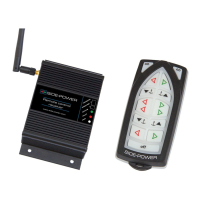
The original transmitter and receiver have the same factory preset code so that no programming is necessary. When additional transmitters
remote controls are to be used, the additional transmitters/remote controls have to be paired with the receiver.
1. Be sure there is power on the receiver (S-link status LED is blinking green or continuous green ) and the transmitter that should be paired is off .
2. Push the Pair Button on the receiver to put the receiver in pairing mode (as shown above). The LINK/ACT LED should start to blink.
3. Within 10s after the receiver pair button is pushed, set the transmitter in pairing mode by holding the off button and pressing both “ON” buttons
at the same time, all the transmitter LED’s turn on indicating that it is set in pairing mode. When a pairing signal is received from the receiver the
transmitter LED’s while turn off and the system is ready to be used. If no pairing signal received within 10s the transmitter will leave the pairing
mode.
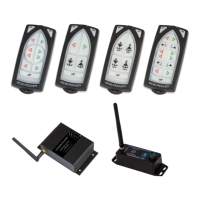
4. Additional transmitters must be programmed according to step 2-3. You can pair up to 4 transmitters.
5. To clear all transmitters paired with the receiver hold the pair button on the receiver for approximately 10s until the LINK/ACT LED stops blinking.
When the LED stops blinking release the pair button. The receiver is then ready to pair with up to four transmitters.
MC_0202
! Please refer to the graphic for special considerations relating to your model !



 To Next Page