3.3 Status LED
Action Status LED Description
Insert the battery
The status LED flashes green, red, green
The window handle is ready for
operation.
Teach in window handle
The status LED flashes green The window handle can be taught in.
The status LED lights up yellow for 1 s
The window handle is locked or
unlocked.
The status LED lights up red for 1 s
The window handle is locked.
Lock or release the window
handle
The status LED lights up green for 1 s
The window handle is unlocked.
Battery warning
The status LED flashes red 3 times every 5 s The battery status is critical.
Perform factory reset
The status LED flashes, alternating red and
green
The factory reset is complete.
3.4 Operation
3.4.1 Smart window handle
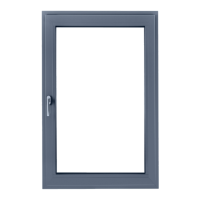
The smart window handle is a window handle for
integration in smart home networks. The window
handle communicates with a home controller via the
wireless protocol Thread.
Additional product functions are also available via the
SIEGENIA HomeConnect app:
•
extended status monitoring of open and closed
windows
• central locking function
•
installation wizard for step-by-step installation of
the window handle
3.4.2 SIEGENIA HomeConnect app
The SIEGENIA HomeConnect app is used to control
and monitor SIEGENIA smart home devices in a smart
home network.
•
The opening status of the window handle is
displayed in the SIEGENIA HomeConnect app.
•
The charge level of the battery is displayed in the
SIEGENIA HomeConnect app. If the charge level is
low, a warning message is displayed.
•
If the window is tilted or closed, the window handle
can be locked using the SIEGENIA HomeConnect
app.
•
The window handle can be operated from any
position via the SIEGENIA HomeConnect app.
However, the window handle will only lock once it
has been moved to the closed or tilted position. The
window handle can be operated from any position
via the SIEGENIA HomeConnect app. However,
the window handle will only lock once it has been
moved to the locking position or tilt position.
•
If the window handle is locked, the window can no
longer be opened.
3.4.3 Smart home network
WiFi router
A WiFi router relays WiFi radio signals to other devices
in a smart home network. WiFi routers must be ready
to transmit and receive signals at all times.
7/24H47.TIT002EN-00 01.2024
TITAN – Operating and care instructions
Smart window handle



 To Next Page