Siemens AG 2003, L:\Mobil\R65\A65_Puma_v2\am\Puma_Main.fm
21Setup
VAR Language: am; VAR issue date: 041104
left page (21) of A65_PUMA am, A31008-H5810-A40-1-4A19 (11.11.2004, 16:23)
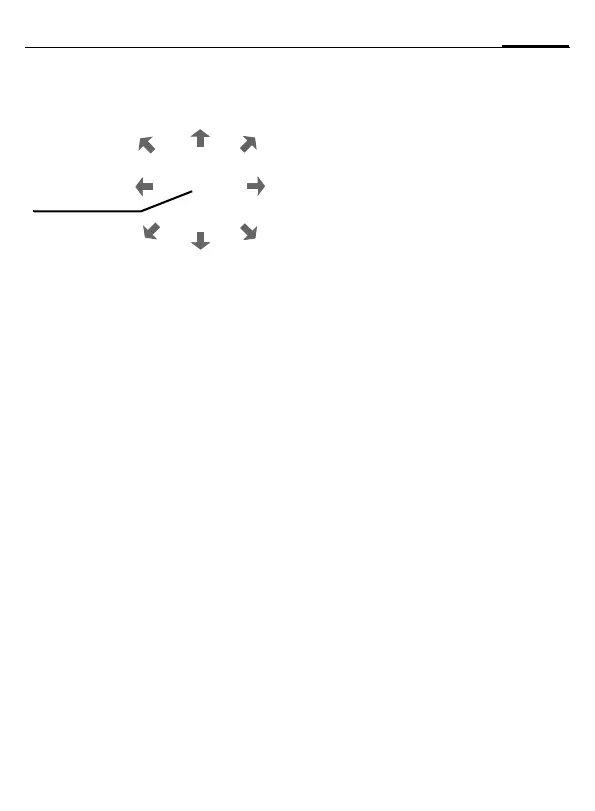
Key control
The following key control is used for
many games (virtual joystick):
or use the key
I.
Setup
Profiles
§Menu§ ¢ m ¢ Profiles
Several settings can be stored in a phone
profile in order, for example, to adapt the
phone to the surrounding level of noise.
• Five profiles are standard with default
settings, they can be changed howev-
er: Normal envi., Quiet environ.,
Noisy environ., Car Kit, Headset
• You can set two personal profiles
(<No Title>).
• The special profile Aircraft mode cannot
be changed.
Activate
Select default profile or personal profile
¢ §Activate§.
Setup
Select profile ¢ §Options§ ¢ Change sett.
The list of available functions is displayed.
Car Kit
The profile is only activated automatically
as soon as the phone is inserted into the
cradle if a Siemens original Car Kit is used.
Headset
The profile is only activated automatically
if used with an original Siemens headset.
Aircraft mode
The alarm tone is deactivated. An alarm is
only shown on the display. It is not possible
to modify this profile. The phone will auto-
matically switch off if you select this
profile.
Normal mode
The next time you switch on the phone
and return to normal operation the de-
fault profile will be activated.
Display
§Menu§ ¢ m ¢ Display
¢ Select a function
Language
Set the language of the display text. "Au-
tomatic" will set the language of your
home service provider. Reset to this lan-
guage in standby status:
*
# 0 0 0 0 #
Background
Logo
Color scheme
Own greeting
Big letters
Illumination
Contrast
Screensaver
The screensaver shows a picture on the
display as soon as a period that can be set
by you has elapsed. The function is ended
by an incoming call or by pressing
any key.
8
13
7
9
5
2
6
4
function
depends on
the game


 To Next Page