Siemens AG 2003, L:\Mobil\R65\A65_Puma_v2\am\Puma_Overview.fm
5Phone overview
VAR Language: am; VAR issue date: 041104
left page (5) of A65_PUMA am, A31008-H5810-A40-1-4A19 (11.11.2004, 16:23)
Phone overview
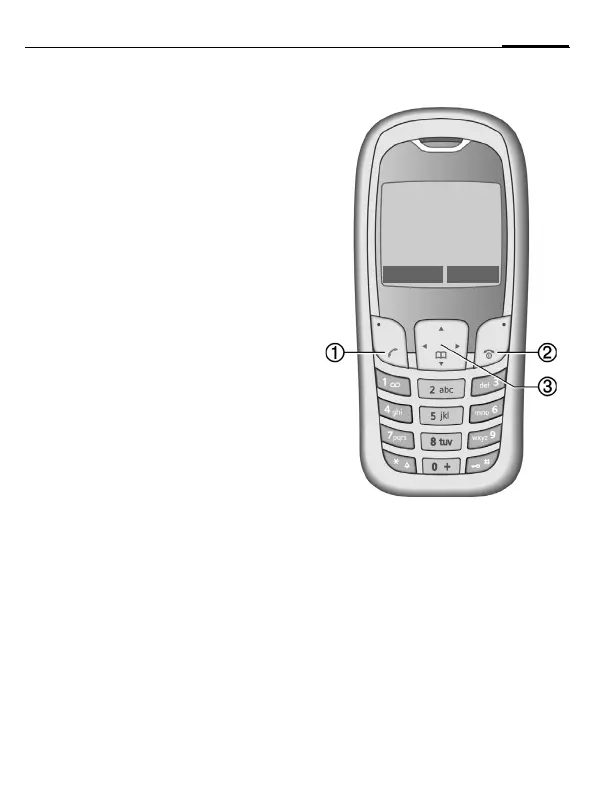
1
A
Call key (press lower part of button)
Dial phone number /name displayed, take
calls. Show last phone numbers dialed in
standby mode.
2
B
On/Off/End key
(press lower part of button)
• Switched off: press and hold to
switch on.
• During a call or in use: press briefly
to finish.
• In menus: press briefly: one level back.
Press and hold: return to standby mode.
• In standby mode: Press and hold to
switch off phone.
3 Control key
In lists and menus:
G Scroll up and down.
D
Select function.
C
Back a menu level.
During a call:
D
Open call menu.
In standby mode:
F
Open Phonebook.
D
Open menu.
C
GPRS info.
_ªg
Service provider
01.10.2004 10:10
NewMMS Menu



 To Next Page