EasyManua.ls Logo

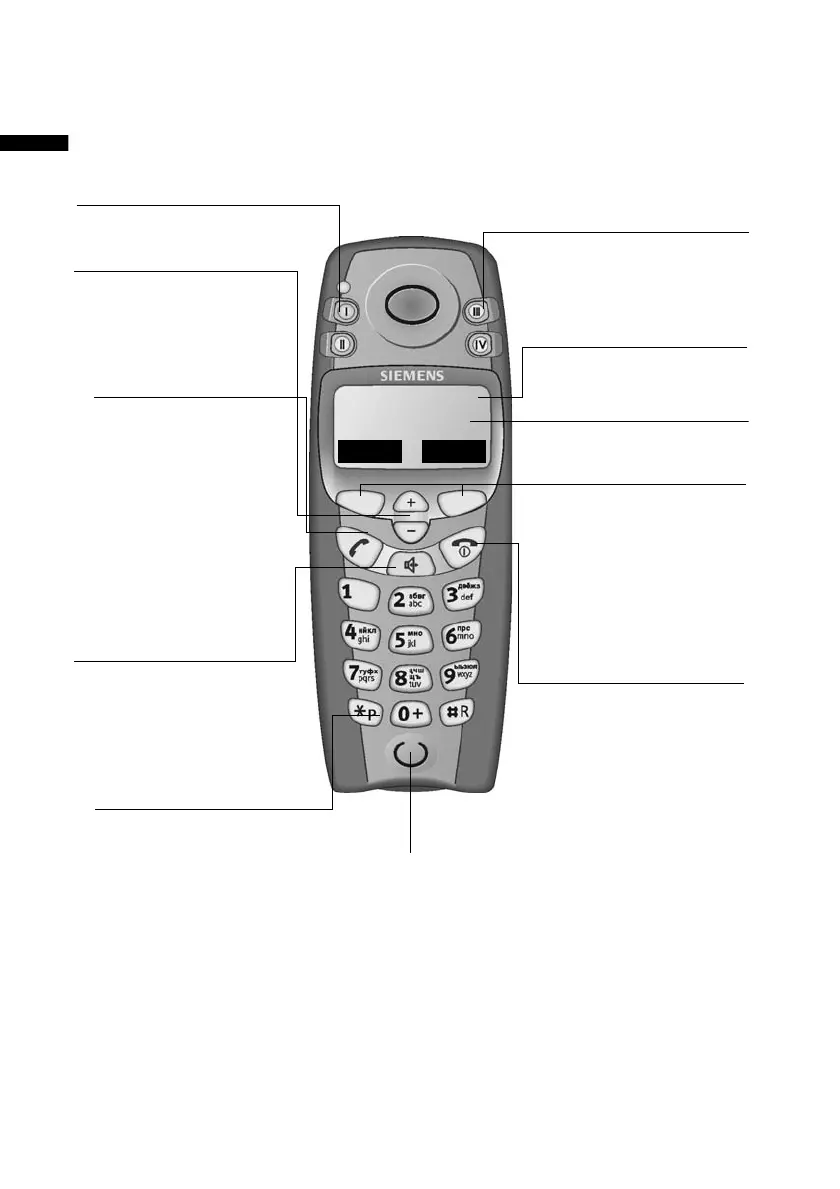
Siemens Gigaset E1 - Brief overview of Gigaset E1 handset; Handset control keys overview; Key functions for call handling and input; End call and On;Off key functionality

Siemens Gigaset E1
131 pages
Print Icon
To Next Page IconTo Next Page
To Previous Page IconTo Previous Page
Loading...
2
Brief overview
Gigaset E 1 / English / A31008-S002-B002-1-RY19 / covers_I-II.fm / 17.10.2003
Brief overview
=
REDIAL MENU
End call and
On/Off key
End call
Cancel function
(press briefly)
Handset on/off
(hold down)
Handsfree key
Switch from
"earpiece" to
handsfree mode
Battery display
Function keys
Access to the
functions displayed
on the screen
Microphone
Direct dial keys
(II to IV)
Talk key
Accepting a
call
Initiate dialling
Switch from
handsfree to
"earpiece" mode
Control keys
Navigation
Volume
Star key
Ringer on/off
(long press)
When entering text:
toggles between
upper/lower case
and digits
SOS/direct dial key (I)
Screen
with icons
Illustration of a handset that is registered to a base with SMS
functionality.

Table of Contents

Related product manuals