1
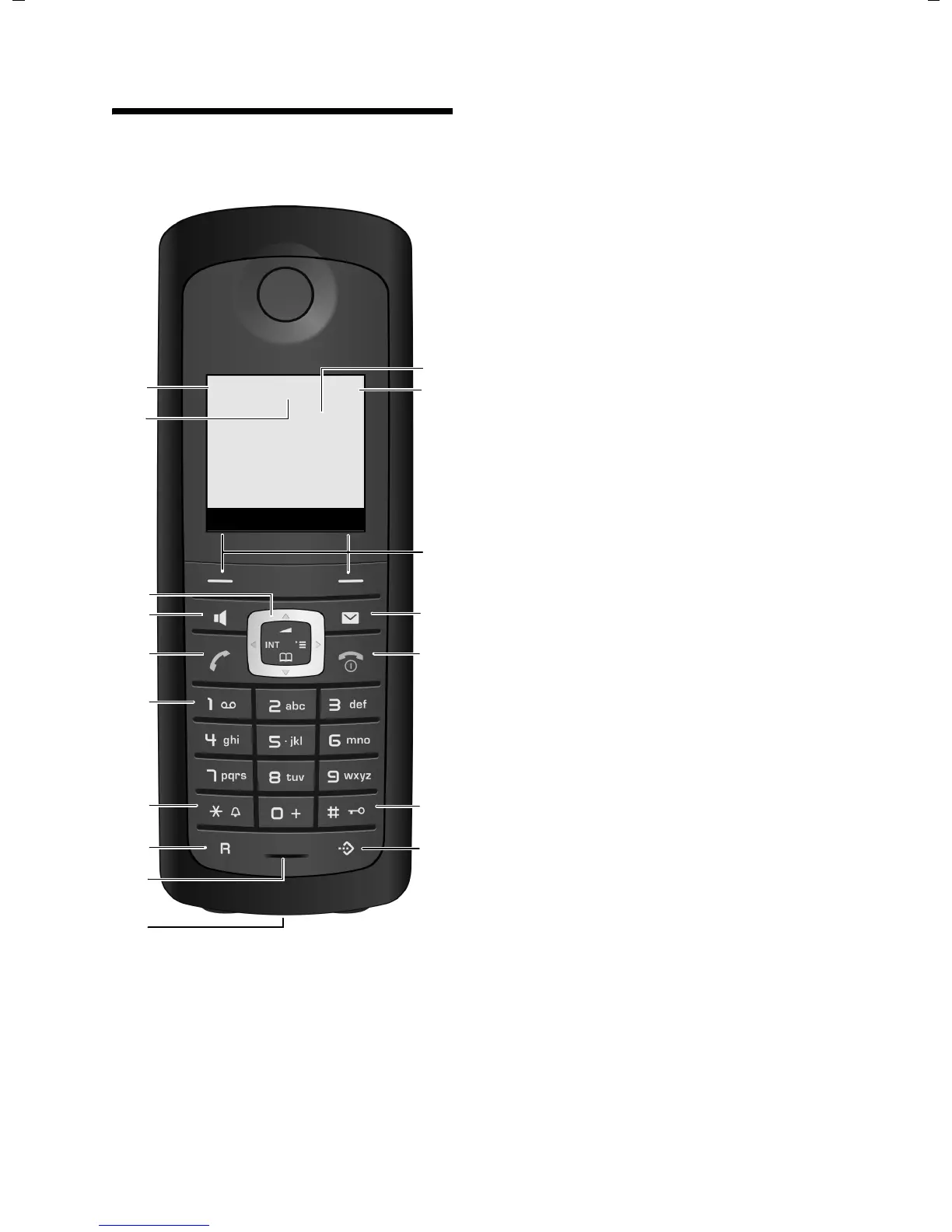
The handset at a glance
Gigaset E49H / IM1 eng / A31008-M2154-R101-1-4N19 / overview.fm / 14.09.2010
Version 4.1, 21.11.2007
The handset at a glance
1 Display in idle status
2 Charge status of the batteries
= e V U (flat to full)
= flashes: batteries almost flat
e V U flashes: batteries charging
3 Display keys (
¢page 15)
4 Message key
Access to calls and message lists;
Flashes: new message or new call
5 End call key, On/Off key
End call, cancel function, go back one menu
level (press briefly), back to idle status
(press and hold), activate/deactivate handset
(press and hold in idle status)
6 Hash key
Keypad lock on/off (press and hold in
idle status);
Toggle between upper/lower case and digits
7 Call-by-call list key
Open call-by-call list
8 Connection socket for headset (
¢page 12)
9 Microphone
10 Recall key
- Consultation call (flash)
- Insert a dialling pause (press and hold)
11 Star key
Ring tone on/off (press and hold),
With an open connection: switch between dial
pulsing/touch tone dialling (press briefly);
Text input: Open table of special characters
12 Key 1
Dial network mailbox (press and hold)
13 Talk key
Answer a call, open last number redial list
(press briefly), start dialling (press and hold)
14 Handsfree key
Switch between handset and handsfree mode;
Lights up: handsfree activated;
Flashes: incoming call
15 Control key (
¢page 14)
16 Eco Mode enabled (
¢page 25)
17 Eco Mode + enabled (
¢page 25)
2
3
5
4
6
7
15
14
9
10
8
1
13
¼½V
INT 1
01.10.09 09:45
INT SMS
12
11
17
16
www.InternetVoipPhone.co.uk | sales@internetvoipphone.co.uk | 0800 088 4846




 To Next Page