
 Need help?
Do you have a question about the Siemens iQ500 GI V Series and is the answer not in the manual?
Read manual, keep safe, do not connect if damaged.
For kitchens, freezing food, ice cubes, private households, up to 2000m.
For children 8+, people with reduced abilities, supervised use.
Warning about injury from lifting, do not lift alone.
Warnings about electric shock, explosion, fire risk from incorrect installation.
Warnings about electric shock, suffocation, explosion, fire.
Warnings about electric shock and fire if appliance or cord is damaged.
Do not stand on base/runners/doors, keep plastic parts free of oil/grease.
Packaging is recyclable, sort and dispose separately.
Tips for saving energy: installation location, usage tips.
Warnings about space/refrigerant, weight, subfloor stability, room temperature, niche dimensions.
Install according to enclosed installation instructions.
Steps to prepare the appliance before use (remove material, clean).
How to plug in the appliance and check connection.
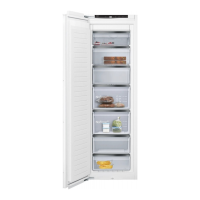
Overview of appliance parts with numbered diagram.
Explanation of control panel functions and symbols.
Information on using original accessories.
Steps to turn the appliance on and initial cooling process.
Tips for optimal operation, door vacuum, panel heating.
How to turn off the appliance.
How to adjust the freezer compartment temperature.
Explanation of automatic super freezing and its effects.
How to activate manual super freezing for rapid freezing.
How the door alarm works and how to switch it off.
Causes of temperature alarm and how to switch it off.
Explains freezing capacity and prerequisites.
Tips for maximizing storage space.
Advice on packaging and storage.
Guidance on freezing different types of food.
Table showing storage times for different foods.
Methods for safely thawing frozen food.
Step-by-step guide to manual defrosting.
Steps to take before cleaning the appliance.
How to clean the appliance, warnings about cleaning agents.
Instructions for removing shelves and containers for cleaning.
Addresses issues with appliance not cooling, displays lit.
Addresses alarm sounds and flashing displays.
Troubleshooting temperature differences from setting.
Explains normal operational noises and no action required.
Addresses noises from fittings or containers.
Advice during power outages and checking food quality after.
How to perform a self-test to diagnose faults.
Steps for decommissioning the appliance.
Environmental disposal instructions and safety warnings.
How to find product and production numbers for service.
This document provides comprehensive information for the safe and efficient operation, maintenance, and disposal of your Siemens freezer. It covers general safety guidelines, proper installation procedures, energy-saving tips, and detailed instructions for using the appliance's various functions.
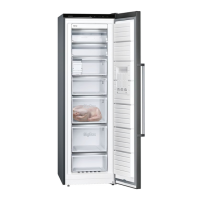
The Siemens freezer is designed for the long-term storage of perishable food items and for making ice cubes. It is intended for use in private households within enclosed domestic environments, at altitudes up to 2000 meters above sea level. The appliance operates by maintaining low temperatures, which slow down or stop the spoilage process of food. The freezer compartment allows for temperature settings ranging from -16 °C to -24 °C, with a recommended long-term storage temperature of -18 °C or lower for optimal food preservation.
A key function of this freezer is its "Super freezing" feature, which can be activated either automatically or manually. Automatic Super freezing is triggered when fresh food is placed in the top frozen food container, particularly starting from the right-hand side. This function rapidly cools the freezer compartment to a much lower temperature, accelerating the freezing process and helping to preserve the quality of fresh food. During automatic Super freezing, the "super" indicator light illuminates, and the appliance may produce increased noise. After the freezing process is complete, the appliance automatically reverts to normal operation. Manual Super freezing can be activated four to six hours before placing 2 kg or more of food into the freezer compartment, ensuring the coldest possible temperature for efficient freezing.
The appliance also incorporates alarm functions to alert users to potential issues. A door alarm activates if the freezer door remains open for an extended period, while a temperature alarm sounds and the temperature display flashes if the freezer compartment becomes too warm. These alarms are crucial for preventing food spoilage and ensuring the appliance operates within safe temperature ranges.
To ensure safe and efficient use, several features and operational guidelines are provided. The control panel, located at the top of the appliance, allows users to switch the appliance on and off, set the desired temperature, and monitor the operational status. The temperature display shows the current temperature in the freezer compartment, and the "super" light indicates when Super freezing is active.
When switching on the appliance for the first time, it is important to allow several hours for the set temperature to be reached before storing any food. During initial operation, a warning signal may sound, and the temperature display may flash if the compartment is too warm; this can be switched off using the temperature setting button.
For optimal energy saving, users are advised to open the appliance only briefly, close it carefully, and avoid covering or blocking the internal or external ventilation openings. Transporting purchased food in a cool bag and quickly placing it in the appliance, as well as allowing warm food and drinks to cool down before storage, also contribute to energy efficiency. Regular defrosting of the freezer compartment is recommended to prevent the build-up of hoarfrost, which can impair refrigeration and increase power consumption.
The freezer compartment is designed for flexible storage. All fittings, such as frozen food containers and shelves, can be removed to maximize storage volume, allowing food to be placed directly on the shelves and the floor of the compartment. For quick and gentle freezing of larger quantities of fresh food, the top frozen food container is the recommended location. To ensure proper air circulation, frozen food containers should be pushed in as far as they will go.
Tips for freezing fresh food include using fresh and undamaged food, freezing in portions, and proper packaging to prevent freezer burn and loss of flavor. Suitable foods for freezing include baked items, fish, meat, and vegetables, while carbonated drinks, eggs in shells, and certain fruits and vegetables are unsuitable.
Regular cleaning and servicing are essential for maintaining the appliance's efficiency and longevity. Before cleaning, the appliance must be switched off and disconnected from the power supply. All food should be removed and stored in a cool place, ideally with ice packs. If a layer of hoarfrost is present, it should be allowed to defrost. All fittings and accessories should be removed for thorough cleaning.
The appliance, its fittings, accessories, and door seals should be cleaned with a dishcloth, lukewarm water, and a pH-neutral washing-up liquid. It is crucial to dry all surfaces thoroughly with a soft, dry cloth after cleaning. Users are warned against using hard scouring pads, abrasive detergents, or cleaning products with a high alcohol content, as these can damage the appliance's surfaces. Steam- or high-pressure cleaners should also be avoided due to the risk of electric shock. Fittings and accessories should never be cleaned in a dishwasher, as this may cause them to deform or discolor.
Defrosting the freezer compartment is a key maintenance task. It is recommended to switch on Super freezing approximately four hours before defrosting to ensure food reaches very low temperatures for temporary storage. After removing frozen food and placing it in a cool location, the appliance should be switched off and disconnected from the power supply. To accelerate defrosting, a pan of hot water can be placed on a trivet in the freezer compartment. Condensation water should be wiped up with a soft cloth or sponge, and the compartment should be thoroughly dried before reconnecting the appliance and switching it back on.
The appliance also features a self-test function to help identify and troubleshoot minor faults. This test can be initiated by switching the appliance off and then back on, then pressing and holding the temperature setting button for a few seconds. The self-test displays faults that can often be resolved without customer service intervention. If the self-test indicates an issue that cannot be resolved, customer service should be contacted.
For disposal, the appliance contains valuable raw materials that can be recycled. Users are advised to unplug the appliance, cut the power cord, and dispose of it in an environmentally friendly manner, following local authority guidelines. Safety precautions for disposal include leaving shelves and containers inside to prevent children from climbing in and ensuring the refrigerant circuit tubes are not damaged.
 General
| Category | Freezer |
|---|---|
| Climate Class | SN-T |
| Control Type | Electronic |
| SuperFreezing Function | Yes |
| Light | LED |
| Door Open Alarm | Yes |
| Type | Upright |
| Door Hinge | Reversible |


 To Next Page