Technische Support-Zentrale
Central Technical Support
技术支持中心
SIMATIC HMI
KP400 Basic color PN
KTP400 Basic color PN
Bediengerät einbauen
Mounting the HMI device
安装 HMI 设备
Bediengerät anschließen
Connecting the HMI device
连接 HMI 设备
Projekt transferieren
Transferring a project
传送项目
Reparatur und Ersatzteile
Service and spare parts
维修和备件
www.automation.
siemens.com/service
3.1
Projektierungs-PC anschließen – Connecting a configuring PC –
连接组态 PC
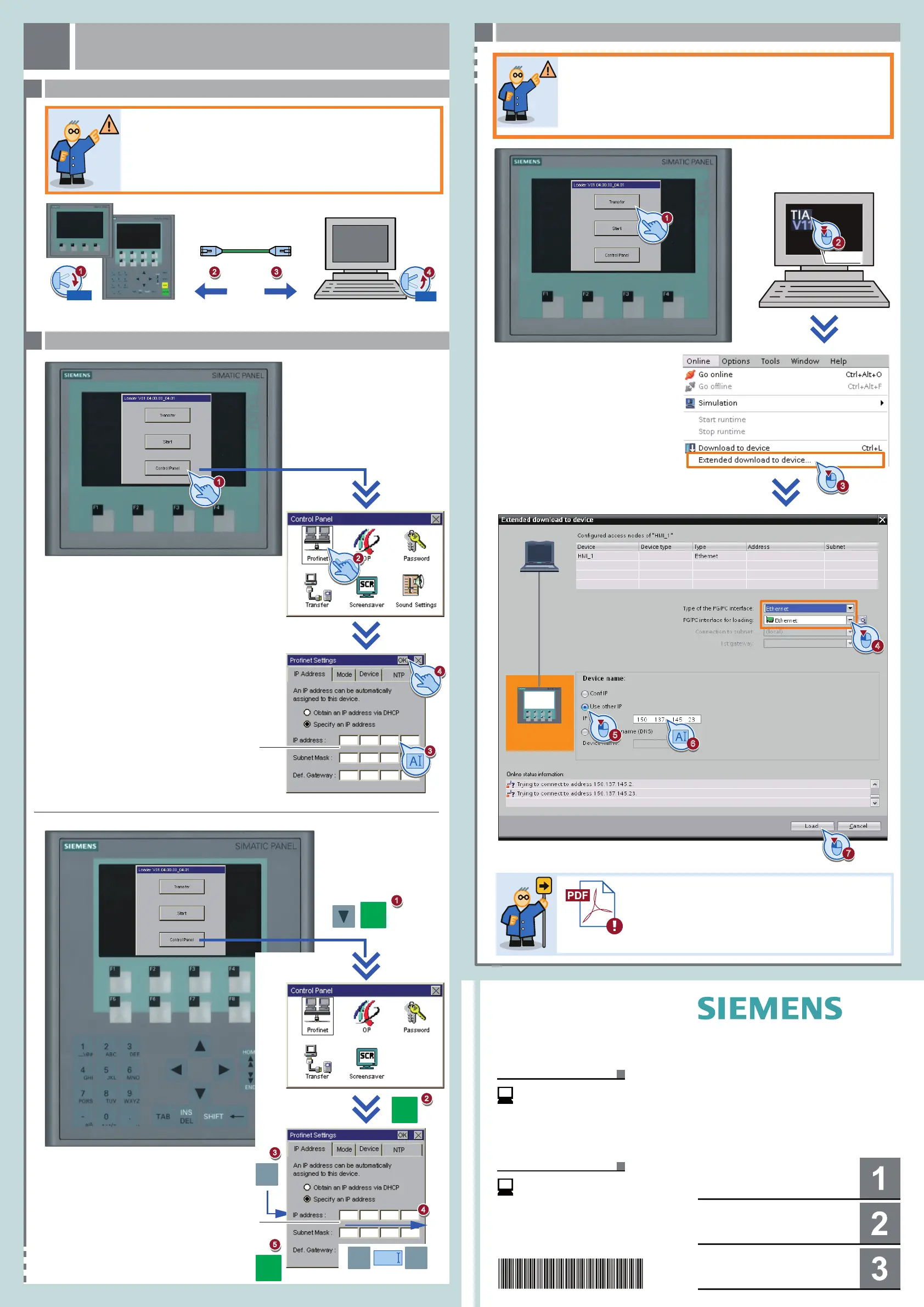
Projekt transferieren
Transferring a project
传送项目
3
3.2
Datenkanal parametrieren – Configuring the data channel –
组态数据通道
3.3
Transfer starten – Starting transfer –
启动传送
Beim Transfer eines Projekts wird das aktuelle Projekt auf dem Bediengerät
überschrieben. Falls erforderlich, sichern Sie vor dem Transfer die Daten.
传送项目时,HMI 设备中的当前项目将被覆盖。 根
据需要,在传送前保存现有数据。
Transferring a project will overwrite the current project on your HMI device.
If required, save existing data before the transfer.
PC
WinCC
2
3
http://support.automation.siemens.com/WW/view/en/31032678
Transfer
传输
2 3
LAN
0/OFF
1
4
1/ON
7
4
A
6
5
K(T)P400 Basic co ...
150.137.145.23
1
ENTER
2
3
Valid IP Address
ENTER
TAB
3 x
2
1
ENTER
5
03/2012
A5E03531454-01
1
WinCC V11 SP2 Update 2 HSP Basic 4“ color oder höher
erforderlich
WinCC V11 SP2 Update 2 HSP Basic 4“ color or higher required
Transfer
要求 WinCC V11 SP2 Update 2 HSP Basic 4“ color
或更高版本
Valid IP Address
150 137 145
255 255 255
23
0
4
TAB
123
. . .
150 137 145
255 255 255
23
0
4
A
3
www.automation.
siemens.com/support







 To Previous Page