EasyManua.ls Logo

Sierra Wireless AirLink RX55 - User Manual

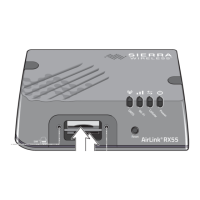
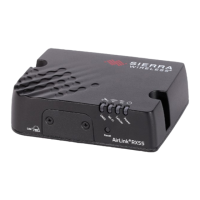
Sierra Wireless AirLink RX55
69 pages
Print Icon
To Next Page IconTo Next Page
Loading...
AirLink RX55
Hardware User Guide
41114494 Rev. 1 September 2022

Table of Contents

Question and Answer IconNeed help?

Do you have a question about the Sierra Wireless AirLink RX55 and is the answer not in the manual?

Summary

Important Notice

Safety and Hazards

Hazardous Area Precautions

Critical warnings for operating in potentially hazardous environments, including USB and button use.

Preface

1: Introduction to the AirLink RX55

Key Features Overview

Highlights the main capabilities and advantages of the AirLink RX55 router.

Product Description and Panel Layout

Details the back and front panel connectors and indicators of the RX55.

Router Configuration and Management

Power Modes and Consumption

Explains the router's power modes and provides power draw specifications.

Power Saving Features

Details various methods and settings for optimizing power consumption.

Dual SIM and Network Operator Switching

Accessory Options

Lists essential and optional accessories for the RX55 router.

Warranty Information

2: Installation and Startup

Installation Preparation and Overview

Lists tools, materials, and provides an overview of the installation process.

Physical Installation Steps

Covers SIM card insertion, mounting, antenna, cable, and power connections.

Wiring Diagrams and Configurations

Details wiring for vehicle/fixed installs and I/O configurations.

Operation Check and Initial Setup

Steps for checking operation, LED status, and initial software configuration.

3: Specifications at a Glance

Certification, Environment, and Reliability

Lists certifications, environmental testing compliance, and reliability specifications.

Host Interfaces and Connectivity

Details for antenna connectors, USB, Ethernet, Serial ports, and SIM interface.

Performance Specifications

Covers operating voltage, power, GNSS, RF bands, Wi-Fi, and protocols.

Mechanical and Torque Settings

Details on the router's physical dimensions and screw torque specifications.

4: Regulatory Information

North American and EU Compliance

FCC/IC RF exposure guidelines and EU Declaration of Conformity.

IECEx Compliance and Standards

Information on IECEx certification, applicable standards, and hazardous area ratings.

WEEE Notice

Information for European customers regarding WEEE product disposal.

A: Accessories

Power Cables and Adapters

Details for DC power cables and AC power adapters.

Serial Port and CAN Y-Cables

Specifications for dual serial port and serial CAN Y-cable accessories.

Summary

Important Notice

Safety and Hazards

Hazardous Area Precautions

Critical warnings for operating in potentially hazardous environments, including USB and button use.

Preface

1: Introduction to the AirLink RX55

Key Features Overview

Highlights the main capabilities and advantages of the AirLink RX55 router.

Product Description and Panel Layout

Details the back and front panel connectors and indicators of the RX55.

Router Configuration and Management

Power Modes and Consumption

Explains the router's power modes and provides power draw specifications.

Power Saving Features

Details various methods and settings for optimizing power consumption.

Dual SIM and Network Operator Switching

Accessory Options

Lists essential and optional accessories for the RX55 router.

Warranty Information

2: Installation and Startup

Installation Preparation and Overview

Lists tools, materials, and provides an overview of the installation process.

Physical Installation Steps

Covers SIM card insertion, mounting, antenna, cable, and power connections.

Wiring Diagrams and Configurations

Details wiring for vehicle/fixed installs and I/O configurations.

Operation Check and Initial Setup

Steps for checking operation, LED status, and initial software configuration.

3: Specifications at a Glance

Certification, Environment, and Reliability

Lists certifications, environmental testing compliance, and reliability specifications.

Host Interfaces and Connectivity

Details for antenna connectors, USB, Ethernet, Serial ports, and SIM interface.

Performance Specifications

Covers operating voltage, power, GNSS, RF bands, Wi-Fi, and protocols.

Mechanical and Torque Settings

Details on the router's physical dimensions and screw torque specifications.

4: Regulatory Information

North American and EU Compliance

FCC/IC RF exposure guidelines and EU Declaration of Conformity.

IECEx Compliance and Standards

Information on IECEx certification, applicable standards, and hazardous area ratings.

WEEE Notice

Information for European customers regarding WEEE product disposal.

A: Accessories

Power Cables and Adapters

Details for DC power cables and AC power adapters.

Serial Port and CAN Y-Cables

Specifications for dual serial port and serial CAN Y-cable accessories.

Sierra Wireless AirLink RX55 Specifications

General IconGeneral
ModelAirLink RX55
CategoryNetwork Router
Max Download Speed150 Mbps
Max Upload Speed50 Mbps
Serial1 x RS-232
GPSYes
CellularLTE
Wi-Fi802.11 b/g/n
Ethernet Ports1 x 10/100/1000 Mbps
Operating Temperature-30°C to 70°C (-22°F to 158°F)
Input Voltage9-36 VDC
Power SupplyDC input

Related product manuals