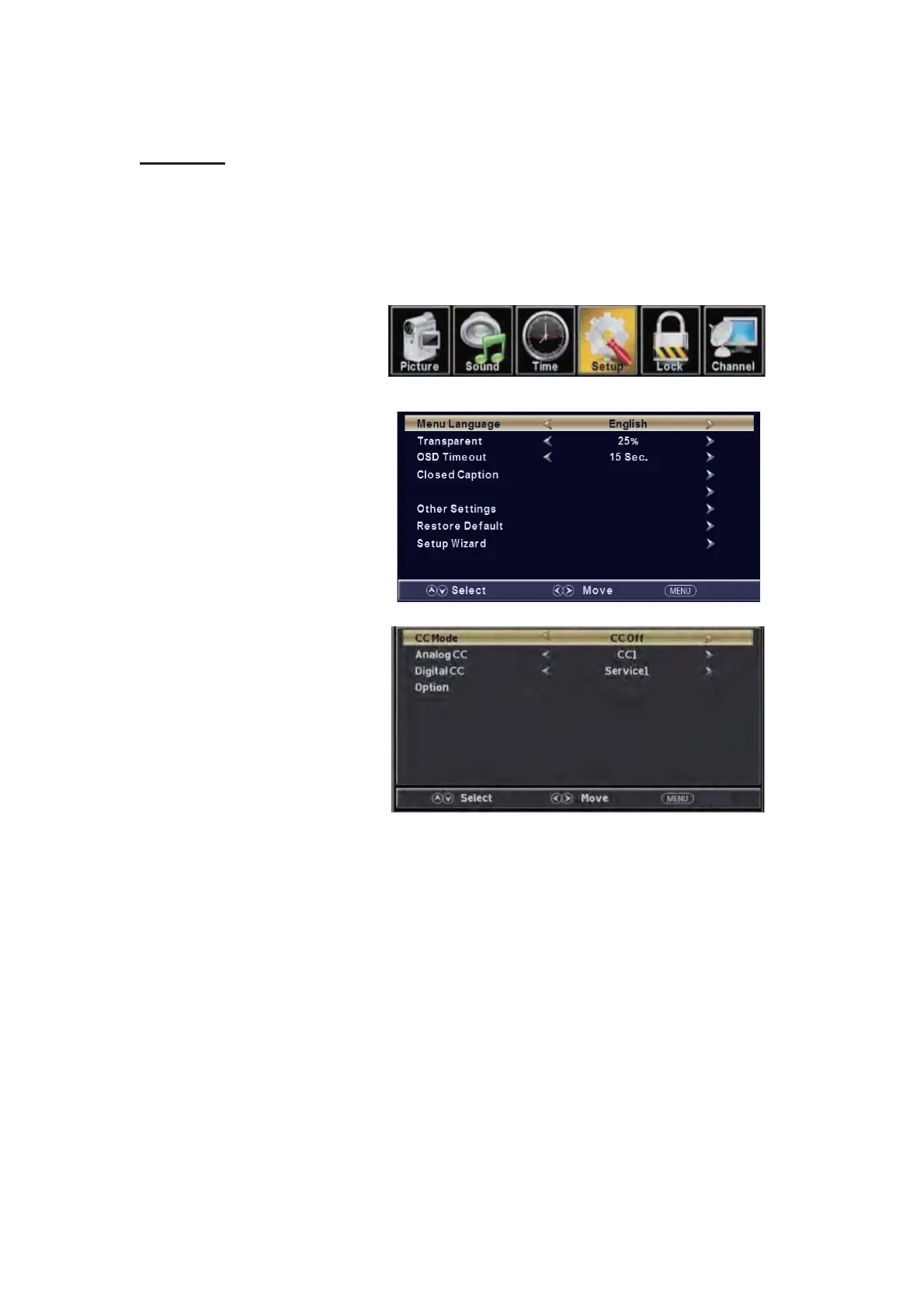
the “Setup” m
enu. And press the "ENTER" button to enter the sub-menu.
1.
Press “d” button to select “MENU Language” and press the “ e/f” button to select the MEUN
language which you
desire.
2. Press “c/d” button to elect
“Transparency” and press
the “ e/f”
button to select.
3. Press “c/d” button to select
“OSD Timeout” the
button to
adjust OSD timeout.
4. Press “c/d” button to select
“Closed
Caption” and press the
“ENTER/f” button to enter
a.
Press “c/d” button to select “CC Mode” the “e/f” button to adjust.
b. Press “c/d” button to select “Analog CC ” the “e/f” button to adjust.
c. Press “c/d” button to select “Digital CC” the “e/f” button to adjust.
d. Press “c/d” button to select “Option” the “ENTER/f” button to enter sub-menu.
Note: The cǃd function it is only available in DTV.
Note: The option is adjust the digital closed captioning setting.
SETUP
Press the “MENU” button to enter the OSD m
enu .Then press “e/f” button to select
“e/f”
sub-m
e
nu.
12
Return
Input Label
Return


 To Next Page