Need help?
Do you have a question about the Sigma BC 1200 and is the answer not in the manual?
Instructions for resetting device functions to their default states.
How to navigate through and select different operating modes.
Guide to selecting and setting the display language.
Steps to set the speed unit to kilometers or miles per hour.
Procedure for calibrating the bike computer with the correct wheel size.
How to set the current time on the device.
Instructions for setting or resetting the total accumulated distance.
How to adjust the screen contrast for optimal readability.
How to reset individual data displays like trip distance or time.
Procedure for performing a complete reset of all device settings and data.
Explains how average speed relates to current speed readings.
Guide for replacing the device battery and general battery care.
Information on product warranty and CE compliance documentation.
Solutions for display issues like no speed, blank screen, or black display.
Troubleshooting steps for when the speed displayed is inaccurate.
How to resolve issues with a sluggish or unresponsive display.
Instructions on how to dispose of batteries responsibly and legally.
 General
| Display Type | LCD |
|---|---|
| Auto Start/Stop | Yes |
| Water Resistant | Yes |
| Battery Type | CR2032 |
| Type | Wired |
| Battery Life | Approx. 1 year |
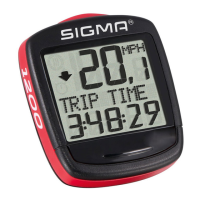
| Functions | Current speed, average speed, maximum speed, trip distance, total distance, trip time, clock |
| Distance | Trip, Total |

 To Next Page