27
PREPARATION OF WIRELESS FLASH (MASTER UNIT)
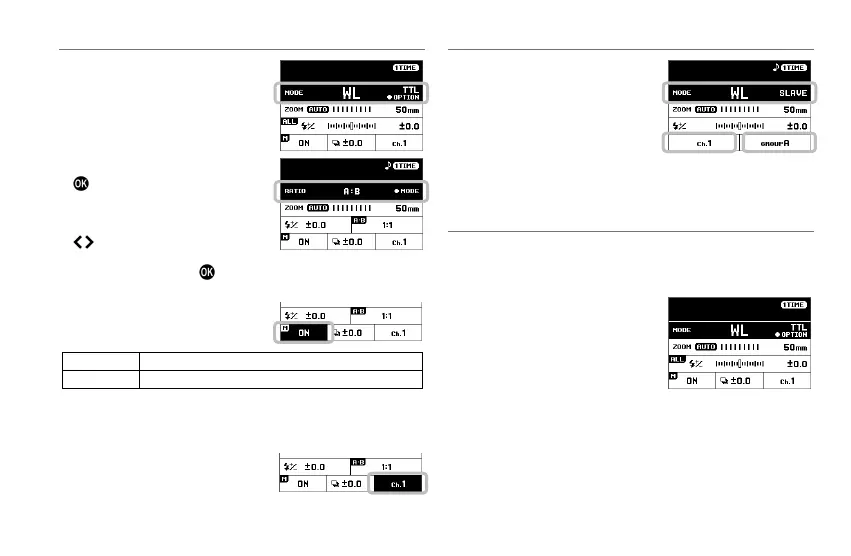
SLAVE GROUP SETTING
Shooting with different flash ratios and
flash amounts is available by dividing
the slaves into two groups [A, B] or
three groups [A, B, C].
1. When the desired wireless flash
mode is set, and when the flash
mode area is selected, pressing the
button opens the Slave group
setting screen.
2. The slave group setting can be
switched by using the dial or the
button. (When OFF is selected,
flash
ratio
shooting
is
not
performed.)
3. After setting, press the button to return to the normal screen.
MASTER FLASH SETTING
It sets whether "Master" is set for the
control function only or for the control
function and light emission as a flash.
Control function + Flash*
*
During wireless shooting where the flash ratio is set, "Master"
belongs to Group [A].
CHANNEL SETTING
When another person is performing
wireless flash, setting a different
channel
prevents
malfunctions
(selecting
from channels 1 to 4 is possible).
PREPARATION OF WIRELESS FLASH (SLAVE UNIT)
1. Set the flash mode to [WL SLAVE].
2. In the Mode details area, set a
channel that is the same as Master.
3. When using wireless flash with the
flash ratio setting, set the slave ID to
that of the desired group in the
Mode details area (if shooting using
flash ratio is not performed, then either one of A, B, or C can be
selected).
WIRELESS E-TTL
II
/
E-TTL AUTO FLASH
In the wireless E-TTL II / E-TTL auto flash, the camera automatically
controls the exposure to an appropriate value.
Auto flash with one flash or all slave flashes with the same
flash amount
MASTER UNIT SETTING
1. Set the Flash mode to [WL TTL].
2. When necessary, perform "Setting
the channel" and "Master unit flash
setting" in the Mode details area.
SLAVE UNIT SETTING
3. Perform the setting by following "PREPARATION OF WIRELESS
FLASH (SLAVE UNIT)".
4. Place the slave unit, confirm the completion of charging, and then
start shooting (the slave notifies the completion of charging by
blinking the AF assist light.)







 To Next Page