33
BRIGHTNESS
Adjust the brightness to the desired
level by
using the buttons.
CONTRAST
Adjust the contrast to the desired level by using
When finalizing the adjustment, select [OK] and confirm with the
button.
When cancelling the adjustment, select [CANCEL] and confirm with
the button.
CHANGING THE UNIT OF MEASUREMENT
INDICATION
(
MENU 4
)
The unit of measurement in the Status area can be changed.
[MENU 4] → [M / FEET]
FLASH UNIT INFORMATION
(
MENU 5
)
The following information can be checked.
[MENU 5] → [INFORMATION]
INITIALIZATION OF SETTINGS
(
MENU 5
)
It is possible to reset the flash unit back to factory settings.
[MENU 5] → [RESET SETTINGS]
To initialize the setting, select [OK] and confirm with the
button.
When the settings are reset, stored custom modes are deleted.
OTHER USEFUL FUNCTIONS
FLASH HEAD SETTING
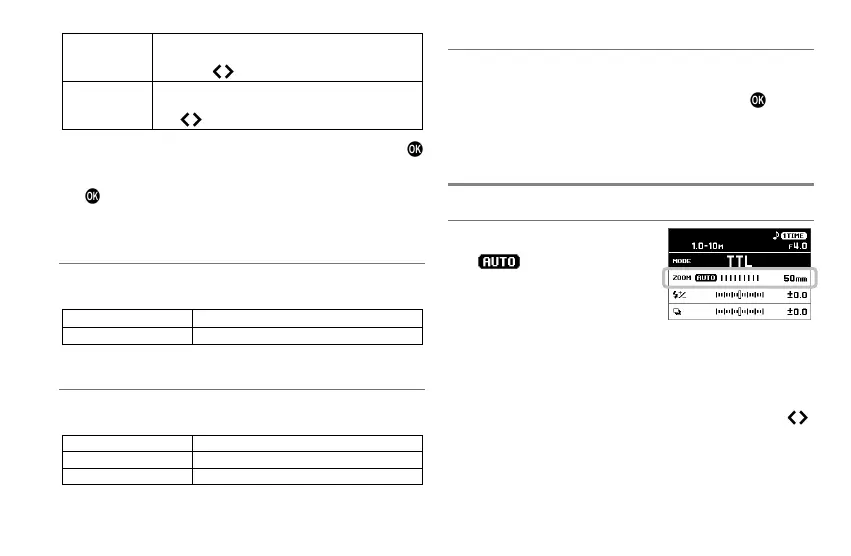
When the flash head setting is used
with (Auto), the flash head is
automatically set to the flash angle
that is the optimal to the lens’s focal
length.
The flash head takes into account the size of the camera’s image
sensor, therefore the focal length displayed on the flash may be
different to that of the lens.
Depending on the Flash mode, the flash head setting may be
fixed regardless of the focal length of the lens.
The flash head setting can be changed manually. Press the
buttons in the Mode details area.
AUTO
⇔
24
⇔
28
⇔
35
⇔
50
⇔
70
⇔
85
⇔
105
⇔
135
⇔
200mm
Depending on the flash head setting, the flash’s Guide Number
will change.







 To Next Page