EasyManua.ls Logo

Signode GRIPPACK - TROUBLESHOOTING GUIDES; TOOL DOES NOT OPERATE

Signode GRIPPACK
28 pages
Print Icon
To Next Page IconTo Next Page
To Previous Page IconTo Previous Page
Loading...
TROUBLESHOOTING GUIDES
19
.................
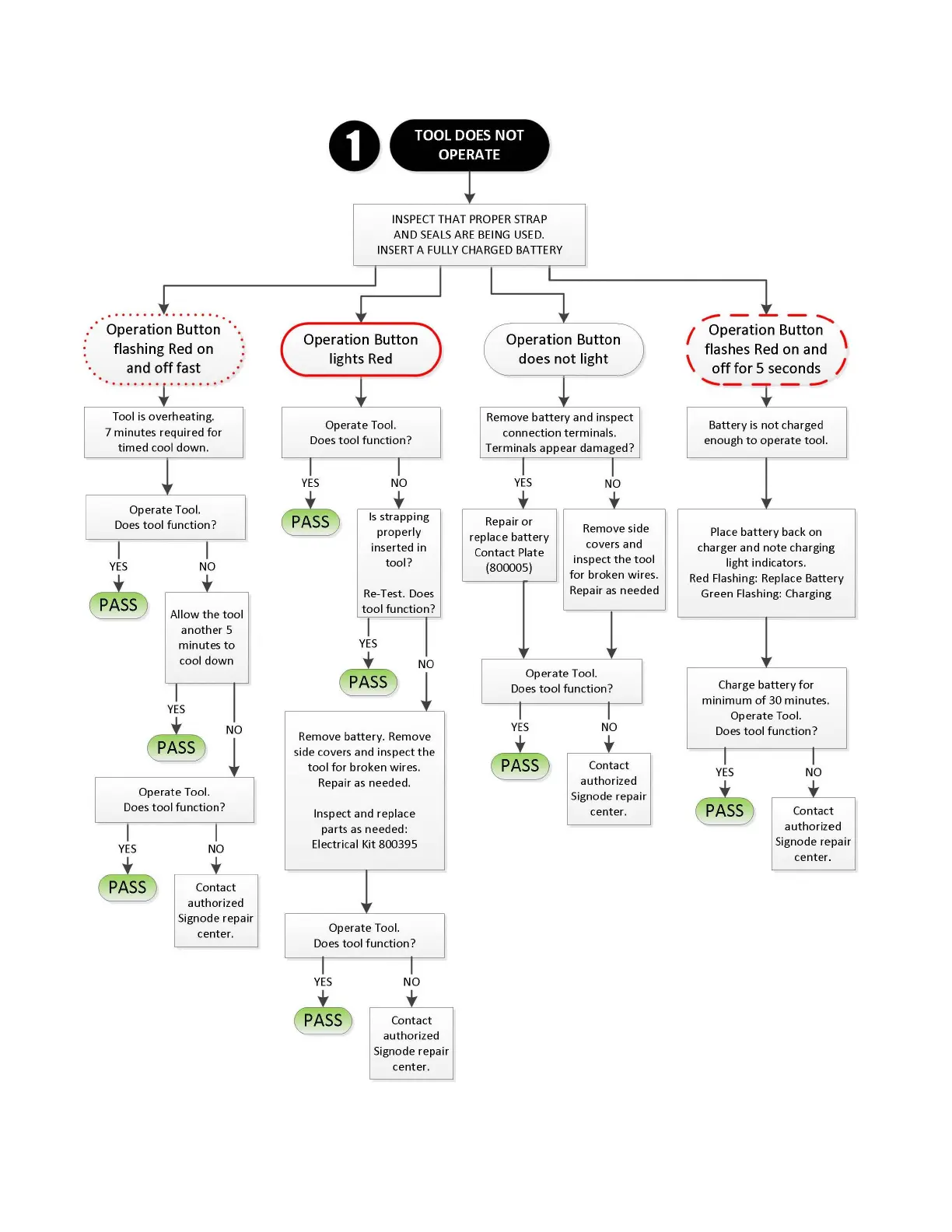
Operation Button
flashing
Red
on
and
off
fast
.
..
..
...........
Tool is overheating.
7
minutes
required
for
timed
cool
down
.
Operate
Tool.
Does
tool
function?
YES
NO
PASS
Allow
the
tool
another
5
minutes
to
cool
down
YES
NO
PASS
Operate
Tool.
Does
tool
function?
YES
PASS
NO
Co
ntact
authorized
Signode repair
center.
0
INSPECT
THAT
PROPER
STRAP
AND
SEALS
ARE
BEING
USED.
INSERT
A
FULLY
C
HARGED
BA
TTERY
Operation Button
lights
Red
Operate
Tool.
Does
tool
functi
on?
YES
PASS
NO
Is
strapping
properly
inserted
in
tool
?
Re
-Test. Does
tool
function?
YES
NO
PASS
Remove
battery.
Remove
s
ide
covers and inspect
the
tool
for
broken
wires.
Repair
as
needed.
Inspect
and
replace
parts
as
needed:
Electrical Kit
800395
Operate
Tool.
Do
es
tool
function?
YES
PASS
NO
Con
tact
authorized
Signode
repair
center.
Operation Button
does
not
light
Remove
battery
and
inspect
connection
terminal
s.
Terminals
appear
damaged?
YES
Repair or
replace
battery
Contact Plate
(800005)
NO
Remove s
ide
covers and
in
s
pect
the
tool
for
broken
wires.
Repair
as
needed
Operate
Tool.
Does
tool
function
?
YES
PASS
NO
Contact
authorized
Si
gnode
repair
center.
.,,,...
- - '
/ Operation Button \
flashes
Red
on and
\
off
for 5 seconds /
....__
--
Battery
is
not
charged
enough
to
opera
te
tool.
Pla
ce
batter
y back
on
charger
and
no
te
c
har
g
ing
light
indicators
.
Red
Flashing: Replace
Battery
Green
Fl
as
hin
g: C
har
g
in
g
Charge
battery
for
minimum
of
30
minutes
.
Opera
te
Tool.
Does
tool
function?
YES
PASS
NO
Contact
authorized
Signode
repair
center
.

Related product manuals