SLB 10 A1
■ 94
│
GB
│
MT
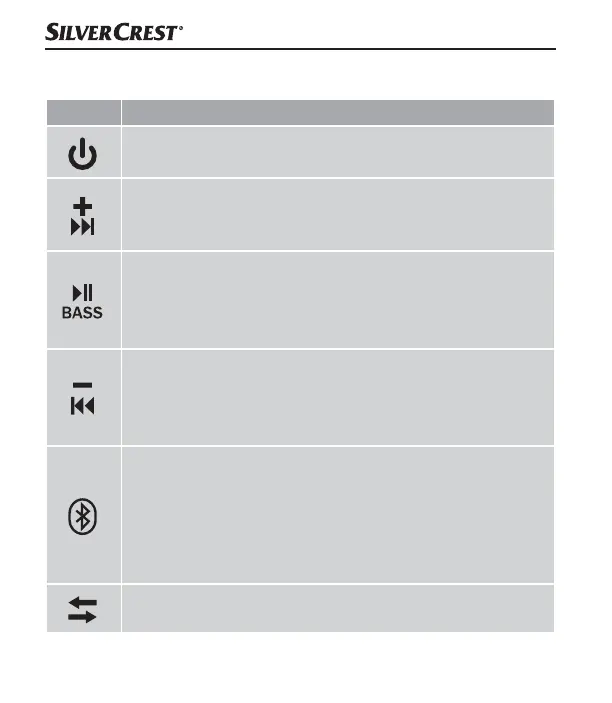
Using the buttons
Button Function
► Switching on: press for 3 seconds
► Switching off: press for 3 seconds
► Increase volume: press briefly. When you reach the
maximum volume, you will hear a short beep.
► Next track: press for 2 seconds
► Play/Pause: press briefly
► Switch BassBoost function on/off: press for 2 seconds
► Activate voice control: press 2x briefly
► Accept/end call: press briefly
► Reduce volume: press briefly
► Restart current track: press for 2 seconds
► Previous track: if the current track restarts, press again
for 2 seconds
► Activate Bluetooth
®
function: press briefly
(you will hear a beep)
► Disconnecting/establishing a Bluetooth
®
connection:
press briefly to disconnect the Bluetooth
®
connection
(the device will beep). You can connect to another
Bluetooth
®
device immediately.
► Switching on the TWS: press briefly
► Switching off the TWS: press briefly
IB_330701_SLB10A1_LB5.indb 94 30.06.2020 12:16:18



 To Next Page