EasyManua.ls Logo

Silvercrest KH809 - User Manual

Silvercrest KH809
100 pages
Print Icon
To Next Page IconTo Next Page
Loading...
3 A
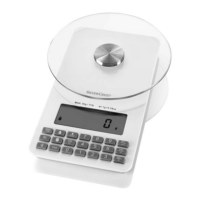
Nutrition Scales
Nutrition Scales
Operating instructions
Dieettivaaka
Käyttöohje
Dietköksvåg
Bruksanvisning
KOMPERNASS GMBH · BURGSTRASSE 21 · D - 44867 BOCHUM
www.kompernass.com
ID-Nr.: KH809-08/09-V5
KH809

Table of Contents

Questions and Answers

  • D
    David FranklinAug 1, 2025
    What to do if Silvercrest KH809 display shows "0 - Ld"?
    • M
      Melissa HamiltonAug 1, 2025
      If the Silvercrest Scales display shows "0 - Ld", it means you're exceeding the maximum weight limit of 5 kg/ 11lb. To resolve this, remove some weight from the scales.
  • J
    Jennifer CooperAug 9, 2025
    Why does my Silvercrest KH809 Scales show "L0" and the battery symbol?
    • J
      jhartAug 9, 2025
      If the display shows "L0" and the battery symbol on your Silvercrest Scales, it means the batteries are very weak. You should replace them.
  • M
    matthew57Aug 16, 2025
    Why is there no display on my Silvercrest Scales?
    • M
      Miss Kimberly MorganAug 16, 2025
      If there are no indicators on the display of your Silvercrest Scales, it could be due to exhausted batteries or the plastic strip in the battery compartment might not have been removed. Try replacing the batteries and ensure the plastic strip is removed from the battery compartment.
  • C
    Carol CrawfordAug 25, 2025
    What to do if Silvercrest KH809 display "NULL" when retrieving saved values?
    • K
      Kimberly IbarraAug 25, 2025
      If "NULL" appears on the display of your Silvercrest Scales when trying to retrieve saved values, it indicates that no values have been saved yet, meaning the memory is empty. You need to save some measured values first.

Summary

Introduction

Preface

Welcomes the user and introduces the appliance's quality and modern standards.

Operating Instructions Information

Explains the purpose, availability, and intended audience of the operating manual.

Copyright

States the copyright protection and reserved rights for the documentation.

Limited Liability

Outlines the manufacturer's disclaimer regarding information accuracy and usage.

Warnings

Explains the meaning of different warning symbols (WARNING, IMPORTANT, NOTICE).

Intended Use

Defines the appliance's specific purpose for weighing food and nutrition monitoring.

Safety

Introduces the safety information section for handling the appliance correctly.

Basic Safety Instructions

Provides fundamental safety guidelines for safe operation and handling.

Interaction with Batteries

Details safety precautions for handling, charging, and storing batteries.

Items Supplied; Transport Inspection

Lists standard package contents and advises on checking for damage.

Disposal of Packaging

Guidance on environmentally responsible disposal of packaging materials.

Operating Elements

Weighing Plate and Display

Describes the weighing plate, unit switch, and the main display.

Data Input and Management

Covers M+, MR, MC buttons and number buttons for data management.

Function and Power Buttons

Details power, tare, nutritional function buttons, and battery compartment.

Initial Use

Setup

Instructions for placing the scales on a level surface for correct measurement.

Operation

Weighing Items

Step-by-step guide on how to weigh items on the scale.

Weighing Additional Items (Tare)

How to reset the scale to zero for adding more items.

Display Nutrient and Energy Values

How to enter food codes to view nutritional information.

Switching the Scale Off

Instructions on how to turn the appliance off manually or automatically.

Saving a Measurement

How to save measured values for later recall and cumulative totals.

Display Added Measurement Values

How to retrieve and view previously saved measurements.

Delete Saved Measurement Values

Instructions for clearing stored measurement data from memory.

Cleaning and Care

Troubleshooting

Safety Instructions

General safety warnings related to troubleshooting and appliance repairs.

Malfunction Causes and Remedies

A table listing common display issues and their solutions.

Technical Data

Disposal

Disposal of the Appliance

Guidelines for disposing of the scale according to electronic waste regulations.

Disposing of the Batteries

Instructions for the proper disposal of used batteries to prevent pollution.

Warranty and Service

Importer

Contact information for the importer and service department details.

Foodstuff Codes

Silvercrest KH809 Specifications

General IconGeneral
BrandSilvercrest
ModelKH809
CategoryScales
LanguageEnglish

Related product manuals