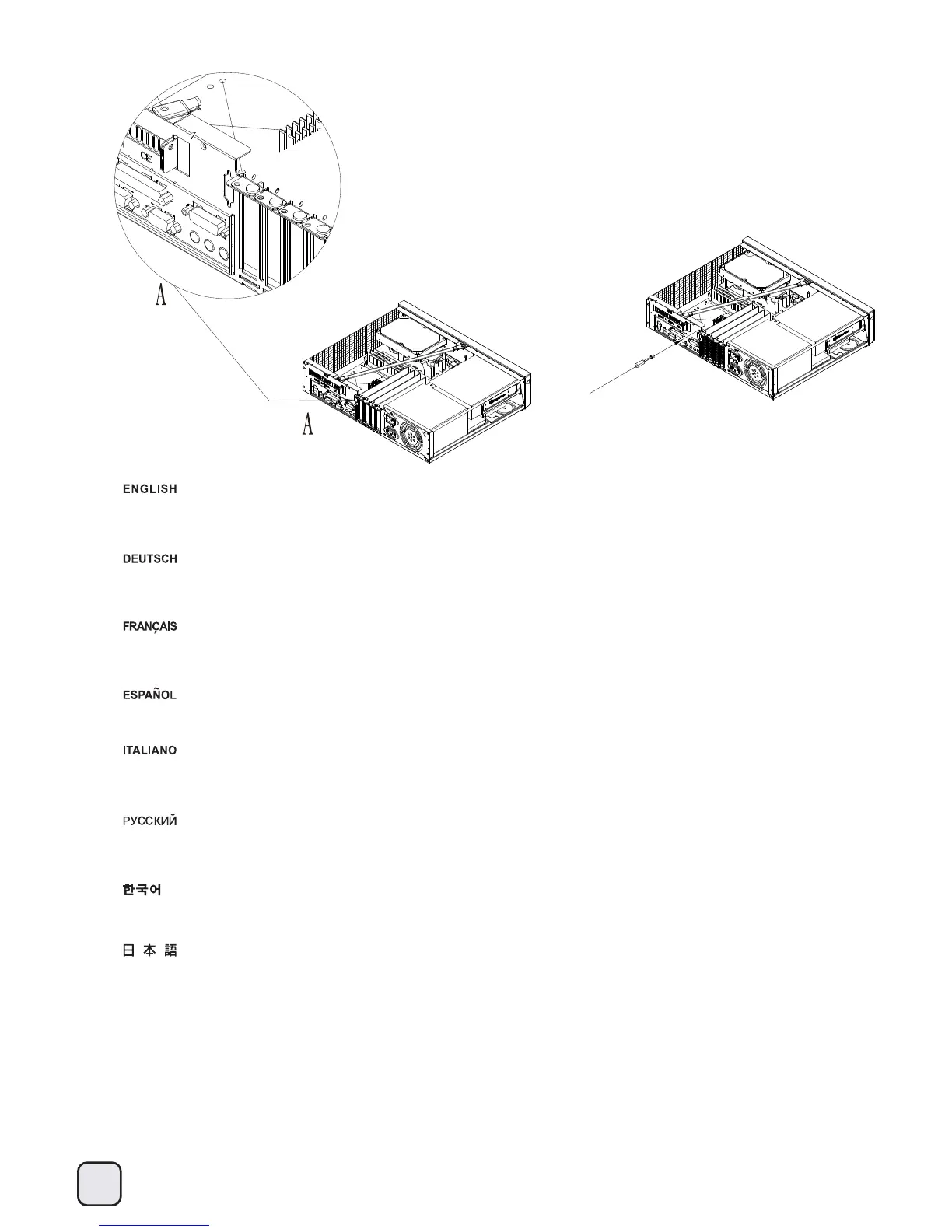
扭開機殼上的不斷孔,將VGA
插座裝上去;
機殼上的孔位是配合各種不同的顯示卡,可以正反安裝,請根據您的顯示卡需求,選一種最好的方向安裝。
扭开机壳上的不断孔,将VGA插座装上去;
机壳上的孔位是配合各种不同的显示卡,可以正反安装,请根据您的显示卡需求,选一种最好的方向安装。
简体中文
繁体中文
33
Break the VGA (D-sub) cutout from the case and install the VGA (D-sub) connector.
The case’s cutout supports mounting of the connector in both orientations so you may choose one that best suit your graphics
card’s requirement.
Сделайте паз
VGA (D-sub)
в
корпусе
и
установите разъем
VGA (D-sub).
Паз в корпусе позволит установить
разъем
в
обоих
направлениях
, поэтому можно выбрать необходимый вариант в
зависимости
от графической
карты.
Durchstoßen Sie die VGA- (D-Sub-) Ausfräsung des Gehäuses und installieren Sie den VGA- (D-Sub-) Anschluss.
Die Ausfräsung des Gehäuses unterstützt die Montage des Anschlusses in beide Richtungen; wählen Sie die am besten für Ihre
Grafikkarte geeignete Option.
Retirer le cache prédécoupé pour le connecteur VGA (D-sub) et installez le connecteur VGA (D-sub).
Le cache prédécoupé du boîtier peut subir n’importe quelle orientation de montage selon les nécessités dues aux contraintes de
votre carte graphique.
Abra el agujero precortado para VGA (D-sub) de la carcasa e instale el conector VGA (D-sub). El agujero de la carcasa acepta montar
el conector en ambas direcciones, luego podría escoger la más adecuada para su tarjeta gráfica.
ケースからVGA(D-sub)開口部を開け、VGA(D-sub)
コネクタをインストールします。
ケースの開口部は両方の方向のコネクタ設置をサポートするので、グラフィックカードの必要条件に最適な向きを選ぶことができます。
VGA(D-SUB)가 있는 곳의 철판을 제거해, VGA(D-SUB)
커넥터를
설치합니다.
케이스의 구멍은 커넥터
마운팅을 양쪽방향에서 모두 지원하기 때문에
그래픽 카드에 맞는 적절한 방향으로 설치 바랍니다.
Break the VGA (D-sub) cutout from the case and install the VGA (D-sub) connector.
The case’s cutout supports mounting of the connector in both orientations so you may choose one that best suit your graphics
card’s requirement.
2.




 To Next Page